Unlock a world of possibilities! Login now and discover the exclusive benefits awaiting you.

- Qlik Community
- :
- All Forums
- :
- QlikView
- :
- How to replace a value from one table into another...
- Subscribe to RSS Feed
- Mark Topic as New
- Mark Topic as Read
- Float this Topic for Current User
- Bookmark
- Subscribe
- Mute
- Printer Friendly Page

- Mark as New
- Bookmark
- Subscribe
- Mute
- Subscribe to RSS Feed
- Permalink
- Report Inappropriate Content
How to replace a value from one table into another table
Been away from QlikView for a while and I forgot how to do this. Need to replace values, where the key exists, from one table into another table. For example, if I inline load two table:
BaseTable:
LOAD * INLINE [
KEY, FRUIT
1001, Apple
1002, Pear
1003, Grape
1004, Banana
];
SubTable:
LOAD * INLINE [
KEY, FRUIT_NAME
1001, Honeycrisp
1004, Yellow Banana
];
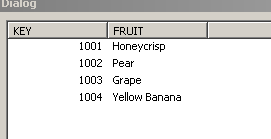
How can I create a resulting table of:
1001, Honeycrisp
1002, Pear
1003, Grape
1004, Yellow Banana
- Tags:
- new_to_qlikview
Accepted Solutions

 maxgro
- Mark as New
- Bookmark
- Subscribe
- Mute
- Subscribe to RSS Feed
- Permalink
- Report Inappropriate Content
With a mapping table
SubTable:
Mapping
LOAD * INLINE [
KEY, FRUIT_NAME
1001, Honeycrisp
1004, Yellow Banana
];
BaseTable:
LOAD KEY,
ApplyMap('SubTable', KEY, FRUIT) as FRUIT
INLINE [
KEY, FRUIT
1001, Apple
1002, Pear
1003, Grape
1004, Banana
];
maxgro
- Mark as New
- Bookmark
- Subscribe
- Mute
- Subscribe to RSS Feed
- Permalink
- Report Inappropriate Content
With a mapping table
SubTable:
Mapping
LOAD * INLINE [
KEY, FRUIT_NAME
1001, Honeycrisp
1004, Yellow Banana
];
BaseTable:
LOAD KEY,
ApplyMap('SubTable', KEY, FRUIT) as FRUIT
INLINE [
KEY, FRUIT
1001, Apple
1002, Pear
1003, Grape
1004, Banana
];

 Clever_Anjos
- Mark as New
- Bookmark
- Subscribe
- Mute
- Subscribe to RSS Feed
- Permalink
- Report Inappropriate Content
One posible approach
SubTable:
mapping LOAD * INLINE [
KEY, FRUIT_NAME
1001, Honeycrisp
1004, Yellow Banana
];
BaseTable:
LOAD KEY,ApplyMap('SubTable',KEY,FRUIT) as FRUIT INLINE [
KEY, FRUIT
1001, Apple
1002, Pear
1003, Grape
1004, Banana
];
Clever_Anjos
- Mark as New
- Bookmark
- Subscribe
- Mute
- Subscribe to RSS Feed
- Permalink
- Report Inappropriate Content
Ops, haven´t seen that maxgro already answered