Unlock a world of possibilities! Login now and discover the exclusive benefits awaiting you.

- Qlik Community
- :
- All Forums
- :
- QlikView
- :
- How to restrict to excatly 2 Decimal points in Scr...
Options
- Subscribe to RSS Feed
- Mark Topic as New
- Mark Topic as Read
- Float this Topic for Current User
- Bookmark
- Subscribe
- Mute
- Printer Friendly Page
Turn on suggestions
Auto-suggest helps you quickly narrow down your search results by suggesting possible matches as you type.
Showing results for

 psk180590
Creator III
2018-06-07
03:23 AM
- Mark as New
- Bookmark
- Subscribe
- Mute
- Subscribe to RSS Feed
- Permalink
- Report Inappropriate Content
How to restrict to excatly 2 Decimal points in Script
Hello All,
When i use the below expression in my script
Round((Sum(Total1)/Sum(Total2))*100,0.01)
I get results as in the below screenshot
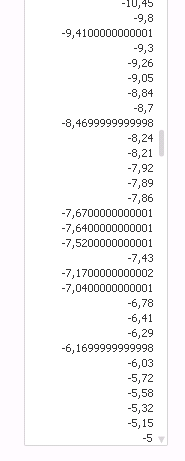
Some values only have 1 decimal point, some don't have decimal point at all and few have more then 2 decimals.
What i would like to have is to restrict all the values to 2 decimal points.
Ex: -9,80
-9,41
-5,00
.......
TIA!!
1,702 Views
4 Replies

 tresB
tresB
Champion III
2018-06-07
03:26 AM
- Mark as New
- Bookmark
- Subscribe
- Mute
- Subscribe to RSS Feed
- Permalink
- Report Inappropriate Content
Try like:
Num(
Round((Sum(Total1)/Sum(Total2))*100,0.01)
, '##.00')
psk180590
Creator III
2018-06-07
03:36 AM
Author
- Mark as New
- Bookmark
- Subscribe
- Mute
- Subscribe to RSS Feed
- Permalink
- Report Inappropriate Content

This is the result.
1,642 Views

 shiveshsingh
Master
2018-06-07
05:46 AM
- Mark as New
- Bookmark
- Subscribe
- Mute
- Subscribe to RSS Feed
- Permalink
- Report Inappropriate Content
You can use num function
=num(Your Field,'###.00')
1,642 Views

 ogautier62
Specialist II
2018-06-07
06:04 AM
- Mark as New
- Bookmark
- Subscribe
- Mute
- Subscribe to RSS Feed
- Permalink
- Report Inappropriate Content
Hi,
try :
Round(your number*100)/100
1,642 Views
