Unlock a world of possibilities! Login now and discover the exclusive benefits awaiting you.

- Qlik Community
- :
- All Forums
- :
- QlikView
- :
- Re: How to sum Null Values
- Subscribe to RSS Feed
- Mark Topic as New
- Mark Topic as Read
- Float this Topic for Current User
- Bookmark
- Subscribe
- Mute
- Printer Friendly Page

 anushree1
- Mark as New
- Bookmark
- Subscribe
- Mute
- Subscribe to RSS Feed
- Permalink
- Report Inappropriate Content
How to sum Null Values
HI,
I would like to create a field in the script which returns Null(Meaning '-') incase i Perform Sum Function on top of it.
I tried the below ways to create the field but when sum is applied on the field it returns 0.
Eg:
'' As Test
Null() AS Test
'-' as Test
None of them return '-' instead they return 0 when sum is applied on it like Sum(Test)
Can anyone please let me know how this could be done, so that i get '-' as the result

 prieper
- Mark as New
- Bookmark
- Subscribe
- Mute
- Subscribe to RSS Feed
- Permalink
- Report Inappropriate Content
In the script:
IF(SUM(MyValue) = 0, NULL(), SUM(MyValue) AS ....

 jonathandienst
- Mark as New
- Bookmark
- Subscribe
- Mute
- Subscribe to RSS Feed
- Permalink
- Report Inappropriate Content
Sum aggregates many values. QV skips over nulls, so if all the values are null, then Sum returns 0 as there was nothing to sum.
So do you want to show a null any value is null, or if all values are null?
anushree1
- Mark as New
- Bookmark
- Subscribe
- Mute
- Subscribe to RSS Feed
- Permalink
- Report Inappropriate Content
i have a pick match expression which returns a field upon which i perform sum() in a chart.
so incase the pick match does'nt yield the right expression i want the sum() in chart to return '-'.
Please let me if this is not clear
 el_aprendiz111
- Mark as New
- Bookmark
- Subscribe
- Mute
- Subscribe to RSS Feed
- Permalink
- Report Inappropriate Content
Hi,
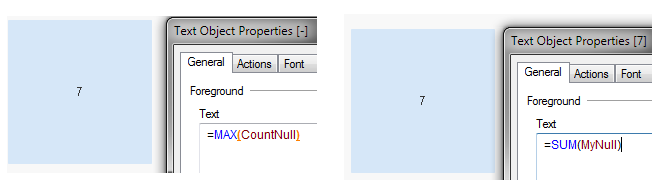
2 options:
tmp:
LOAD *,
If(Len(Data) = 0,1,0) AS MyNull,
If(Len(Data) = 0, RangeSum(1, Peek('CountNull')), RangeSum(0, Peek('CountNull'))) AS CountNull;
;
Load * inline
[
ID ,Data
1 ,123
2 ,23
3 ,
4 ,
5 ,
6 ,
7 ,453
8 ,143
9 ,1
10 ,
11 ,211
12 ,
13 ,
14 ,4892
];