Unlock a world of possibilities! Login now and discover the exclusive benefits awaiting you.

- Qlik Community
- :
- All Forums
- :
- QlikView
- :
- Re: How to use a variable in LOAD statement?
- Subscribe to RSS Feed
- Mark Topic as New
- Mark Topic as Read
- Float this Topic for Current User
- Bookmark
- Subscribe
- Mute
- Printer Friendly Page

- Mark as New
- Bookmark
- Subscribe
- Mute
- Subscribe to RSS Feed
- Permalink
- Report Inappropriate Content
How to use a variable in LOAD statement?
Hi,
I want to load all my tables with a variable, so instead of the column names listed after the load statement I just want it to be a variable. That way I can load other tables and keep it running.
Example (Currently being loaded like this below, with database info and column name being pulled through a variable from a excel file)
There are multiple tabs and I Concatenate to MyTableName, and it works fine with using a variable for the database in the connection string.
MyTableName:
LOAD
NameOfFirstColumn as Column1
NameOfSecondColumn as Column2
NameOfThirdColumn as Column3
NameOfFourthColumn as Column4
SELECT * FROM blank;
But what I want to do is.. for example
LET vLoadColumns ()?
MyTableName:
LOAD
vLoadColumns:
SELECT * FROM blank;
Just like the variable for database cycles through the databases I want the data that is pulled after load to be stored in a variable and use that same variable to keep Concatenating MyTableName:
Please let me know if you need more clarification.
Thanks

 tobias_klett
- Mark as New
- Bookmark
- Subscribe
- Mute
- Subscribe to RSS Feed
- Permalink
- Report Inappropriate Content
List the columnnames and Tablenames in excel and read them into one field using:
Customer_Columnnames:
Load concat(columnames,',') as Customer_Columnnames
from ... where Tablename = 'Customer';
then create a variable like this:
let vCustomer_Columnnames = peek('Customer_Columnnames');
Use it in load statement like this:
Customer:
Load $(Customer_Columnnames);
Select....

 ecolomer
- Mark as New
- Bookmark
- Subscribe
- Mute
- Subscribe to RSS Feed
- Permalink
- Report Inappropriate Content
You need put the $ prefix:
CAL:
LOAD
Date(IterNo()+$(vMin)-1) as CFecha,
Year(Date(IterNo()+$(vMin)-1)) as CAño,
Month(Date(IterNo()+$(vMin)-1)) as CMes,
Week(Date(IterNo()+$(vMin)-1)) as CSemana,
WeekStart(Date(IterNo()+$(vMin)-1)) as CSemIni,
WeekEnd(Date(IterNo()+$(vMin)-1)) as CSemFin
AutoGenerate 1 While IterNo()+$(vMin)-1<=$(vMax);
where vMin and vMax are a variable
- Mark as New
- Bookmark
- Subscribe
- Mute
- Subscribe to RSS Feed
- Permalink
- Report Inappropriate Content
Hi Tobias,
This was helpful but, what if the excel sheet has a column named ProjectName and I want to pull those names. Each row is a different project name which should change to the next name every time I concatenate more to my Table I am creating.
tobias_klett
- Mark as New
- Bookmark
- Subscribe
- Mute
- Subscribe to RSS Feed
- Permalink
- Report Inappropriate Content
Hi Alam,
no sure if I get you right, but why not extending the Excel like this.
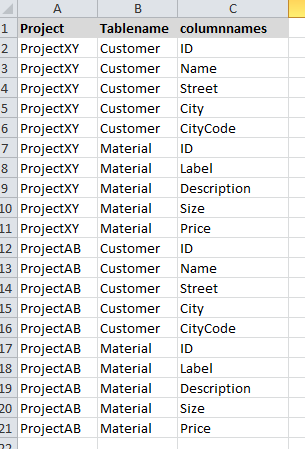
And the script like this.
Customer_Columnnames:
Load concat(columnames,',') as Customer_Columnnames
from ... where Tablename = 'Customer' and Project ='ProjectXY';