Unlock a world of possibilities! Login now and discover the exclusive benefits awaiting you.

- Qlik Community
- :
- All Forums
- :
- QlikView
- :
- Re: How to write the expression for YTD calculatio...
- Subscribe to RSS Feed
- Mark Topic as New
- Mark Topic as Read
- Float this Topic for Current User
- Bookmark
- Subscribe
- Mute
- Printer Friendly Page

 suvechha_b
- Mark as New
- Bookmark
- Subscribe
- Mute
- Subscribe to RSS Feed
- Permalink
- Report Inappropriate Content
How to write the expression for YTD calculation ?
Hi All ,
Please find the expression below for the Actual Sales calculation :
Sum(Aggr(if(Measure='Quantity',SUM({<[Calendar Month]={'<=$(=Max([Calendar Month]))'},[Type Indicator] = {'A'} >} Quantity),if(Measure='Value',SUM({<[Calendar Month]={'<=$(=Max([Calendar Month]))'},[Type Indicator] = {'A'} >} [Sales Value]),if(Measure='AIMS Units',SUM({<[Calendar Month]={'<=$(=Max([Calendar Month]))'},[Type Indicator] = {'AIMS_SALES'} >} [Quantity]),SUM({<[Calendar Month]={'<=$(=Max([Calendar Month]))'},[Type Indicator] = {'AIMS_SALES'} >} [Sales Value])))),Measure,[Calendar Month],Month))
How the YTD Report
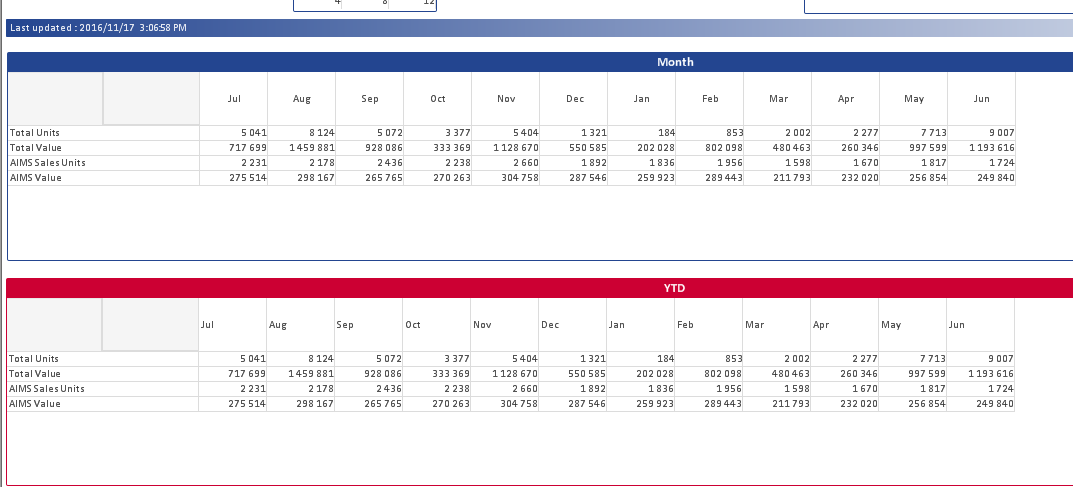
The Total Units
for sep should sum sales for month Jul,Aug and Sep ? and so on.
So, If I select [Fiscal Period]=3
The report should , show from Jul to Sep
and the Total Units should be
Jul Aug Sep
5041 5041 +8124 5041 +8124+5072
And if I dont select any [Fiscal Period ]
The output :
Jul Aug Sep Jun
5041 5041 +8124 5041 +8124+5072 ......... 5041 +8124+5072 ......... +9007
Sample attached.
- « Previous Replies
-
- 1
- 2
- Next Replies »
Accepted Solutions

 sunny_talwar
- Mark as New
- Bookmark
- Subscribe
- Mute
- Subscribe to RSS Feed
- Permalink
- Report Inappropriate Content
Try this:
RangeSum(Before(Sum(Aggr(if(Measure='Quantity', SUM({<[Calendar Month]={'<=$(=Max([Calendar Month]))'},[Type Indicator] = {'A'} >} Quantity), if(Measure='Value', SUM({<[Calendar Month]={'<=$(=Max([Calendar Month]))'},[Type Indicator] = {'A'} >} [Sales Value]), if(Measure='AIMS Units', SUM({<[Calendar Month]={'<=$(=Max([Calendar Month]))'},[Type Indicator] = {'AIMS_SALES'} >} [Quantity]), SUM({<[Calendar Month]={'<=$(=Max([Calendar Month]))'},[Type Indicator] = {'AIMS_SALES'} >} [Sales Value])))) , Measure, [Calendar Month], Month)), 0, ColumnNo()))

sunny_talwar
- Mark as New
- Bookmark
- Subscribe
- Mute
- Subscribe to RSS Feed
- Permalink
- Report Inappropriate Content
Try this:
RangeSum(Before(Sum(Aggr(if(Measure='Quantity', SUM({<[Calendar Month]={'<=$(=Max([Calendar Month]))'},[Type Indicator] = {'A'} >} Quantity), if(Measure='Value', SUM({<[Calendar Month]={'<=$(=Max([Calendar Month]))'},[Type Indicator] = {'A'} >} [Sales Value]), if(Measure='AIMS Units', SUM({<[Calendar Month]={'<=$(=Max([Calendar Month]))'},[Type Indicator] = {'AIMS_SALES'} >} [Quantity]), SUM({<[Calendar Month]={'<=$(=Max([Calendar Month]))'},[Type Indicator] = {'AIMS_SALES'} >} [Sales Value])))) , Measure, [Calendar Month], Month)), 0, ColumnNo()))
suvechha_b
- Mark as New
- Bookmark
- Subscribe
- Mute
- Subscribe to RSS Feed
- Permalink
- Report Inappropriate Content
Thanks ,Yes, it working.
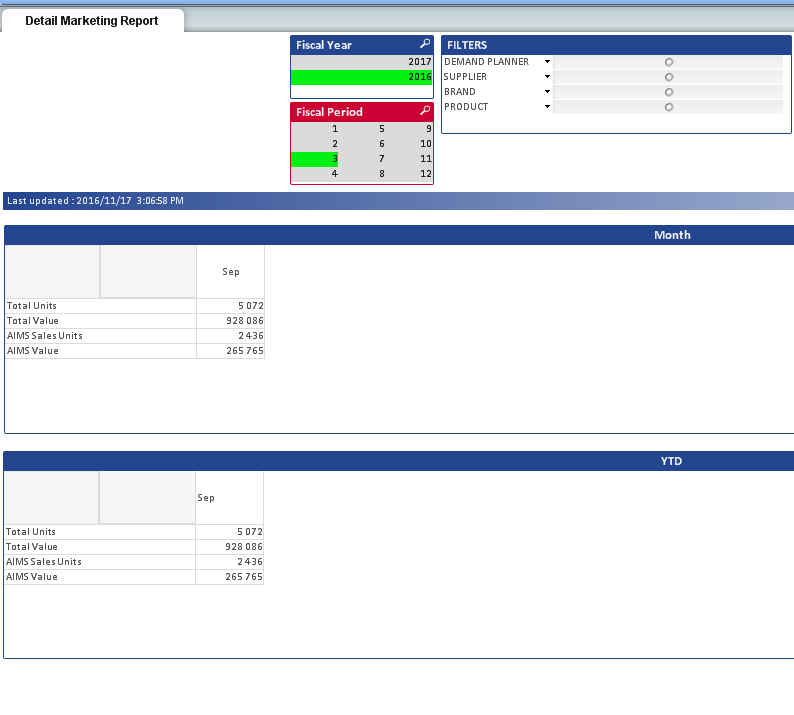
But if I select Specify [Fiscal Period] =3
The Result needs to be :
The Total Units = 18237
But it showing 5072
sunny_talwar
- Mark as New
- Bookmark
- Subscribe
- Mute
- Subscribe to RSS Feed
- Permalink
- Report Inappropriate Content
Try this:
RangeSum(Before(Sum({<[Fiscal Period]>} Aggr(if(Only({<[Fiscal Period]>}Measure)='Quantity', SUM({<[Calendar Month]={'<=$(=Max([Calendar Month]))'},[Type Indicator] = {'A'}, [Fiscal Period]>} Quantity), if(Only({<[Fiscal Period]>}Measure)='Value', SUM({<[Calendar Month]={'<=$(=Max([Calendar Month]))'},[Type Indicator] = {'A'}, [Fiscal Period]>} [Sales Value]), if(Only({<[Fiscal Period]>}Measure)='AIMS Units', SUM({<[Calendar Month]={'<=$(=Max([Calendar Month]))'},[Type Indicator] = {'AIMS_SALES'}, [Fiscal Period]>} [Quantity]), SUM({<[Calendar Month]={'<=$(=Max([Calendar Month]))'},[Type Indicator] = {'AIMS_SALES'}, [Fiscal Period]>} [Sales Value])))) , Measure, [Calendar Month], Month)), 0, ColumnNo())) * Avg(1)

suvechha_b
- Mark as New
- Bookmark
- Subscribe
- Mute
- Subscribe to RSS Feed
- Permalink
- Report Inappropriate Content
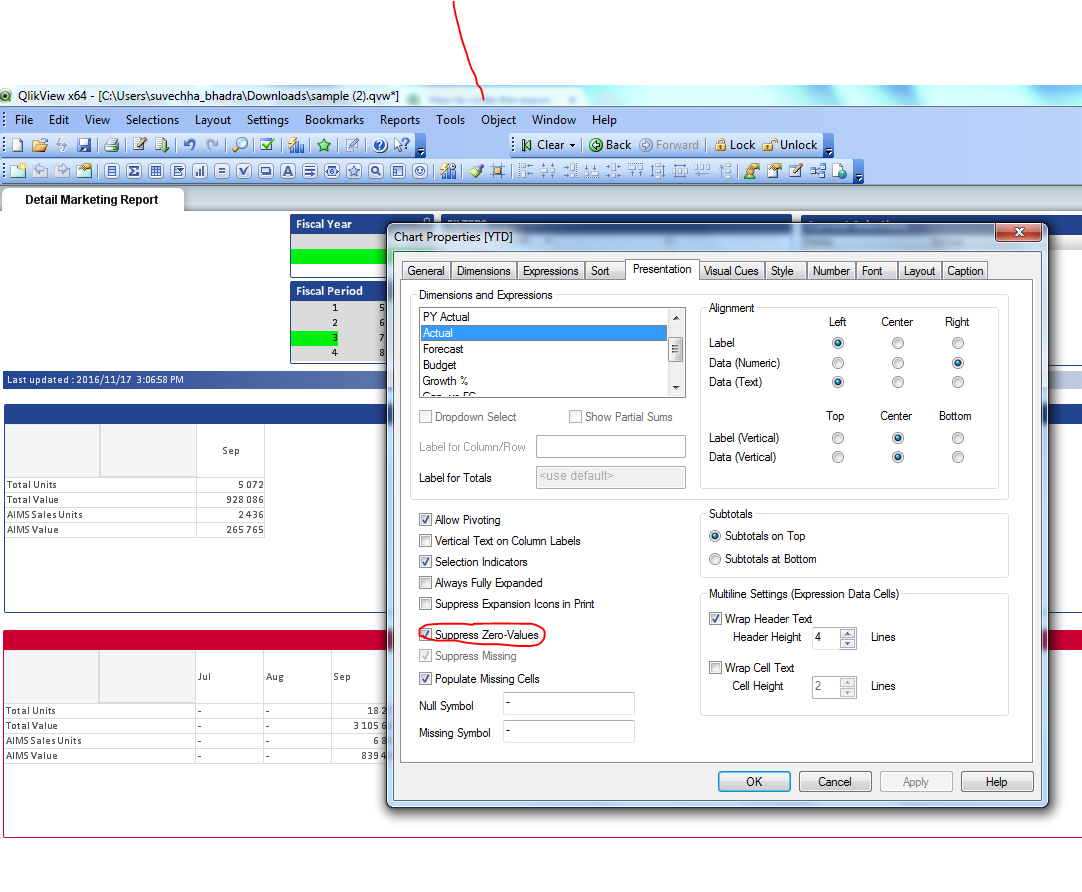
Is it possible to remove this ?

sunny_talwar
- Mark as New
- Bookmark
- Subscribe
- Mute
- Subscribe to RSS Feed
- Permalink
- Report Inappropriate Content
It might be related to the version of QlikView you are using. Can you check to see if 'Suppress Zero Values' is checked on the presentation tab?
suvechha_b
- Mark as New
- Bookmark
- Subscribe
- Mute
- Subscribe to RSS Feed
- Permalink
- Report Inappropriate Content
sunny_talwar
- Mark as New
- Bookmark
- Subscribe
- Mute
- Subscribe to RSS Feed
- Permalink
- Report Inappropriate Content
So then this is due to the the version of QV you are using. Unfortunately, I won't be able to replicate your issue and hence won't be able to provide a solution which might work for you.
suvechha_b
- Mark as New
- Bookmark
- Subscribe
- Mute
- Subscribe to RSS Feed
- Permalink
- Report Inappropriate Content
Thank you for your assistance.
sunny_talwar
- Mark as New
- Bookmark
- Subscribe
- Mute
- Subscribe to RSS Feed
- Permalink
- Report Inappropriate Content
Not a problem 

- « Previous Replies
-
- 1
- 2
- Next Replies »