Unlock a world of possibilities! Login now and discover the exclusive benefits awaiting you.

- Qlik Community
- :
- All Forums
- :
- QlikView
- :
- Re: IF AND
- Subscribe to RSS Feed
- Mark Topic as New
- Mark Topic as Read
- Float this Topic for Current User
- Bookmark
- Subscribe
- Mute
- Printer Friendly Page

 stekol61
- Mark as New
- Bookmark
- Subscribe
- Mute
- Subscribe to RSS Feed
- Permalink
- Report Inappropriate Content
IF AND
I have a QV app with a Text field.
I want to change the font color based on a filter.
If i select the filter 'Technology' as '1' or '2' or '3' the color should be green.
If i select '1' AND '2' it should be red
I used this expression bet it doesn't work (shows green no matter what filter value I use)
=If (Technology='1' and Technology='2' , v_rgb_red, v_rgb_green)
- « Previous Replies
-
- 1
- 2
- Next Replies »
Accepted Solutions

 sunny_talwar
- Mark as New
- Bookmark
- Subscribe
- Mute
- Subscribe to RSS Feed
- Permalink
- Report Inappropriate Content
So, then try this
If(Concat(DISTINCT Technology, '|') = '2G|3G|4G', Green(), Red()) Kushal_Chawda
- Mark as New
- Bookmark
- Subscribe
- Mute
- Subscribe to RSS Feed
- Permalink
- Report Inappropriate Content
@stekol61 Just another option in case your field is not sorted and concat values sequence does not match with hard coded value then for safer side check condition for individual values so that it will work always
=if(wildmatch(GetFieldSelections(Technology),'*2G*') and wildmatch(GetFieldSelections(Technology),'*3G*') and wildmatch(GetFieldSelections(Technology),'*4G*') ,green(),red())
sunny_talwar
- Mark as New
- Bookmark
- Subscribe
- Mute
- Subscribe to RSS Feed
- Permalink
- Report Inappropriate Content
Try this instead
=If(Concat(Technology, '|'), = '1|2', v_rgb_red, v_rgb_green)- Mark as New
- Bookmark
- Subscribe
- Mute
- Subscribe to RSS Feed
- Permalink
- Report Inappropriate Content
Hi!
I get 'Error in expression'
I wrote '1' and '2' but it should be '1G' and '2G'. Don't know if it matters.
Kushal_Chawda
- Mark as New
- Bookmark
- Subscribe
- Mute
- Subscribe to RSS Feed
- Permalink
- Report Inappropriate Content
stekol61
- Mark as New
- Bookmark
- Subscribe
- Mute
- Subscribe to RSS Feed
- Permalink
- Report Inappropriate Content
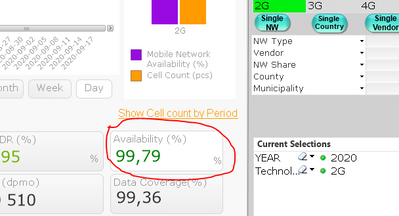
No error but the color is always green, no matter if I select 1G or 2G or both
sunny_talwar
- Mark as New
- Bookmark
- Subscribe
- Mute
- Subscribe to RSS Feed
- Permalink
- Report Inappropriate Content
Would you be able to share an image to show what you are seeing?
stekol61
- Mark as New
- Bookmark
- Subscribe
- Mute
- Subscribe to RSS Feed
- Permalink
- Report Inappropriate Content
See image below:
 sunny_talwar
- Mark as New
- Bookmark
- Subscribe
- Mute
- Subscribe to RSS Feed
- Permalink
- Report Inappropriate Content
But does it turn red when both 1G and 2G are selected? Are you also looking for it to turn red when 1G or 2G was selected? When will it show Green? Only if 3G was selected with or without 1G and/or 2G?
Kushal_Chawda
- Mark as New
- Bookmark
- Subscribe
- Mute
- Subscribe to RSS Feed
- Permalink
- Report Inappropriate Content
@stekol61 may be you have multiple occurrence of value so try with distinct and below condition
=if(GetSelectedCount(Technology)>1,
if(concat(distinct Technology,'|')='1G|2G',red(),
if(concat(distinct Technology,'|')='1G|2G|3G',green())))- Mark as New
- Bookmark
- Subscribe
- Mute
- Subscribe to RSS Feed
- Permalink
- Report Inappropriate Content
Better now.
It should be green if 2G, 3G and 4G is selected and this works
Any other selection should be red

- « Previous Replies
-
- 1
- 2
- Next Replies »