Unlock a world of possibilities! Login now and discover the exclusive benefits awaiting you.

- Qlik Community
- :
- All Forums
- :
- QlikView
- :
- Re: If Then Condition
- Subscribe to RSS Feed
- Mark Topic as New
- Mark Topic as Read
- Float this Topic for Current User
- Bookmark
- Subscribe
- Mute
- Printer Friendly Page

 tracycrown
- Mark as New
- Bookmark
- Subscribe
- Mute
- Subscribe to RSS Feed
- Permalink
- Report Inappropriate Content
If Then Condition
Dear all
This is a simple problem but not sure why I am unable to get the correct answer.
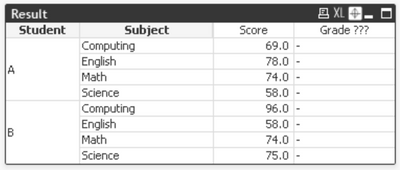
Thank you, Tracy
Accepted Solutions

 MK_QSL
- Mark as New
- Bookmark
- Subscribe
- Mute
- Subscribe to RSS Feed
- Permalink
- Report Inappropriate Content
If you want only to edit your expression without changing script then you can use below expression.
Max(Aggr(If(sum(Score)>= sum(Lower) and sum(Score) <= sum(Upper),Grade),Student, Subject, Score,Lower,Upper))
or
only(Aggr(If(sum(Score)>= sum(Lower) and sum(Score) <= sum(Upper),Grade),Student, Subject, Score,Lower,Upper))
or
Aggr(If(sum(Score)>= sum(Lower) and sum(Score) <= sum(Upper),Grade),Student, Subject, Score,Lower,Upper)
MK_QSL
- Mark as New
- Bookmark
- Subscribe
- Mute
- Subscribe to RSS Feed
- Permalink
- Report Inappropriate Content
Try something like below...
Result:
LOAD Year,
Student,
Subject,
Score
FROM
[Test-1.xlsx]
(ooxml, embedded labels, table is Result);
Grade:
LOAD Grade,
Lower,
Upper
FROM
[Test-1.xlsx]
(ooxml, embedded labels, table is Grade);
IntervalMatch:
IntervalMatch(Score)
Load Distinct Lower, Upper Resident Grade;
Left Join (IntervalMatch)
Load * Resident Grade;
Drop Table Grade;
Drop Fields Lower, Upper;
MK_QSL
- Mark as New
- Bookmark
- Subscribe
- Mute
- Subscribe to RSS Feed
- Permalink
- Report Inappropriate Content
If you want only to edit your expression without changing script then you can use below expression.
Max(Aggr(If(sum(Score)>= sum(Lower) and sum(Score) <= sum(Upper),Grade),Student, Subject, Score,Lower,Upper))
or
only(Aggr(If(sum(Score)>= sum(Lower) and sum(Score) <= sum(Upper),Grade),Student, Subject, Score,Lower,Upper))
or
Aggr(If(sum(Score)>= sum(Lower) and sum(Score) <= sum(Upper),Grade),Student, Subject, Score,Lower,Upper)
tracycrown
- Mark as New
- Bookmark
- Subscribe
- Mute
- Subscribe to RSS Feed
- Permalink
- Report Inappropriate Content
Dear MK_QSL
Thank you so much for your kind and quick response, your methods (Script & Expression) are VERY useful and just in time for me to resolve the issue.
Thank you, Tracy
tracycrown
- Mark as New
- Bookmark
- Subscribe
- Mute
- Subscribe to RSS Feed
- Permalink
- Report Inappropriate Content
Dear MK_QSL
Sorry to trouble you again as I have encountered another problem after adding a new field, Term.
Table A - Grade is OK
Table B - Grade is wrong if using average score ?
Table C - Not sure why I cannot use sum(Lower) and sum(Upper) in expression ?
Thank you in advance for your advice again, Tracy
