Unlock a world of possibilities! Login now and discover the exclusive benefits awaiting you.

- Qlik Community
- :
- All Forums
- :
- QlikView
- :
- Re: In Table Box how to display Function in Lable ...
- Subscribe to RSS Feed
- Mark Topic as New
- Mark Topic as Read
- Float this Topic for Current User
- Bookmark
- Subscribe
- Mute
- Printer Friendly Page

- Mark as New
- Bookmark
- Subscribe
- Mute
- Subscribe to RSS Feed
- Permalink
- Report Inappropriate Content
In Table Box how to display Function in Lable option ?
Hai guys
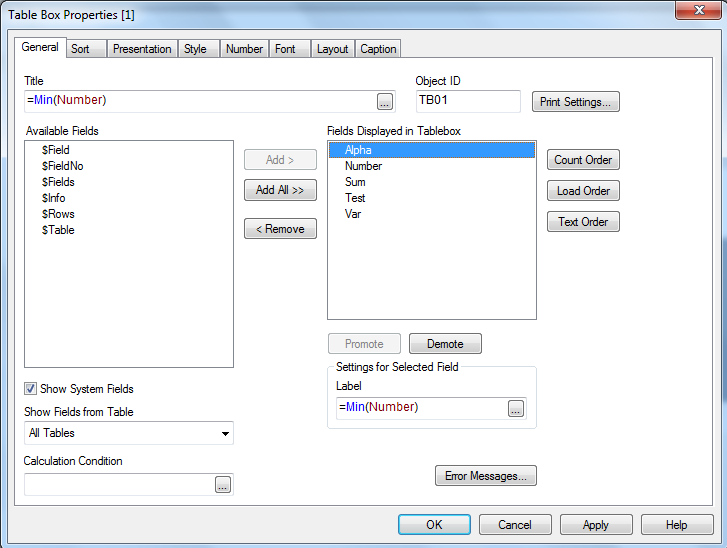
I have created tablebox in that box general tab property have lablebox option. In that LableBox. I have written a function in the lable box option and clik Ok button.After I have opened the same table box in that Generaltab label box Option inside function has disappeared. i attached two table boxsnippingfiles below (1)One. box has APPEARED LABLEBOX option (2) another box has DISAPPEARED LABLEBOX option. I want to display function in Lable box like 1 snipping file image, I do not know How to display the function in Lable box. so please help me.
Regards:
Madhu


- Mark as New
- Bookmark
- Subscribe
- Mute
- Subscribe to RSS Feed
- Permalink
- Report Inappropriate Content
Hi Madhu, Can you change the vlanguage to display like this if it is a text.
'$(vlanguage)'
Thanks.
- Mark as New
- Bookmark
- Subscribe
- Mute
- Subscribe to RSS Feed
- Permalink
- Report Inappropriate Content
also not sure why a variable should be included in square brackets. If you want to dynamically derive the field name, then use something like this.
$(='$(vLanguage)')
- Mark as New
- Bookmark
- Subscribe
- Mute
- Subscribe to RSS Feed
- Permalink
- Report Inappropriate Content
the function=Minstring({<Index={5}>}[$(vLanguage)])
- Mark as New
- Bookmark
- Subscribe
- Mute
- Subscribe to RSS Feed
- Permalink
- Report Inappropriate Content
i wrote function like this
the function=Minstring({<Index={5}>}[$(vLanguage)])

 mangalsk
- Mark as New
- Bookmark
- Subscribe
- Mute
- Subscribe to RSS Feed
- Permalink
- Report Inappropriate Content
Hello,
Label is for each field.
First select field from Field displayed in table box
Then you will see label.