Unlock a world of possibilities! Login now and discover the exclusive benefits awaiting you.

Announcements
Share your agentic AI experience, learn from others, and earn a new badge: Put Agentic AI to Work
- Qlik Community
- :
- All Forums
- :
- QlikView
- :
- Input Box linking to straight table data
Options
- Subscribe to RSS Feed
- Mark Topic as New
- Mark Topic as Read
- Float this Topic for Current User
- Bookmark
- Subscribe
- Mute
- Printer Friendly Page
Turn on suggestions
Auto-suggest helps you quickly narrow down your search results by suggesting possible matches as you type.
Showing results for

Anonymous
Not applicable
2014-07-09
11:08 AM
- Mark as New
- Bookmark
- Subscribe
- Mute
- Subscribe to RSS Feed
- Permalink
- Report Inappropriate Content
Input Box linking to straight table data
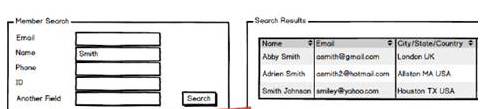
I have created variables as per the input box needed, how i can relate this to straight table data showing only to show possible of these. I can't make it in search box because it will fade out search once we click enter. Can some one help me.
900 Views
1 Reply

 engishfaque
Specialist III
2014-07-09
04:05 PM
- Mark as New
- Bookmark
- Subscribe
- Mute
- Subscribe to RSS Feed
- Permalink
- Report Inappropriate Content
Dear Praveena,
Step 1
Create a variable
Step 2
Create a Input Box and Add Available Variables
Step 3
Go to chart or whatever you want to use > Dimension Limits > Check to Restrict which values are displayed using the first expression > Select Show only radio box > Values > Edit Express > Variables > Paste Variable > OK
Now input box integrated with charts/tables.
Kind regards,
Ishfaque Ahmed
594 Views