Unlock a world of possibilities! Login now and discover the exclusive benefits awaiting you.

- Qlik Community
- :
- All Forums
- :
- QlikView
- :
- Re: IntervalMatch on Resident Table
- Subscribe to RSS Feed
- Mark Topic as New
- Mark Topic as Read
- Float this Topic for Current User
- Bookmark
- Subscribe
- Mute
- Printer Friendly Page

 carlcimino
- Mark as New
- Bookmark
- Subscribe
- Mute
- Subscribe to RSS Feed
- Permalink
- Report Inappropriate Content
IntervalMatch on Resident Table
Hello, I am trying to bucket uneven age groups on a resident table. I'd like the buckets to be as follows. I'd like the age group be appended to the resident table. How would I accomplish that?
0 to 14
15-19
20-24
25-29
30-34
35-39
40-44
45-49
50-54
55+
Here's my resident table.
Quotes:
Load
DRIVER_AGE,
POLICY_NUMBER
From C:\QlikView\Daily Quote\v14\CombinedQuotes.qvd (qvd);
Thanks in advance!
Carl
- « Previous Replies
-
- 1
- 2
- Next Replies »
Accepted Solutions

- Mark as New
- Bookmark
- Subscribe
- Mute
- Subscribe to RSS Feed
- Permalink
- Report Inappropriate Content
Hello Carl,
Using interval match, example qvw attached.
EDIT: Age bucket table replaced with Age Group list box
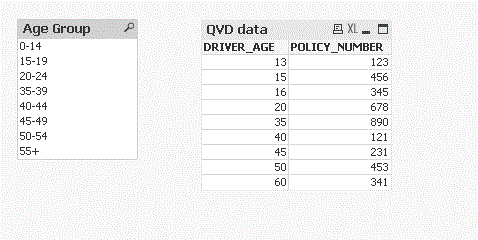
Warm regards,
Nish
- Mark as New
- Bookmark
- Subscribe
- Mute
- Subscribe to RSS Feed
- Permalink
- Report Inappropriate Content
Try this:
Load
DRIVER_AGE,
POLICY_NUMBER,
IF(DRIVER_AGE<15,'0 -14',
IF(DRIVER_AGE<20,'15 -19',
IF(DRIVER_AGE<25,'20 -24',
IF(DRIVER_AGE<30,'25 -29',
IF(DRIVER_AGE< 35,'30 -34',
IF(DRIVER_AGE< 40,'35 -39',
IF(DRIVER_AGE< 45,'40 -44',
IF(DRIVER_AGE< 50,'45 -49',
IF(DRIVER_AGE< 55,'50 -54','55+'))))))))) as [Age Group]
From C:\QlikView\Daily Quote\v14\CombinedQuotes.qvd (qvd);
- Mark as New
- Bookmark
- Subscribe
- Mute
- Subscribe to RSS Feed
- Permalink
- Report Inappropriate Content
Hello Carl,
Using interval match, example qvw attached.
EDIT: Age bucket table replaced with Age Group list box
Warm regards,
Nish
- Mark as New
- Bookmark
- Subscribe
- Mute
- Subscribe to RSS Feed
- Permalink
- Report Inappropriate Content
Did you look at the new field [Age Group]?
- Mark as New
- Bookmark
- Subscribe
- Mute
- Subscribe to RSS Feed
- Permalink
- Report Inappropriate Content
Hi Carl,
Have you had a chance to look at the replies from Caroline and myself yet?
carlcimino
- Mark as New
- Bookmark
- Subscribe
- Mute
- Subscribe to RSS Feed
- Permalink
- Report Inappropriate Content
Hi Caroline, Thanks for replying. I was hoping to avoid the nested if statements. That is how I have it now.
Thanks again!
Carl
carlcimino
- Mark as New
- Bookmark
- Subscribe
- Mute
- Subscribe to RSS Feed
- Permalink
- Report Inappropriate Content
Hi Nishant, Thank you for replying as well. I was looking to add the field to the resident table not add a dimension table without using nested if statements. Does that make sense?
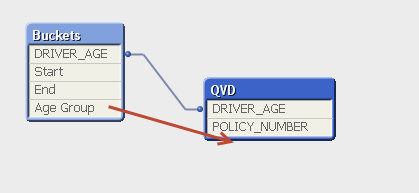
Thanks,
Carl
carlcimino
- Mark as New
- Bookmark
- Subscribe
- Mute
- Subscribe to RSS Feed
- Permalink
- Report Inappropriate Content
Also, is there any performance benefit to having the buckets as a dimension table instead of appending the field to your fact table? If not then I will use your method.
Thanks,
Carl
carlcimino
- Mark as New
- Bookmark
- Subscribe
- Mute
- Subscribe to RSS Feed
- Permalink
- Report Inappropriate Content
Sorry one more question... I see you have start of 0 and end of 100 in your inline table. How would you account for positive and negative infinity?
- Mark as New
- Bookmark
- Subscribe
- Mute
- Subscribe to RSS Feed
- Permalink
- Report Inappropriate Content
Hi Carl,
In QlikView a single table approach can be bad for RAM consumption and Script run time as far as I know, there are many pros for having the buckets as a dimension table instead. This approach offers flexibility too when dealing/administering future changes to the age group as you would just need to amend the inline load script below without touching your fact table. I hope this makes sense.
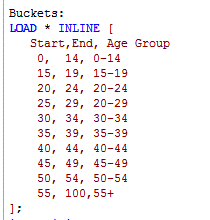
Warm regards,
Nish
- « Previous Replies
-
- 1
- 2
- Next Replies »