Unlock a world of possibilities! Login now and discover the exclusive benefits awaiting you.

- Qlik Community
- :
- All Forums
- :
- QlikView
- :
- Re: IsNull function not working in script
- Subscribe to RSS Feed
- Mark Topic as New
- Mark Topic as Read
- Float this Topic for Current User
- Bookmark
- Subscribe
- Mute
- Printer Friendly Page

- Mark as New
- Bookmark
- Subscribe
- Mute
- Subscribe to RSS Feed
- Permalink
- Report Inappropriate Content
IsNull function not working in script
Hi Friends,
I am having a Issue with Isnulll function. Some of expert can please help me to resolve this Issue
I am having field called Date.I want to show 0 when there is no Date got selected.
In front end side I am using formula in Text Object if(Isnull(Dates) = -1,0,1) we expected output 0. It's getting as expected.
I have written Same formula in script
Test:
LOAD
Dates,
if(IsNull(Dates)=-1,0,1) as [Date Info]
FROM
xyz.qvw
but [Date Info] is displaying only 1. Not even 0. Just like in below Screen shot
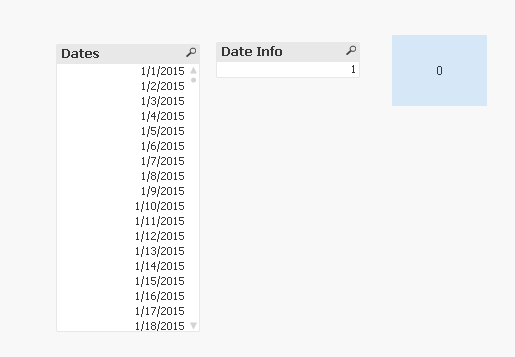
Some can plz help on this. I am attaching sample data and sample qvw
Thank you,
Swarupaaa
- « Previous Replies
-
- 1
- 2
- Next Replies »
- Mark as New
- Bookmark
- Subscribe
- Mute
- Subscribe to RSS Feed
- Permalink
- Report Inappropriate Content
Hi Stefan
Thank you for your reply. I have Tried this but it's not working

 kruppas78
- Mark as New
- Bookmark
- Subscribe
- Mute
- Subscribe to RSS Feed
- Permalink
- Report Inappropriate Content
Problem is that you only read 1 column.
on which date should QlikView set the value 0?
You can use
LOAD RowNo()+1 as Row,
Dates,
if(IsNull(Dates),0,1) as [Date Info]
the Row will Show you the Excel file Row when there is an empty date.
- Mark as New
- Bookmark
- Subscribe
- Mute
- Subscribe to RSS Feed
- Permalink
- Report Inappropriate Content
Thank you, Stefan
- « Previous Replies
-
- 1
- 2
- Next Replies »