Unlock a world of possibilities! Login now and discover the exclusive benefits awaiting you.

- Qlik Community
- :
- All Forums
- :
- QlikView
- :
- Re: Issue Formatting Totals
- Subscribe to RSS Feed
- Mark Topic as New
- Mark Topic as Read
- Float this Topic for Current User
- Bookmark
- Subscribe
- Mute
- Printer Friendly Page

 caio_caminoski
- Mark as New
- Bookmark
- Subscribe
- Mute
- Subscribe to RSS Feed
- Permalink
- Report Inappropriate Content
Issue Formatting Totals
Hi guys,
I was working on a table with a few conditional formatting rules and I came across a problem.
As you can see in the image below, my total row is also getting afected by the format conditions I have used for my data.
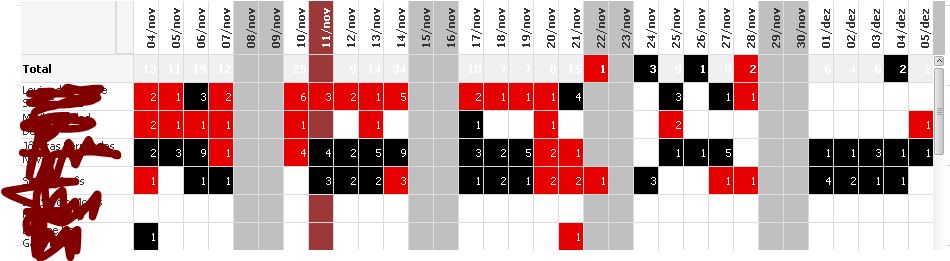
I have tried a few rules to get able to avoid this behavior, but with no success. I also tried "Custom Format Cell" and, as I expected, didn't work.
Is there any workaround?
Thanks in advance!
Accepted Solutions

 afurtado
- Mark as New
- Bookmark
- Subscribe
- Mute
- Subscribe to RSS Feed
- Permalink
- Report Inappropriate Content
Hi.
maybe you can use Dimensionality().
if(Dimensionality()=0,rgb(x,x,x),.....)
Could you put a sample model?
Best,
Alessandro Furtado
afurtado
- Mark as New
- Bookmark
- Subscribe
- Mute
- Subscribe to RSS Feed
- Permalink
- Report Inappropriate Content
Hi.
maybe you can use Dimensionality().
if(Dimensionality()=0,rgb(x,x,x),.....)
Could you put a sample model?
Best,
Alessandro Furtado
caio_caminoski
- Mark as New
- Bookmark
- Subscribe
- Mute
- Subscribe to RSS Feed
- Permalink
- Report Inappropriate Content
Beautiful solution! I didn't know about this function!
Valeu Alessandro! Abraço
afurtado
- Mark as New
- Bookmark
- Subscribe
- Mute
- Subscribe to RSS Feed
- Permalink
- Report Inappropriate Content
grande abraço
