Unlock a world of possibilities! Login now and discover the exclusive benefits awaiting you.

- Qlik Community
- :
- All Forums
- :
- QlikView
- :
- Re: Issue with RowNo()
- Subscribe to RSS Feed
- Mark Topic as New
- Mark Topic as Read
- Float this Topic for Current User
- Bookmark
- Subscribe
- Mute
- Printer Friendly Page

 Black_Hole
- Mark as New
- Bookmark
- Subscribe
- Mute
- Subscribe to RSS Feed
- Permalink
- Report Inappropriate Content
Issue with RowNo()
Hello all,
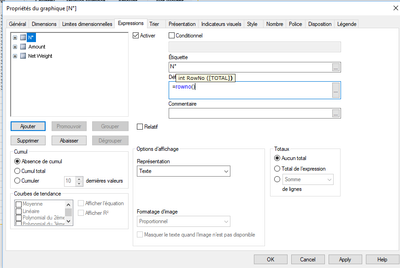
In a graphic table, I added a column with RowNo() as an expression.
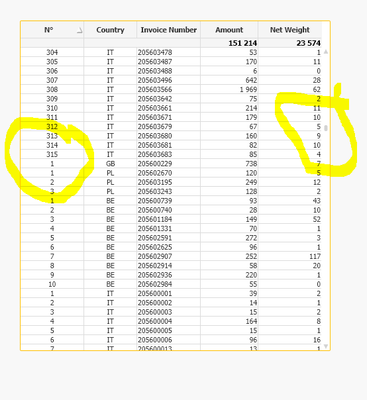
However, the row numbers displayed on my table are not correct. I don't understand what happened!
> Table view:
> Properties view:
Please could you help me to resolve this issue.
Thank you in advance for your help.
Accepted Solutions

 sunny_talwar
- Mark as New
- Bookmark
- Subscribe
- Mute
- Subscribe to RSS Feed
- Permalink
- Report Inappropriate Content
Do you need may be RowNo(TOTAL) to get a continuous row number count
 marcus_sommer
- Mark as New
- Bookmark
- Subscribe
- Mute
- Subscribe to RSS Feed
- Permalink
- Report Inappropriate Content
I assume the dimensions within your table aren't properly associated to eachother and therefore some rows will be duplicated. Before playing further with this table I suggest to create a tablebox with all relevant fields and to ensure that a definite unique key is included (if none exists within the datamodel you could there with recno() and/or rowno() create some) and then to check if all data and the relations of them are like expected.
- Marcus
sunny_talwar
- Mark as New
- Bookmark
- Subscribe
- Mute
- Subscribe to RSS Feed
- Permalink
- Report Inappropriate Content
Do you need may be RowNo(TOTAL) to get a continuous row number count
Black_Hole
- Mark as New
- Bookmark
- Subscribe
- Mute
- Subscribe to RSS Feed
- Permalink
- Report Inappropriate Content
Hello @marcus_sommer , @sunny_talwar ,
Thank you both for your help.
@sunny_talwar : I tried and that's work perfectly! Thank you very much for this solution 👍
