Unlock a world of possibilities! Login now and discover the exclusive benefits awaiting you.

- Qlik Community
- :
- All Forums
- :
- QlikView
- :
- Re: Issue with num format
Options
- Subscribe to RSS Feed
- Mark Topic as New
- Mark Topic as Read
- Float this Topic for Current User
- Bookmark
- Subscribe
- Mute
- Printer Friendly Page
Turn on suggestions
Auto-suggest helps you quickly narrow down your search results by suggesting possible matches as you type.
Showing results for

 sergio0592
Specialist III
2016-12-07
11:37 AM
- Mark as New
- Bookmark
- Subscribe
- Mute
- Subscribe to RSS Feed
- Permalink
- Report Inappropriate Content
Issue with num format
Hi all,
I'd like format my expression number with separation between thousands . In the chart properties, it works when i put # ##0
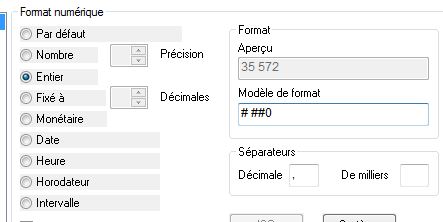
But i try to get the same thing with num function, it goes wrong. I try with =num(sum(Orders),# ##0) and i have the message 'Error in expression'.
Regards
995 Views
1 Solution
Accepted Solutions

 sunny_talwar
MVP
2016-12-07
11:52 AM
- Mark as New
- Bookmark
- Subscribe
- Mute
- Subscribe to RSS Feed
- Permalink
- Report Inappropriate Content
4 Replies
 robert_mika
MVP
2016-12-07
11:38 AM
- Mark as New
- Bookmark
- Subscribe
- Mute
- Subscribe to RSS Feed
- Permalink
- Report Inappropriate Content
=num(sum(Orders),'# ##0')
You need apostrophes..
904 Views
 Chanty4u
MVP
2016-12-07
11:41 AM
- Mark as New
- Bookmark
- Subscribe
- Mute
- Subscribe to RSS Feed
- Permalink
- Report Inappropriate Content
try to add single quotes for
'##0'
904 Views
sunny_talwar
MVP
2016-12-07
11:52 AM
- Mark as New
- Bookmark
- Subscribe
- Mute
- Subscribe to RSS Feed
- Permalink
- Report Inappropriate Content
Try this:
=Num(Sum(Orders), '# ##0', '.', ' ')
sergio0592
Specialist III
2016-12-07
12:07 PM
Author
- Mark as New
- Bookmark
- Subscribe
- Mute
- Subscribe to RSS Feed
- Permalink
- Report Inappropriate Content
Great Sunny, as usual  !! Solutions suggested by Chanty and Robert return : Number # ##0
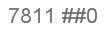
I will work on num function, it seems have numerous parameters!
904 Views
