Unlock a world of possibilities! Login now and discover the exclusive benefits awaiting you.

- Qlik Community
- :
- All Forums
- :
- QlikView
- :
- Join tables with condition
- Subscribe to RSS Feed
- Mark Topic as New
- Mark Topic as Read
- Float this Topic for Current User
- Bookmark
- Subscribe
- Mute
- Printer Friendly Page

- Mark as New
- Bookmark
- Subscribe
- Mute
- Subscribe to RSS Feed
- Permalink
- Report Inappropriate Content
Join tables with condition
Hi!
I want to join the next tables:
Table1:
| YEAR | T1_ID | ID | DENOM |
|---|---|---|---|
| 2012 | 1 | 1111 | Denomination1 |
| 2012 | 1 | 2222 | Denomination1 |
| 2012 | 2 | 1111 | Denomination2 |
| 2012 | 2 | 3333 | Denomination2 |
Table2:
| YEAR | T2_ID | ID |
|---|---|---|
| 2012 | 1 | 1111 |
| 2012 | 1 | 2222 |
| 2012 | 2 | 1111 |
| 2012 | 3 | 1111 |
| 2012 | 3 | 3333 |
| 2012 | 3 | 4444 |
The target that I have to reach:
| YEAR | T2_ID | ID | DENOM |
|---|---|---|---|
| 2012 | 1 | 1111 | Denomination1 |
| 2012 | 1 | 2222 | Denomination1 |
| 2012 | 2 | 1111 | |
| 2012 | 3 | 1111 | Denomination2 |
| 2012 | 3 | 3333 | Denomination2 |
| 2012 | 3 | 4444 |
So I have to check that each T2_ID have all ID from Table1, to take DENOM value. For example, T2_ID = 2, has no DENOM value because only with ID = 1111 is not possible. It would be necessary another row with ID = 2222 or ID = 3333.
However, T2_ID = 3, with ID in (1111, 3333), take Denomination2 value although it's not available for all rows (ID = 4444).
How can I do that in the script?
Thanks!

 salto
salto
- Mark as New
- Bookmark
- Subscribe
- Mute
- Subscribe to RSS Feed
- Permalink
- Report Inappropriate Content
Hi,
you say "For example, T2_ID = 2, has no DENOM value because only with ID = 1111 is not possible." - T2_ID =2 has an ID = 1111, and a YEAR=2012, so it has Denom1 and Denom2 in Table1.
I'm afraid I have not understood your requirements...
- Mark as New
- Bookmark
- Subscribe
- Mute
- Subscribe to RSS Feed
- Permalink
- Report Inappropriate Content
Table 1 works like an group with fields YEAR-T1_ID. So, T2_ID = 1 matchs in group 1 (T1_ID = 1).
However, T2_ID = 2 don't match with any group because it needs ID = 2222, to get Denomination1, or ID = 3333, to get Denomination2.
I hope I have explained better.
Thanks!
- Mark as New
- Bookmark
- Subscribe
- Mute
- Subscribe to RSS Feed
- Permalink
- Report Inappropriate Content
In addition, I need to do this because I want that when user choose "Denomination1", it only appears T2_ID = 1.
Without this join, if user choose ID values 1111 and 2222, it will appear all T2_ID values and I don't want that.
- Mark as New
- Bookmark
- Subscribe
- Mute
- Subscribe to RSS Feed
- Permalink
- Report Inappropriate Content
I have looked for in forums but I have not found a solution for this issue. On the other hand, there isn't an easy way to select dimension values and works like an AND clause. I have seen in the web a similar example to change the selection mode. This example solves the problem with the selection mode when you select different dimensions, but I want to change the mode when I select an only dimension.
When I select, for example, two values in a dimension I want the AND mode not the OR mode.
- Mark as New
- Bookmark
- Subscribe
- Mute
- Subscribe to RSS Feed
- Permalink
- Report Inappropriate Content
Hi Qlikviewers!
I keep thinking about how to solve this problem.
Do you think it's better change the sql views that I have now?
Thanks!
salto
- Mark as New
- Bookmark
- Subscribe
- Mute
- Subscribe to RSS Feed
- Permalink
- Report Inappropriate Content
Hello,
Just to check if I hve understood correctly: all values YEAR and ID from table2 need to be in Table1 ?
- Mark as New
- Bookmark
- Subscribe
- Mute
- Subscribe to RSS Feed
- Permalink
- Report Inappropriate Content
No, it's not necessary.
For example, ID = 4444 is not in Table1.
salto
- Mark as New
- Bookmark
- Subscribe
- Mute
- Subscribe to RSS Feed
- Permalink
- Report Inappropriate Content
Hello again,
I am sorry but I do not understand the rules that make a record in the resultant table. Could you please explain where does every record in the resultant table come from?
Thanks.
- Mark as New
- Bookmark
- Subscribe
- Mute
- Subscribe to RSS Feed
- Permalink
- Report Inappropriate Content
Hi again:
Ok, I write the conditions of the example (the colors show the groups):
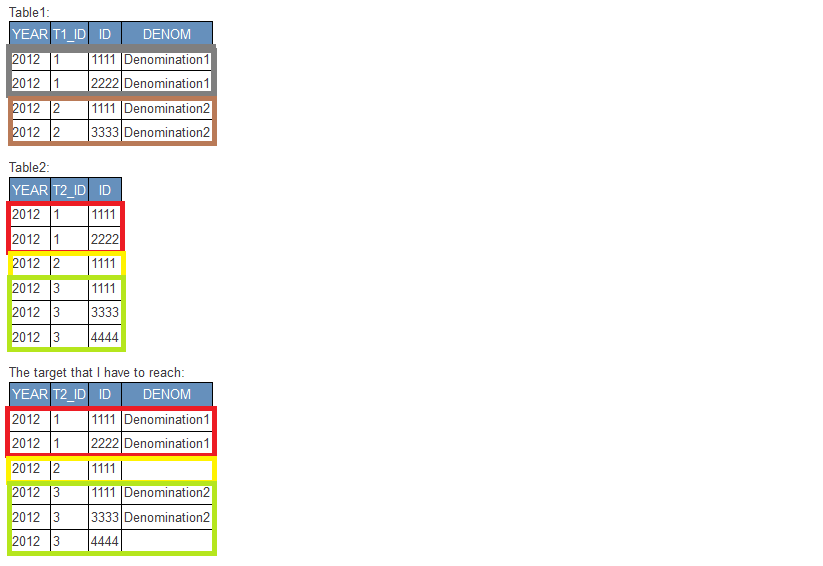
- Table1 has two groups (YEAR-T1_ID). Each group has the same DENOM value.
- Table2 has three groups (YEAR-T2_ID)
- Target table and Table2 must have the same number of records.
- For the first group of Table2, I have to check that ID values (1111, 2222) match with a group of Table1. In this case, it gets Denomination1.
- For the second group of Table2, I have to check that ID value (1111) math with a group of Table1 but it's not possible because there isn't a group with only 1111.
- For the third group of Table2, I have to check that ID values (1111, 3333, 4444) match with a group of Table1. In this case, ID values 1111 and 3333 math with T1_ID = 1, so it gets Denomination2 (only for ID values 1111 and 3333).
Thanks!