Unlock a world of possibilities! Login now and discover the exclusive benefits awaiting you.

- Qlik Community
- :
- All Forums
- :
- QlikView
- :
- Re: Left fxn
- Subscribe to RSS Feed
- Mark Topic as New
- Mark Topic as Read
- Float this Topic for Current User
- Bookmark
- Subscribe
- Mute
- Printer Friendly Page

- Mark as New
- Bookmark
- Subscribe
- Mute
- Subscribe to RSS Feed
- Permalink
- Report Inappropriate Content
Left fxn
Hi All
i have field in my table called Product_code and Customer_number
Product_code,
L140
R40
z15
a32
A201
C40
D20
T10
T01
l225
T301
A50
A54,........
Now In my Load
i need to extract the Customer_number where Product_code starts with L,l,T
Please Suggest
- Tags:
- new_to_qlikview
Accepted Solutions

 sunny_talwar
- Mark as New
- Bookmark
- Subscribe
- Mute
- Subscribe to RSS Feed
- Permalink
- Report Inappropriate Content
Try this:
Where Match(Upper(Left(Product_code, 1)), 'L', 'I', 'T');
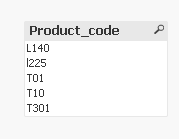
For the sample, the below script seems to work:
Table:
LOAD *
Where Match(Upper(Left(Product_code, 1)), 'L', 'I', 'T');
LOAD * Inline [
Product_code
L140
R40
z15
a32
A201
C40
D20
T10
T01
l225
T301
A50
A54
];
Output:
sunny_talwar
- Mark as New
- Bookmark
- Subscribe
- Mute
- Subscribe to RSS Feed
- Permalink
- Report Inappropriate Content
Try this:
Where Match(Upper(Left(Product_code, 1)), 'L', 'I', 'T');
For the sample, the below script seems to work:
Table:
LOAD *
Where Match(Upper(Left(Product_code, 1)), 'L', 'I', 'T');
LOAD * Inline [
Product_code
L140
R40
z15
a32
A201
C40
D20
T10
T01
l225
T301
A50
A54
];
Output:
- Mark as New
- Bookmark
- Subscribe
- Mute
- Subscribe to RSS Feed
- Permalink
- Report Inappropriate Content
Customer:
load Product_code as Customer_code
resident Products
where match(left(Product_code,1),'L','I','T') > 0
 maxgro
- Mark as New
- Bookmark
- Subscribe
- Mute
- Subscribe to RSS Feed
- Permalink
- Report Inappropriate Content
if you want uppercase only
where match(Left(Product_code,1), 'L','I','T')
for upper and lower
where mixmatch(Left(Product_code,1), 'L','I','T')
 MarcoWedel
- Mark as New
- Bookmark
- Subscribe
- Mute
- Subscribe to RSS Feed
- Permalink
- Report Inappropriate Content
another one:
Where WildMatch(Product_code, 'L*', 'I*', 'T*');
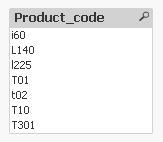
table1:
LOAD * Inline [
Product_code
L140
R40
z15
a32
A201
C40
D20
T10
T01
t02
l225
T301
A50
A54
i60
]
Where WildMatch(Product_code, 'L*', 'I*', 'T*');
hope this helps
regards
Marco