Unlock a world of possibilities! Login now and discover the exclusive benefits awaiting you.

- Qlik Community
- :
- All Forums
- :
- QlikView
- :
- Legend colour mismatch
- Subscribe to RSS Feed
- Mark Topic as New
- Mark Topic as Read
- Float this Topic for Current User
- Bookmark
- Subscribe
- Mute
- Printer Friendly Page

- Mark as New
- Bookmark
- Subscribe
- Mute
- Subscribe to RSS Feed
- Permalink
- Report Inappropriate Content
Legend colour mismatch
Hi. I'm very new to QV (v11.2) and I have a baffling problem.
I have a line chart where I have used an expression to set the colour of one of the lines ("Overall") to black (I have used the expression =if(Resolver_Group_Name='Overall',black()) to set the Background colour). This expression has successfully updated the line color in the Legend but the colour of the corresponding line in the chart has remained its old colour, green. So what I've ended up with is a colour in the Legend (black) that doesn't match the colour of the line shown in the Line Chart (green).
Does anyone know how to fix this please? I'm totally stumped.
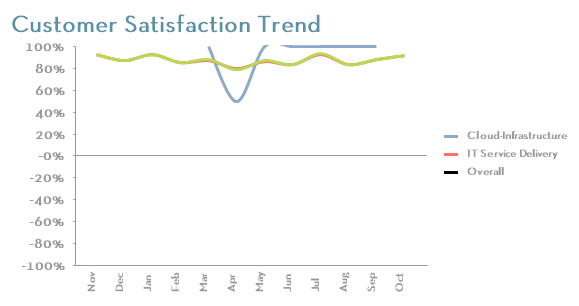
Message was edited by: Dave O'Reardon - added picture

 anbu1984
- Mark as New
- Bookmark
- Subscribe
- Mute
- Subscribe to RSS Feed
- Permalink
- Report Inappropriate Content
Can you post sample app
- Mark as New
- Bookmark
- Subscribe
- Mute
- Subscribe to RSS Feed
- Permalink
- Report Inappropriate Content
Thank you for helping. Do you mean by QVW file? If so, I can't because it contains sensitive customer data that I am not able to share.
anbu1984
- Mark as New
- Bookmark
- Subscribe
- Mute
- Subscribe to RSS Feed
- Permalink
- Report Inappropriate Content
Can you provide sample dummy data and your expressions
- Mark as New
- Bookmark
- Subscribe
- Mute
- Subscribe to RSS Feed
- Permalink
- Report Inappropriate Content
As_at_Month, Resolver_Group_Name, NPS
Aug 2014, Overall, 70
Sep 2014, Overall, 80
Oct 2014, Overall, 90
Aug 2014, Cloud-Infrastructure, 50
Sep 2014, Cloud-Infrastructure, 60
Oct 2014, Cloud-Infrastructure, 70
Aug 2014, IT Service Delivery, 40
Sep 2014, IT Service Delivery, 50
Oct 2014, IT Service Delivery, 60
Chart Properties->Expressions->NPS->Background Color->Definition=if(Resolver_Group_Name='Overall',black())
anbu1984
- Mark as New
- Bookmark
- Subscribe
- Mute
- Subscribe to RSS Feed
- Permalink
- Report Inappropriate Content
Setting back ground color works for me. Check this qvw
- Mark as New
- Bookmark
- Subscribe
- Mute
- Subscribe to RSS Feed
- Permalink
- Report Inappropriate Content
Unfortunately, I'm using Personal Edition too and so I can't open your QVW. I think you're telling me that you couldn't replicate the problem though. Thank you for trying to help me!

 danieloberbilli
- Mark as New
- Bookmark
- Subscribe
- Mute
- Subscribe to RSS Feed
- Permalink
- Report Inappropriate Content
I think this is a bug due to some format changes in the chart object. Try to create a new chart object (without too much experimenting in styles/colors/sizes) and I guess it should work
- Mark as New
- Bookmark
- Subscribe
- Mute
- Subscribe to RSS Feed
- Permalink
- Report Inappropriate Content
Thanks Daniel, I'll have a play.