Unlock a world of possibilities! Login now and discover the exclusive benefits awaiting you.

- Qlik Community
- :
- All Forums
- :
- QlikView
- :
- Like and Not Like Equivalent
- Subscribe to RSS Feed
- Mark Topic as New
- Mark Topic as Read
- Float this Topic for Current User
- Bookmark
- Subscribe
- Mute
- Printer Friendly Page

- Mark as New
- Bookmark
- Subscribe
- Mute
- Subscribe to RSS Feed
- Permalink
- Report Inappropriate Content
Like and Not Like Equivalent
I have records that have ITEM_NBRs like the following:
AVSCC00000
G5R85
G5889
LOKDA0002
I want to remove these from a list box.
In Microsoft Access I would use something like the following
Not Like "AVS*" And Not Like "FB*" And Not Like "G*" And Not Like "LOK*"
What statement could I use in QlikView?
Thanks for your help in advance.

 rwunderlich
- Mark as New
- Bookmark
- Subscribe
- Mute
- Subscribe to RSS Feed
- Permalink
- Report Inappropriate Content
The trick is you;ll need an aggr(). You could use the Not LIke And syntax but wildmatch() may be easier. You can code it as a if() or a Set expression.
=aggr(if(NOT WildMatch(ITEM_NBR,'AVS*','FB*'),ITEM_NBR), ITEM_NBR)
or
=aggr(Only({<ITEM_NBR={"=NOT WildMatch(Country,'AVS*','FB*')"}>} ITEM_NBR), ITEM_NBR)
-Rob
- Mark as New
- Bookmark
- Subscribe
- Mute
- Subscribe to RSS Feed
- Permalink
- Report Inappropriate Content
Thank you for your help.
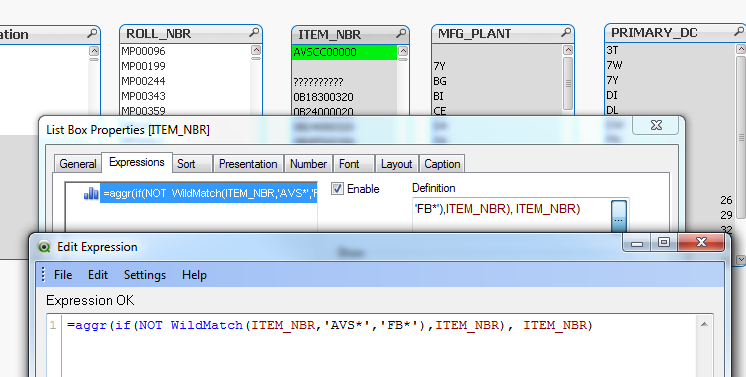
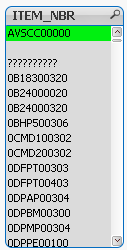
I entered =aggr(if(NOT WildMatch(ITEM_NBR,'AVS*','FB*'),ITEM_NBR), ITEM_NBR) in the Expressions/Definition section of my list box and Enabled it to no avail.
I am very new to Qlikview as I just finished a week long training session last week. Any help is appreciated.