Unlock a world of possibilities! Login now and discover the exclusive benefits awaiting you.

- Qlik Community
- :
- All Forums
- :
- QlikView
- :
- Re: Line chart design issue
Options
- Subscribe to RSS Feed
- Mark Topic as New
- Mark Topic as Read
- Float this Topic for Current User
- Bookmark
- Subscribe
- Mute
- Printer Friendly Page
Turn on suggestions
Auto-suggest helps you quickly narrow down your search results by suggesting possible matches as you type.
Showing results for

 deepakqlikview_
Specialist
2015-03-03
01:52 AM
- Mark as New
- Bookmark
- Subscribe
- Mute
- Subscribe to RSS Feed
- Permalink
- Report Inappropriate Content
Line chart design issue
Hi All,
Please find below image.
Can you please suggest how to get unemployment rate by descending order on y axis.
thanks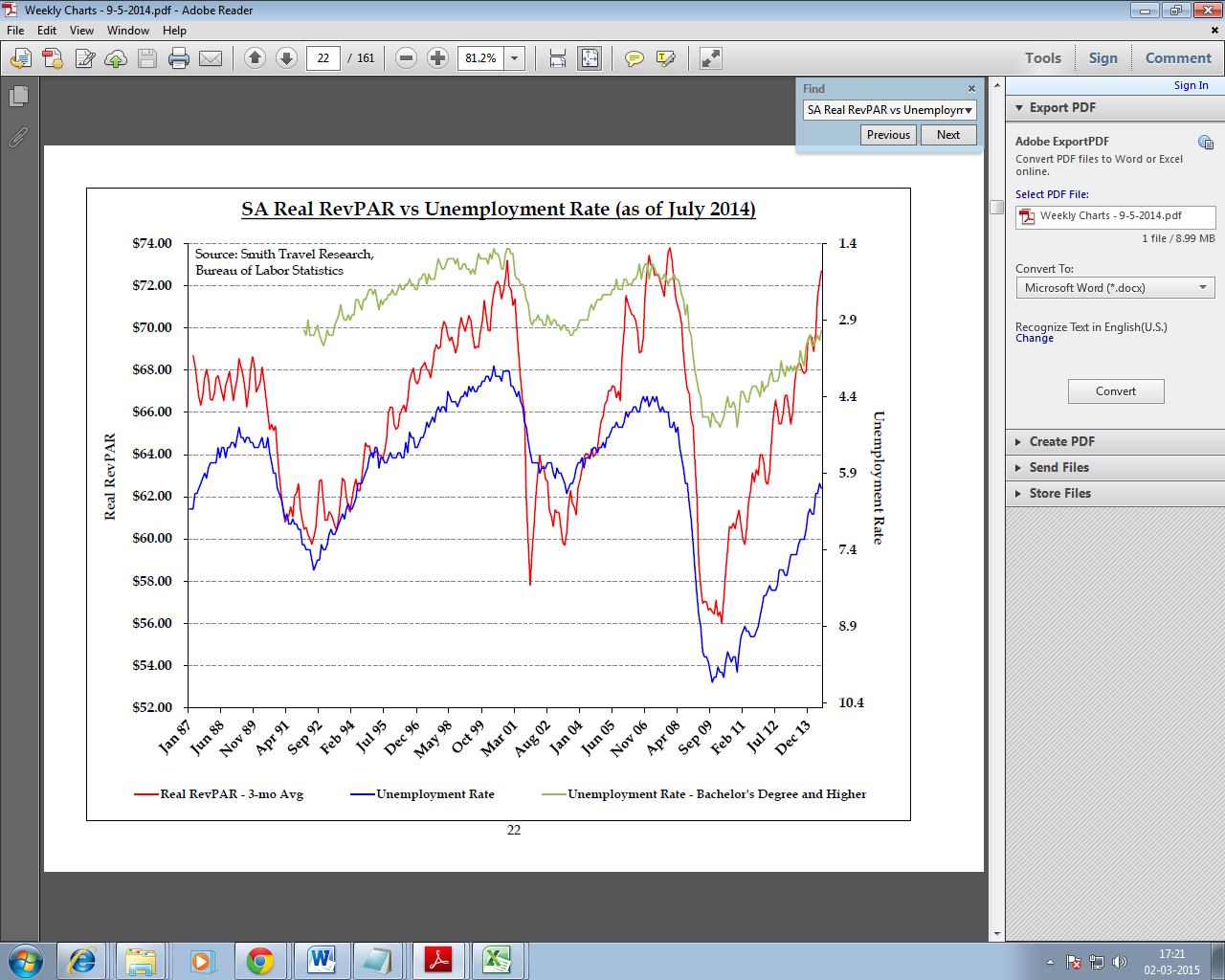
870 Views
1 Solution
Accepted Solutions

Not applicable
2015-03-03
02:08 AM
- Mark as New
- Bookmark
- Subscribe
- Mute
- Subscribe to RSS Feed
- Permalink
- Report Inappropriate Content
In Axis tab - select the relevant expression, and on the right hand side, check the Right Side axis box
813 Views
2 Replies
Not applicable
2015-03-03
02:08 AM
- Mark as New
- Bookmark
- Subscribe
- Mute
- Subscribe to RSS Feed
- Permalink
- Report Inappropriate Content
In Axis tab - select the relevant expression, and on the right hand side, check the Right Side axis box
814 Views
deepakqlikview_
Specialist
2015-03-03
02:13 AM
Author
- Mark as New
- Bookmark
- Subscribe
- Mute
- Subscribe to RSS Feed
- Permalink
- Report Inappropriate Content
I have followed the same proc but not able to get value as shown in chart(descending order)