Unlock a world of possibilities! Login now and discover the exclusive benefits awaiting you.

- Qlik Community
- :
- All Forums
- :
- QlikView
- :
- Re: List Box Sort
- Subscribe to RSS Feed
- Mark Topic as New
- Mark Topic as Read
- Float this Topic for Current User
- Bookmark
- Subscribe
- Mute
- Printer Friendly Page

- Mark as New
- Bookmark
- Subscribe
- Mute
- Subscribe to RSS Feed
- Permalink
- Report Inappropriate Content
List Box Sort
Hi
In have the following expression in a list box
=if(Inv_Criticality = 'A', 'Critical',
if(Inv_Criticality = 'B', 'Semi Critical',
if(Inv_Criticality = 'C', 'Non Critical',
'Others')))
However, I am struggling to sort in the following order which is
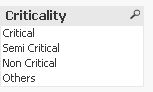
- Critical , Semi-Critical, Non Critical and Others.
I get the following below when used Match
=Match(Inv_Criticality,'A','B','C','O')

Thank you,
Kind regards
Nayan
Accepted Solutions

 MarcoWedel
- Mark as New
- Bookmark
- Subscribe
- Mute
- Subscribe to RSS Feed
- Permalink
- Report Inappropriate Content
Hi,
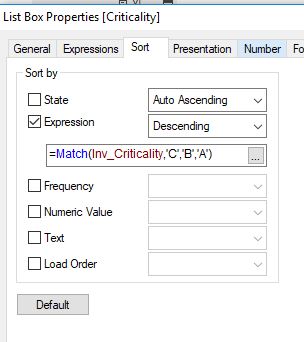
maybe one solution might be to change your sorting expression to:
=Match(Inv_Criticality,'C','B','A')
and sort in descending order.
hope this helps
regards
Marco

- Mark as New
- Bookmark
- Subscribe
- Mute
- Subscribe to RSS Feed
- Permalink
- Report Inappropriate Content
Try to add your expression as
=if(Inv_Criticality = 'A', dual('Critical', 1)
if(Inv_Criticality = 'B', dual('Semi Critical',2),
if(Inv_Criticality = 'C', dual('Non Critical',3),
Dual( 'Others',4))))
MarcoWedel
- Mark as New
- Bookmark
- Subscribe
- Mute
- Subscribe to RSS Feed
- Permalink
- Report Inappropriate Content
Hi,
maybe one solution might be to change your sorting expression to:
=Match(Inv_Criticality,'C','B','A')
and sort in descending order.
hope this helps
regards
Marco
- Mark as New
- Bookmark
- Subscribe
- Mute
- Subscribe to RSS Feed
- Permalink
- Report Inappropriate Content
Thank you Marco. It worked.
Kind regards
Nayan