Unlock a world of possibilities! Login now and discover the exclusive benefits awaiting you.

- Qlik Community
- :
- All Forums
- :
- QlikView
- :
- Re: Load Redundand Fields
- Subscribe to RSS Feed
- Mark Topic as New
- Mark Topic as Read
- Float this Topic for Current User
- Bookmark
- Subscribe
- Mute
- Printer Friendly Page

- Mark as New
- Bookmark
- Subscribe
- Mute
- Subscribe to RSS Feed
- Permalink
- Report Inappropriate Content
Load Redundand Fields
Hi Togehter,
following excellist list is given:

Columns C to L are repeated in every each record.
How can I get the repeating columns in the following Table transformation ?
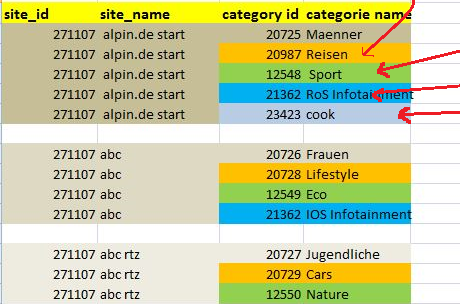
In this example, the first data set is transformed into 5 records.
The second original data is transformed into 4 records because the redundant fields K and L contains nothing.
The third data set produced only 3 records etc..
How can I load on the first table from Excel, to derive the second Table from the first ?
Thanks for your advice.
Best Regards,
- Tags:
- qlikview_scripting
Accepted Solutions

 CELAMBARASAN
- Mark as New
- Bookmark
- Subscribe
- Mute
- Subscribe to RSS Feed
- Permalink
- Report Inappropriate Content
Hi,
Could you possibly try this
Data:
LOAD site_id,
site_name,
category_id & '|' & category_id1 & '|' & category_id2 & '|' & category_id3 & '|' & category_id4 as category_id,
categorie_name & '|' & categorie_name1 & '|' & categorie_name2 & '|' & categorie_name3 & '|' & categorie_name4 as categorie_name
FROM
RedundantFields.xlsx
(ooxml, embedded labels, table is Sheet1);
Result:
LOAD
RowNo() AS UniqueNumber,
site_id,
site_name,
SubField(category_id, '|') AS category_id
Resident Data;
Left Join(Result)
LOAD
RowNo() AS UniqueNumber,
site_id,
site_name,
SubField(categorie_name, '|') AS categorie_name
Resident Data;
DROP Table Data;
CELAMBARASAN
- Mark as New
- Bookmark
- Subscribe
- Mute
- Subscribe to RSS Feed
- Permalink
- Report Inappropriate Content
Could you post the script formed by the qlikview by choosing the file using Qlikview table files button?
 jaimeaguilar
- Mark as New
- Bookmark
- Subscribe
- Mute
- Subscribe to RSS Feed
- Permalink
- Report Inappropriate Content
Hi,
try this
Redundant:
LOAD site_id,
site_name,
category_id,
categorie_name
FROM
RedundantFields.xlsx
(ooxml, embedded labels, table is Sheet1);
for i=1 to 4 //You need to load category_id and categorie_name 4 times besides the one that is already loaded
Concatenate(Redundant)
LOAD site_id,
site_name,
category_id$(i) as category_id,
categorie_name$(i) as categorie_name
FROM
RedundantFields.xlsx
(ooxml, embedded labels, table is Sheet1);
NEXT
Also take a look at the attached example,
regards
CELAMBARASAN
- Mark as New
- Bookmark
- Subscribe
- Mute
- Subscribe to RSS Feed
- Permalink
- Report Inappropriate Content
Hi,
Could you possibly try this
Data:
LOAD site_id,
site_name,
category_id & '|' & category_id1 & '|' & category_id2 & '|' & category_id3 & '|' & category_id4 as category_id,
categorie_name & '|' & categorie_name1 & '|' & categorie_name2 & '|' & categorie_name3 & '|' & categorie_name4 as categorie_name
FROM
RedundantFields.xlsx
(ooxml, embedded labels, table is Sheet1);
Result:
LOAD
RowNo() AS UniqueNumber,
site_id,
site_name,
SubField(category_id, '|') AS category_id
Resident Data;
Left Join(Result)
LOAD
RowNo() AS UniqueNumber,
site_id,
site_name,
SubField(categorie_name, '|') AS categorie_name
Resident Data;
DROP Table Data;
- Mark as New
- Bookmark
- Subscribe
- Mute
- Subscribe to RSS Feed
- Permalink
- Report Inappropriate Content