Unlock a world of possibilities! Login now and discover the exclusive benefits awaiting you.

- Qlik Community
- :
- All Forums
- :
- QlikView
- :
- Load files from folder
- Subscribe to RSS Feed
- Mark Topic as New
- Mark Topic as Read
- Float this Topic for Current User
- Bookmark
- Subscribe
- Mute
- Printer Friendly Page

 markgraham123
- Mark as New
- Bookmark
- Subscribe
- Mute
- Subscribe to RSS Feed
- Permalink
- Report Inappropriate Content
Load files from folder
All,
I'm trying to only load files which have 9 am Timestamp.
I tried below code - but this did not help.
Load *
FROM
[..\TEST\*9 AM*.qvd]
(qvd);
Here is the example:
| Demand Master 2017-09-05 8 AM |
| Demand Master 2017-09-05 9 AM |
| Demand Master 2017-09-05 10 AM |
| Demand Master 2017-09-05 11 AM |
| Demand Master 2017-09-06 8 AM |
| Demand Master 2017-09-06 9 AM |
| Demand Master 2017-09-06 10 AM |
Demand Master 2017-09-06 11 AM |
Any help is highly appreciated!
- « Previous Replies
-
- 1
- 2
- Next Replies »
Accepted Solutions


- Mark as New
- Bookmark
- Subscribe
- Mute
- Subscribe to RSS Feed
- Permalink
- Report Inappropriate Content
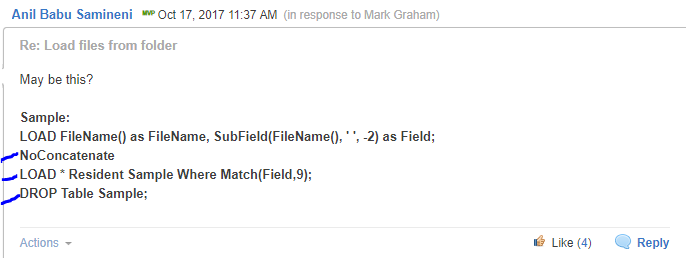
If you notice, I've created resident copy load from all filenames which you need to set up same thing? Highlighted 3 lines where you need to write code 

 vkish16161
- Mark as New
- Bookmark
- Subscribe
- Mute
- Subscribe to RSS Feed
- Permalink
- Report Inappropriate Content
You can try the FileBaseName() function.
Something like this:
where Wildmatch(filebasename (lib://Insert your coneection path here),'*9 AM*')
vkish16161
- Mark as New
- Bookmark
- Subscribe
- Mute
- Subscribe to RSS Feed
- Permalink
- Report Inappropriate Content
Is this Qlik Sense or View?
- Mark as New
- Bookmark
- Subscribe
- Mute
- Subscribe to RSS Feed
- Permalink
- Report Inappropriate Content
May be this?
Sample:
LOAD FileName() as FileName, SubField(FileName(), ' ', -2) as Field;
NoConcatenate
LOAD * Resident Sample Where Match(Field,9);
DROP Table Sample;
markgraham123
- Mark as New
- Bookmark
- Subscribe
- Mute
- Subscribe to RSS Feed
- Permalink
- Report Inappropriate Content
Anil,
I got all the file names i wanted.
how do i use that field now to load data from it.
Please advise!
- Mark as New
- Bookmark
- Subscribe
- Mute
- Subscribe to RSS Feed
- Permalink
- Report Inappropriate Content
It's there in my code which fieldname called "Field"
markgraham123
- Mark as New
- Bookmark
- Subscribe
- Mute
- Subscribe to RSS Feed
- Permalink
- Report Inappropriate Content
yes.
I'm trying to use that "Field" in the from statement.
But not working.
- Mark as New
- Bookmark
- Subscribe
- Mute
- Subscribe to RSS Feed
- Permalink
- Report Inappropriate Content
What you have tried, please post script
markgraham123
- Mark as New
- Bookmark
- Subscribe
- Mute
- Subscribe to RSS Feed
- Permalink
- Report Inappropriate Content
Sorry for the confusion.
"FileName" field has all the filenames i wanted.
Now, i wanted to load * from those files.
- Mark as New
- Bookmark
- Subscribe
- Mute
- Subscribe to RSS Feed
- Permalink
- Report Inappropriate Content
If you notice, I've created resident copy load from all filenames which you need to set up same thing? Highlighted 3 lines where you need to write code

- « Previous Replies
-
- 1
- 2
- Next Replies »