Unlock a world of possibilities! Login now and discover the exclusive benefits awaiting you.

- Qlik Community
- :
- All Forums
- :
- QlikView
- :
- Re: Load multiple excel files from Multiple excel ...
- Subscribe to RSS Feed
- Mark Topic as New
- Mark Topic as Read
- Float this Topic for Current User
- Bookmark
- Subscribe
- Mute
- Printer Friendly Page

 Nagaraju_KCS
- Mark as New
- Bookmark
- Subscribe
- Mute
- Subscribe to RSS Feed
- Permalink
- Report Inappropriate Content
Load multiple excel files from Multiple excel sheets
Hi Community,
Load multiple excel files from Multiple excel sheets, but i have same diffrent column field
Thanks..
- Tags:
- new_to_qlikview

 tresB
tresB
- Mark as New
- Bookmark
- Subscribe
- Mute
- Subscribe to RSS Feed
- Permalink
- Report Inappropriate Content
Nagaraju_KCS
- Mark as New
- Bookmark
- Subscribe
- Mute
- Subscribe to RSS Feed
- Permalink
- Report Inappropriate Content
Hi Tresesco,
It's fine, but i don't have same columns.. that's why i have problem
tresB
- Mark as New
- Bookmark
- Subscribe
- Mute
- Subscribe to RSS Feed
- Permalink
- Report Inappropriate Content
If you don't have same columns, you would have different tables(because they won't be auto concatenated). That is what the difference would be I believe. Or, if you are trying to achieve something else, please explain.

 rwunderlich
- Mark as New
- Bookmark
- Subscribe
- Mute
- Subscribe to RSS Feed
- Permalink
- Report Inappropriate Content
How about "LOAD *"?
-Rob
Nagaraju_KCS
- Mark as New
- Bookmark
- Subscribe
- Mute
- Subscribe to RSS Feed
- Permalink
- Report Inappropriate Content
Hi,
Please find attached files...

- Mark as New
- Bookmark
- Subscribe
- Mute
- Subscribe to RSS Feed
- Permalink
- Report Inappropriate Content
Hi
try this
open Qlik view-> Ctrl+E click ->Table files Select Your File.
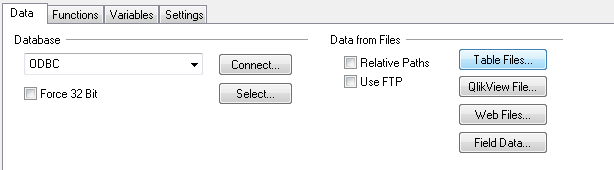
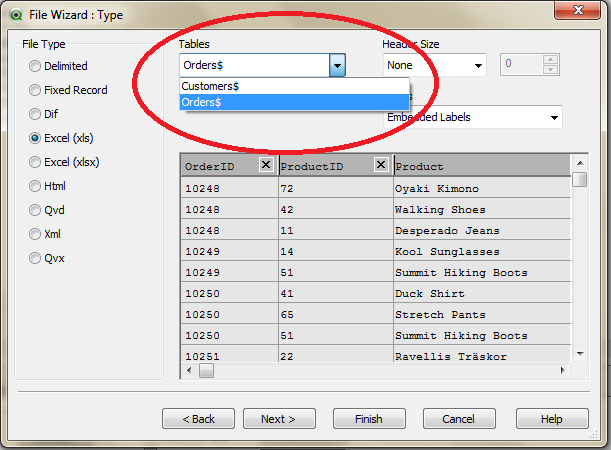
Select one sheet then again load same file select other sheet (The window open like above).

 gajapathy74
- Mark as New
- Bookmark
- Subscribe
- Mute
- Subscribe to RSS Feed
- Permalink
- Report Inappropriate Content
I have given below the script load data from Read.XLSX file. let me know what is the common field (or) the field (/column) that you want to link between Employee/Office to the field (column) in the Read file.
READ_Tbl:
LOAD Name,
Born,
Country,
Tests,
ODIs,
T20s
FROM
READ.xlsx
(ooxml, embedded labels, table is India);
LOAD Name,
Born,
Country,
Tests,
ODIs,
T20s
FROM
READ.xlsx
(ooxml, embedded labels, table is ENG);
LOAD Name,
Born,
Country,
Tests,
ODIs,
T20s
FROM
READ.xlsx
(ooxml, embedded labels, table is NZ);
Nagaraju_KCS
- Mark as New
- Bookmark
- Subscribe
- Mute
- Subscribe to RSS Feed
- Permalink
- Report Inappropriate Content
Hi Jagapathy,
This is not a correct way. i want to load at a time..
see this link http://community.qlik.com/message/258417#258417