Unlock a world of possibilities! Login now and discover the exclusive benefits awaiting you.

- Qlik Community
- :
- All Forums
- :
- QlikView
- :
- Re: Logical help
- Subscribe to RSS Feed
- Mark Topic as New
- Mark Topic as Read
- Float this Topic for Current User
- Bookmark
- Subscribe
- Mute
- Printer Friendly Page

- Mark as New
- Bookmark
- Subscribe
- Mute
- Subscribe to RSS Feed
- Permalink
- Report Inappropriate Content
Logical help
Hi all,
I have field named "CSS_CurrentCEScoreR" which has range of number till 1000.I want to derive a new column from by arranging a range like 0-20,20-40 and so on from this field. I am using the Class function for this but still no data is populating. Can anyone help?
Regards
Adarsh


- Mark as New
- Bookmark
- Subscribe
- Mute
- Subscribe to RSS Feed
- Permalink
- Report Inappropriate Content
May be do this
Class(CSS_CurrentCEScoreR,20) as CSS_CurrentCEScoreR1
- Mark as New
- Bookmark
- Subscribe
- Mute
- Subscribe to RSS Feed
- Permalink
- Report Inappropriate Content
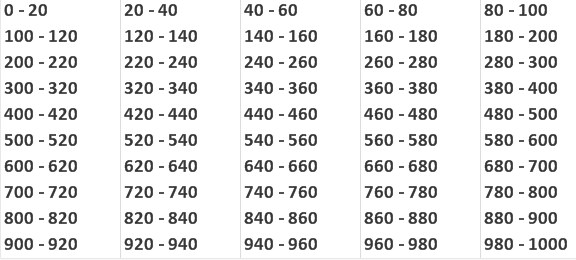
FYI, I used this
LOAD replace(class(RowNo(),20),'<= x <','-') as ID1 AutoGenerate 998;
Output:

 Peter_Cammaert
- Mark as New
- Bookmark
- Subscribe
- Mute
- Subscribe to RSS Feed
- Permalink
- Report Inappropriate Content
In a User Interface expression, or in the Load script? You're not posting this in the Scripting forum, so I'm assuming you want to do this on-the-fly?
Can you post an small example document that shows this behavior?