Unlock a world of possibilities! Login now and discover the exclusive benefits awaiting you.

- Qlik Community
- :
- All Forums
- :
- QlikView
- :
- Re: MTD DATA
- Subscribe to RSS Feed
- Mark Topic as New
- Mark Topic as Read
- Float this Topic for Current User
- Bookmark
- Subscribe
- Mute
- Printer Friendly Page

 mandilicious
- Mark as New
- Bookmark
- Subscribe
- Mute
- Subscribe to RSS Feed
- Permalink
- Report Inappropriate Content
MTD DATA
Hi All
Please assist i need to get MTD information using below and attached data.
Where:
Detractor - Scores between 0 and 6
Promotor - Scores between 9 and 10
Neutral - Scores 7 and 8
I need to know Detractor MTD Scores,Promotor MTD and Neutral MTD Scores.
Thanks
- « Previous Replies
-
- 1
- 2
- Next Replies »
Accepted Solutions

 mdmukramali
- Mark as New
- Bookmark
- Subscribe
- Mute
- Subscribe to RSS Feed
- Permalink
- Report Inappropriate Content
Hi Manti,
i forgot to include Year and Month Fields in the set analysis.
for Detractors MTD:
=SUM({<Result={'Detractor'},Year={'$(vMaxYear)'},Month={'$(vMaxMonth)'}>}SCORES)
for Neutral MTD:
=SUM({<Result={'Neutral'},
Year={'$(vMaxYear)'},Month={'$(vMaxMonth)'}>}SCORES)
for Promotor MTD:
=sUM({<Result={'Promotor'},
Year={'$(vMaxYear)'},Month={'$(vMaxMonth)'}>}SCORES)
kindly find the attached updated File.
Thanks,
Mukram
 zhadrakas
- Mark as New
- Bookmark
- Subscribe
- Mute
- Subscribe to RSS Feed
- Permalink
- Report Inappropriate Content
is that what you are looking for?
LOAD DATE,
LEAD_ID,
ANSWER1,
ANSWER2,
ANSWER3,
SCORES,
if(SCORES >=0 AND SCORES<=6, SCORES) as [Detractor MTD],
if(SCORES >=7 AND SCORES<=8, SCORES) as [Neutral MTD],
if(SCORES >=9 AND SCORES<=10, SCORES) as [Promotor MTD],
AGENT,
PHONENUMEBR
FROM INFO.xlsx (ooxml, embedded labels, table is Sheet1);
mandilicious
- Mark as New
- Bookmark
- Subscribe
- Mute
- Subscribe to RSS Feed
- Permalink
- Report Inappropriate Content
Hi Tim
Thanks if i may ask what if i need totals for current month?let me say i also have data for 17/12/01(2017-12-01) - Date and i need to get data for current month without any selection?
Thanks
zhadrakas
- Mark as New
- Bookmark
- Subscribe
- Mute
- Subscribe to RSS Feed
- Permalink
- Report Inappropriate Content
Change your script like this
LOAD DATE,
month(DATE) as MONTH,
year(DATE) as YEAR,
LEAD_ID,
ANSWER1,
ANSWER2,
ANSWER3,
SCORES,
if(SCORES >=0 AND SCORES<=6, SCORES) as [Detractor MTD],
if(SCORES >=7 AND SCORES<=8, SCORES) as [Neutral MTD],
if(SCORES >=9 AND SCORES<=10, SCORES) as [Promotor MTD],
AGENT,
PHONENUMEBR
FROM INFO.xlsx (ooxml, embedded labels, table is Sheet1);
Now you can create a diagram with Dimension year and Month.
Your Expression is: sum(Scores)
mdmukramali
- Mark as New
- Bookmark
- Subscribe
- Mute
- Subscribe to RSS Feed
- Permalink
- Report Inappropriate Content
Hi,
PFA.
mandilicious
- Mark as New
- Bookmark
- Subscribe
- Mute
- Subscribe to RSS Feed
- Permalink
- Report Inappropriate Content
Hi Mohammend
if i may ask is it a way that i can see totals for Promoter, Neutral MTD without selecting a month or Date? Just after refreshed my dashboard i don't need to select anything? but get Promoter, Neutral MTD .
mandilicious
- Mark as New
- Bookmark
- Subscribe
- Mute
- Subscribe to RSS Feed
- Permalink
- Report Inappropriate Content
Hi Tim
i need to see totals for Promoter, Neutral MTD without selecting a month or Date? cause everything need to be displayed without any selection?
zhadrakas
- Mark as New
- Bookmark
- Subscribe
- Mute
- Subscribe to RSS Feed
- Permalink
- Report Inappropriate Content
ok thats different. then i would use this script
LOAD DATE,
month(DATE) as MONTH,
year(DATE) as YEAR,
LEAD_ID,
ANSWER1,
ANSWER2,
ANSWER3,
SCORES,
if(SCORES >=0 AND SCORES<=6, [Detractor],
if(SCORES >=7 AND SCORES<=8, [Neutral],
if(SCORES >=9 AND SCORES<=10, [Promotor]))) as MTD_TYPE,
AGENT,
PHONENUMEBR
FROM INFO.xlsx (ooxml, embedded labels, table is Sheet1);
Create a diagram with dimensions Year, Month, MTD_Type
Expression is sum(SCORES)
mdmukramali
- Mark as New
- Bookmark
- Subscribe
- Mute
- Subscribe to RSS Feed
- Permalink
- Report Inappropriate Content
Hi Manti,
i forgot to include Year and Month Fields in the set analysis.
for Detractors MTD:
=SUM({<Result={'Detractor'},Year={'$(vMaxYear)'},Month={'$(vMaxMonth)'}>}SCORES)
for Neutral MTD:
=SUM({<Result={'Neutral'},
Year={'$(vMaxYear)'},Month={'$(vMaxMonth)'}>}SCORES)
for Promotor MTD:
=sUM({<Result={'Promotor'},
Year={'$(vMaxYear)'},Month={'$(vMaxMonth)'}>}SCORES)
kindly find the attached updated File.
Thanks,
Mukram
mandilicious
- Mark as New
- Bookmark
- Subscribe
- Mute
- Subscribe to RSS Feed
- Permalink
- Report Inappropriate Content
Hi Mohammend
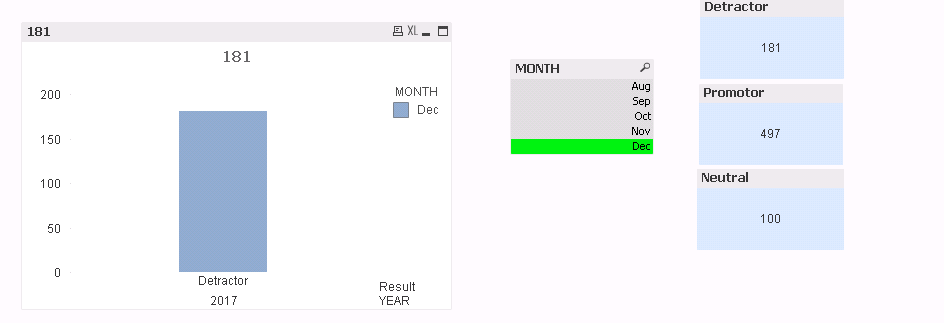
Thank you very much for your help it is working but i have to click month to get totals for Promoter, Neutral etc.
maybe i am missing a point. They don't want to click to get totals.

- « Previous Replies
-
- 1
- 2
- Next Replies »