Unlock a world of possibilities! Login now and discover the exclusive benefits awaiting you.

- Qlik Community
- :
- All Forums
- :
- QlikView
- :
- Re: MTD DATA
- Subscribe to RSS Feed
- Mark Topic as New
- Mark Topic as Read
- Float this Topic for Current User
- Bookmark
- Subscribe
- Mute
- Printer Friendly Page

 mandilicious
- Mark as New
- Bookmark
- Subscribe
- Mute
- Subscribe to RSS Feed
- Permalink
- Report Inappropriate Content
MTD DATA
Hi All
Please assist i need to get MTD information using below and attached data.
Where:
Detractor - Scores between 0 and 6
Promotor - Scores between 9 and 10
Neutral - Scores 7 and 8
I need to know Detractor MTD Scores,Promotor MTD and Neutral MTD Scores.
Thanks
- « Previous Replies
-
- 1
- 2
- Next Replies »
mandilicious
- Mark as New
- Bookmark
- Subscribe
- Mute
- Subscribe to RSS Feed
- Permalink
- Report Inappropriate Content
Hi Tim
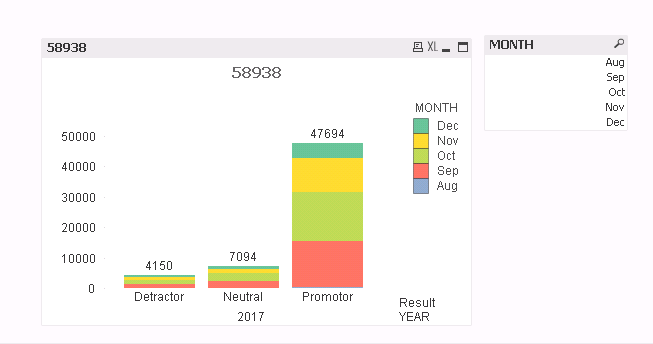
I really appreciate your help, i did as you said but cause i have many months in my side i have to drill per month to get MTD value, if i can just refresh and get MTD value without clicking any value(Month e.g Dec ) in my Month table.
Thanks

 MK9885
- Mark as New
- Bookmark
- Subscribe
- Mute
- Subscribe to RSS Feed
- Permalink
- Report Inappropriate Content
Remove Year from dimension and just use Month and MTD Value?
This would break the bar chart into different months.... if you don;t want to click on month.
mandilicious
- Mark as New
- Bookmark
- Subscribe
- Mute
- Subscribe to RSS Feed
- Permalink
- Report Inappropriate Content
Thanks a lot Tim
mandilicious
- Mark as New
- Bookmark
- Subscribe
- Mute
- Subscribe to RSS Feed
- Permalink
- Report Inappropriate Content
Thank you very much it works
mandilicious
- Mark as New
- Bookmark
- Subscribe
- Mute
- Subscribe to RSS Feed
- Permalink
- Report Inappropriate Content
Hi All
Quick one i know its being long and answered what you suggested it is working when i use bar chart. But client just need text box not bar chart.i am using below formula(=count({<Result={'Detractor'},Year={'$(vMaxYear)'},Month={'$(vMaxMonth)'}>}ANS4) )in my textbox but have to click per month to get results.
Please help.
mandilicious
- Mark as New
- Bookmark
- Subscribe
- Mute
- Subscribe to RSS Feed
- Permalink
- Report Inappropriate Content
Hi All
Quick one i know its being long and answered what you suggested it is working when i use bar chart. But client just need text box not bar chart.i am using below formula(=count({<Result={'Detractor'},Year={'$(vMaxYear)'},Month={'$(vMaxMonth)'}>}ANS4) )in my textbox but have to click per month to get results.
Please help.

 mdmukramali
- Mark as New
- Bookmark
- Subscribe
- Mute
- Subscribe to RSS Feed
- Permalink
- Report Inappropriate Content
Hi Phillip,
=count({<Result={'Detractor'},Year={'$(vMaxYear)'},Month={'$(vMaxMonth)'}>}ANS4)
when you use this expression you don't need to select any month from Month Field default it will take the Year and Month from Max Date.
Maybe check what is the Max Date for your application and check the ANS4 values for that Date.

- « Previous Replies
-
- 1
- 2
- Next Replies »