Unlock a world of possibilities! Login now and discover the exclusive benefits awaiting you.

- Qlik Community
- :
- All Forums
- :
- QlikView
- :
- Re: Macro Troubleshooting
- Subscribe to RSS Feed
- Mark Topic as New
- Mark Topic as Read
- Float this Topic for Current User
- Bookmark
- Subscribe
- Mute
- Printer Friendly Page

 marksmunich
- Mark as New
- Bookmark
- Subscribe
- Mute
- Subscribe to RSS Feed
- Permalink
- Report Inappropriate Content
Macro Troubleshooting
Hello community,
I am running a macro in my qlikview document and i have a Trigger on a button.
I have the following code in the macro module:
This works fine when i click on the test in the edit module console, but it doesnt work when i click on the button, I have also made Setting in the document properties Macro override security and also in macro edit module I have set requested module securit to System Access and also current local security. Is there any mistake in this process. btw i got this code from the community. what is this SUB callexample after the function. Do i Need to replace it with my qvw document Name or just leave it as it is.
FUNCTION ExcelExport(objID)
set obj = ActiveDocument.GetSheetObject( objID )
w = obj.GetColumnCount
if obj.GetRowCount>1001 then
h=1000
else h=obj.GetRowCount
end if
Set objExcel = CreateObject("Excel.Application")
objExcel.Workbooks.Add
objExcel.Worksheets(1).select()
objExcel.Visible = True
set CellMatrix = obj.GetCells2(0,0,w,h)
column = 1
for cc=0 to w-1
objExcel.Cells(1,column).Value = CellMatrix(0)(cc).Text
objExcel.Cells(1,column).EntireRow.Font.Bold = True
column = column +1
next
c = 1
r =2
for RowIter=1 to h-1
for ColIter=0 to w-1
objExcel.Cells(r,c).Value = CellMatrix(RowIter)(ColIter).Text
c = c +1
next
r = r+1
c = 1
next
END FUNCTION
SUB CallExample
ExcelExport( "CH06" )
END SUB
Thanks
Mark
- « Previous Replies
-
- 1
- 2
- Next Replies »
marksmunich
- Mark as New
- Bookmark
- Subscribe
- Mute
- Subscribe to RSS Feed
- Permalink
- Report Inappropriate Content
Rajesh Vaswani : the following is my Approach
I have created a button and it has the following Trigger.
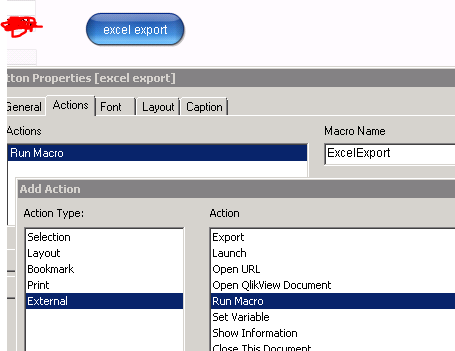
i have clicked on edit module and Input the macro Name.
The following is the code in the Macro module.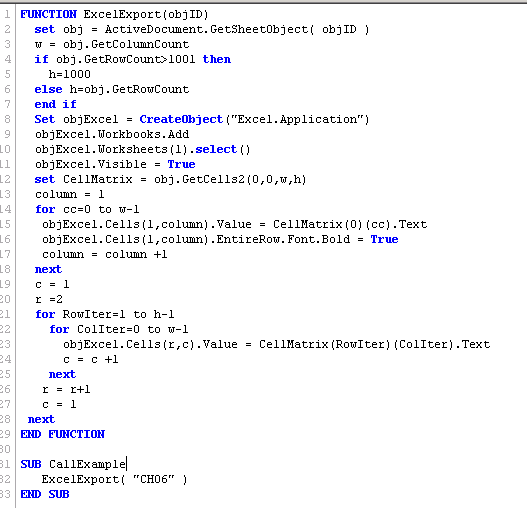
I have enabled the following in the macro module.
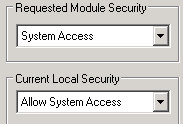
this is what i did. Since I am not familiar with how macro works, i connot provide you more info.
Thanks
Mark

 Siva_Sankar
- Mark as New
- Bookmark
- Subscribe
- Mute
- Subscribe to RSS Feed
- Permalink
- Report Inappropriate Content
Mark,
Possible to upload your qvw file here?

 rajeshvaswani77
- Mark as New
- Bookmark
- Subscribe
- Mute
- Subscribe to RSS Feed
- Permalink
- Report Inappropriate Content
your macro takes a input parameter that you are not passing?
Function excelexport(objID)
that seems to be the cause. Can you pass a value there?

 tresB
tresB
- Mark as New
- Bookmark
- Subscribe
- Mute
- Subscribe to RSS Feed
- Permalink
- Report Inappropriate Content
In the trigger macro name, put the subroutine name "CallExample" instead of the function name and try.
marksmunich
- Mark as New
- Bookmark
- Subscribe
- Mute
- Subscribe to RSS Feed
- Permalink
- Report Inappropriate Content
I dont think so, beacuse it is just a function and át the end we are calling the function where we are proving the object id.
marksmunich
- Mark as New
- Bookmark
- Subscribe
- Mute
- Subscribe to RSS Feed
- Permalink
- Report Inappropriate Content
tresesco : it works now. Thanks a lot for the help.
Rajesh Vaswani : thanks a lot for your efforts in helping me and Response was really quick. thanks once again.
Have a nice day. both.
marksmunich
- Mark as New
- Bookmark
- Subscribe
- Mute
- Subscribe to RSS Feed
- Permalink
- Report Inappropriate Content
tresesco : any idea how to save this generated Excel document.
thanks.

- Mark as New
- Bookmark
- Subscribe
- Mute
- Subscribe to RSS Feed
- Permalink
- Report Inappropriate Content
| objExcel.ActiveWorkbook.SaveAs("C:\...\test1.xls") | |
| objExcel.Quit |
- « Previous Replies
-
- 1
- 2
- Next Replies »