Unlock a world of possibilities! Login now and discover the exclusive benefits awaiting you.

- Qlik Community
- :
- All Forums
- :
- QlikView
- :
- Macros connection with Button Object
- Subscribe to RSS Feed
- Mark Topic as New
- Mark Topic as Read
- Float this Topic for Current User
- Bookmark
- Subscribe
- Mute
- Printer Friendly Page

- Mark as New
- Bookmark
- Subscribe
- Mute
- Subscribe to RSS Feed
- Permalink
- Report Inappropriate Content
Macros connection with Button Object
Hi All,
I am quite new on Macros, and with the Qlik community help i could make one macro format but i am still not able to run it properly.
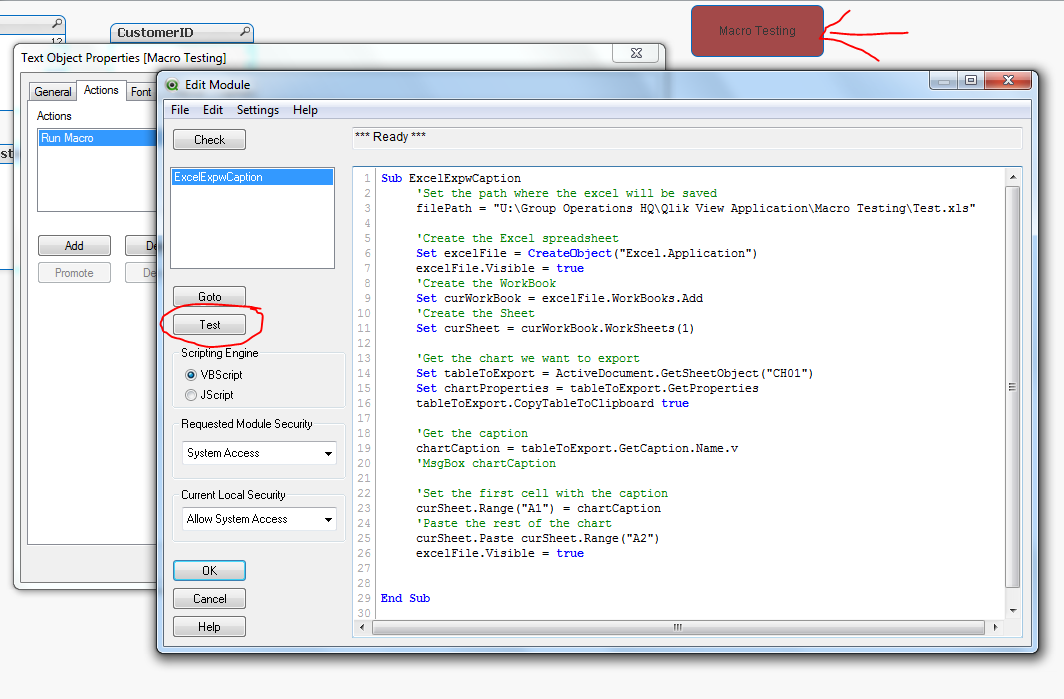
As shown above when i click on test its giving me oproper results as required howveer when i click on Button in Red (Macro Testing) it does not give me anything.
Kindly help what is the process to link this macro to my button
Regards
- Tags:
- new_to_qlikview
Accepted Solutions

 robert_mika
- Mark as New
- Bookmark
- Subscribe
- Mute
- Subscribe to RSS Feed
- Permalink
- Report Inappropriate Content
Do you have "CH01" within your objects?
Could you post the whole code not a screen shot?
robert_mika
- Mark as New
- Bookmark
- Subscribe
- Mute
- Subscribe to RSS Feed
- Permalink
- Report Inappropriate Content
Do you have "CH01" within your objects?
Could you post the whole code not a screen shot?
- Mark as New
- Bookmark
- Subscribe
- Mute
- Subscribe to RSS Feed
- Permalink
- Report Inappropriate Content
Yes, I do have one chart named as CH01
please find the Macros scripting below;
Sub ExcelExpwCaption
'Set the path where the excel will be saved
filePath = "U:\Group Operations HQ\Qlik View Application\Macro Testing\Test.xls"
'Create the Excel spreadsheet
Set excelFile = CreateObject("Excel.Application")
excelFile.Visible = true
'Create the WorkBook
Set curWorkBook = excelFile.WorkBooks.Add
'Create the Sheet
Set curSheet = curWorkBook.WorkSheets(1)
'Get the chart we want to export
Set tableToExport = ActiveDocument.GetSheetObject("CH01")
Set chartProperties = tableToExport.GetProperties
tableToExport.CopyTableToClipboard true
'Get the caption
chartCaption = tableToExport.GetCaption.Name.v
'MsgBox chartCaption
'Set the first cell with the caption
curSheet.Range("A1") = chartCaption
'Paste the rest of the chart
curSheet.Paste curSheet.Range("A2")
excelFile.Visible = true
End Sub
robert_mika
- Mark as New
- Bookmark
- Subscribe
- Mute
- Subscribe to RSS Feed
- Permalink
- Report Inappropriate Content
It does work for me
Please see attached.
Make sure that your "Macro name" under "Action" in the "Button properties" is the same as the name of the Module.
I see that there is space after the Macro name in VBS Editor