Unlock a world of possibilities! Login now and discover the exclusive benefits awaiting you.

- Qlik Community
- :
- All Forums
- :
- QlikView
- :
- Re: Make a multiple selection after one selection
- Subscribe to RSS Feed
- Mark Topic as New
- Mark Topic as Read
- Float this Topic for Current User
- Bookmark
- Subscribe
- Mute
- Printer Friendly Page

- Mark as New
- Bookmark
- Subscribe
- Mute
- Subscribe to RSS Feed
- Permalink
- Report Inappropriate Content
Make a multiple selection after one selection
Hi all,
I'm struggling with something that seems to be very easy.
What I want to do is that if the user Qlik on 201404 the selection for Live Period will be as shown below.
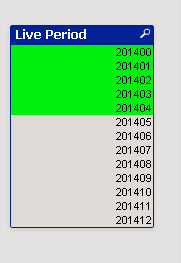
In other words: if the user selects a period, the period and all periods before should be selected.
Thanks for your help,
Kees den Boer
Accepted Solutions

 MK_QSL
- Mark as New
- Bookmark
- Subscribe
- Mute
- Subscribe to RSS Feed
- Permalink
- Report Inappropriate Content
You need to create a trigger for particular field.
Settings >> Document Properties >> Field Even Triggers >> Period
OnSelect >> AddAction >> Add >> Selection >> Select In Field
Field
Period
Search String
=IF(GetFieldSelections(Period),'<='&Period,'')
Now create a list box for Period...
Check enclosed file..
Hope this helps...
- Mark as New
- Bookmark
- Subscribe
- Mute
- Subscribe to RSS Feed
- Permalink
- Report Inappropriate Content
You could setup a document trigger on field change / variable change, the trigger applies a macro which selects <= the selected date

 tresB
tresB
- Mark as New
- Bookmark
- Subscribe
- Mute
- Subscribe to RSS Feed
- Permalink
- Report Inappropriate Content
Use trigger:
='<='&[Live Period]
Like in attached sample
MK_QSL
- Mark as New
- Bookmark
- Subscribe
- Mute
- Subscribe to RSS Feed
- Permalink
- Report Inappropriate Content
You need to create a trigger for particular field.
Settings >> Document Properties >> Field Even Triggers >> Period
OnSelect >> AddAction >> Add >> Selection >> Select In Field
Field
Period
Search String
=IF(GetFieldSelections(Period),'<='&Period,'')
Now create a list box for Period...
Check enclosed file..
Hope this helps...
- Mark as New
- Bookmark
- Subscribe
- Mute
- Subscribe to RSS Feed
- Permalink
- Report Inappropriate Content
First of all I want to thank everyone for their replies.
The solution of Manish was exactly what I needed. There was only still a little issue. In your example you were using the field Period, but in my app it was [Live Period]. For some reason the last one didn't work, so I changed that name to [LivePeriod]. After that change the issue was fixed.
Thanks,
Kees
MK_QSL
- Mark as New
- Bookmark
- Subscribe
- Mute
- Subscribe to RSS Feed
- Permalink
- Report Inappropriate Content
Live Period should work if you change Period to [Live Period]
Check enclosed file...
- Mark as New
- Bookmark
- Subscribe
- Mute
- Subscribe to RSS Feed
- Permalink
- Report Inappropriate Content
I did try that, but for some reason it didn't make the right selection. However it's ok that the space is not in the name.
Thanks again.