Unlock a world of possibilities! Login now and discover the exclusive benefits awaiting you.

- Qlik Community
- :
- All Forums
- :
- QlikView
- :
- Re: Master calendar with hour
- Subscribe to RSS Feed
- Mark Topic as New
- Mark Topic as Read
- Float this Topic for Current User
- Bookmark
- Subscribe
- Mute
- Printer Friendly Page

- Mark as New
- Bookmark
- Subscribe
- Mute
- Subscribe to RSS Feed
- Permalink
- Report Inappropriate Content
Master calendar with hour
Hello,
I need to make a master calendar using a manual startdate and enddate in my load script.
Example:
Using Startdate= 08/01/2013 and Enddate= 12/31/2014
It should generate a table with every year, month, day and hour within the range.
Calendar:
year, month, day, hour
2013, 08, 01, 00
2013, 08, 01, 01
2013, 08, 01, 02
2013, 08, 01, 03
.
.
.
2014, 12, 31, 22
2014, 12, 31, 23
Thank you,
Juan

 tresB
tresB
- Mark as New
- Bookmark
- Subscribe
- Mute
- Subscribe to RSS Feed
- Permalink
- Report Inappropriate Content
try like this:
Let vMinDate = Num(Date#('08/01/2013' , 'MM/DD/YYYY');
Let vMaxDate = Num(Date#('12/31/2014', 'MM/DD/YYYY');
MasterTable:
Load
Year(Date(recno()+$(vMinDate))) as Year,
Month(Date(recno()+$(vMinDate))) as Month,
Day(Date(recno()+$(vMinDate))) as Day,
Hour(Date(recno()+$(vMinDate))) as Hour
Autogenerate vMaxDate - vMinDate;

 Kushal_Chawda
- Mark as New
- Bookmark
- Subscribe
- Mute
- Subscribe to RSS Feed
- Permalink
- Report Inappropriate Content
- Mark as New
- Bookmark
- Subscribe
- Mute
- Subscribe to RSS Feed
- Permalink
- Report Inappropriate Content
Hello,
I tried it but all the values in the field hour got a zero.
tresB
- Mark as New
- Bookmark
- Subscribe
- Mute
- Subscribe to RSS Feed
- Permalink
- Report Inappropriate Content
That is obvious, because when you generate a date it is with 00 hours. if a date is 07-08-2013, then it has no hours component as timestamp, ie. timestamp would be '07-08-2013 00:00:00'( hour, mins seconds all are zero). What do you want the output to be like?
- Mark as New
- Bookmark
- Subscribe
- Mute
- Subscribe to RSS Feed
- Permalink
- Report Inappropriate Content
You missed the hour range. Each year, month and date must have an hour range from 00 to 23.
Calendar:
year, month, day, hour
2013, 08, 01, 00
2013, 08, 01, 01
2013, 08, 01, 02
2013, 08, 01, 03
..
2013, 08, 01, 23
2013, 08, 02, 00
2013, 08, 02, 01
..
etc.
tresB
- Mark as New
- Bookmark
- Subscribe
- Mute
- Subscribe to RSS Feed
- Permalink
- Report Inappropriate Content
Sorry, I should have noticed earlier. Try this:
Let vMinDate = Num(Date#('08/01/2013' , 'MM/DD/YYYY'));
Let vMaxDate = Num(Date#('12/31/2014', 'MM/DD/YYYY'));
Let vLoop=(vMaxDate - vMinDate)*24;
MasterTable:
Load
Year(Date(recno()+$(vMinDate))) as Year,
Month(Date(recno()+$(vMinDate))) as Month,
Day(Date(recno()+$(vMinDate))) as Day,
Mod(recno(),24) as Hour
Autogenerate vLoop;
tresB
- Mark as New
- Bookmark
- Subscribe
- Mute
- Subscribe to RSS Feed
- Permalink
- Report Inappropriate Content
Correction:
Let vMinDate = Num(Date#('08/01/2013' , 'MM/DD/YYYY'));
Let vMaxDate = Num(Date#('12/31/2014', 'MM/DD/YYYY'));
Let vLoop=(vMaxDate - vMinDate)*24;
Let vDiff=vMaxDate - vMinDate;
MasterTable:
Load
Year(Date(mod(recno(),$(vDiff))+$(vMinDate))) as Year,
Month(Date(Mod(recno(),$(vDiff))+$(vMinDate))) as Month,
Day(Date(Mod(recno(),$(vDiff))+$(vMinDate))) as Day,
Mod(recno(),24) as Hour
Autogenerate vLoop;
- Mark as New
- Bookmark
- Subscribe
- Mute
- Subscribe to RSS Feed
- Permalink
- Report Inappropriate Content
With that script I am getting this output:
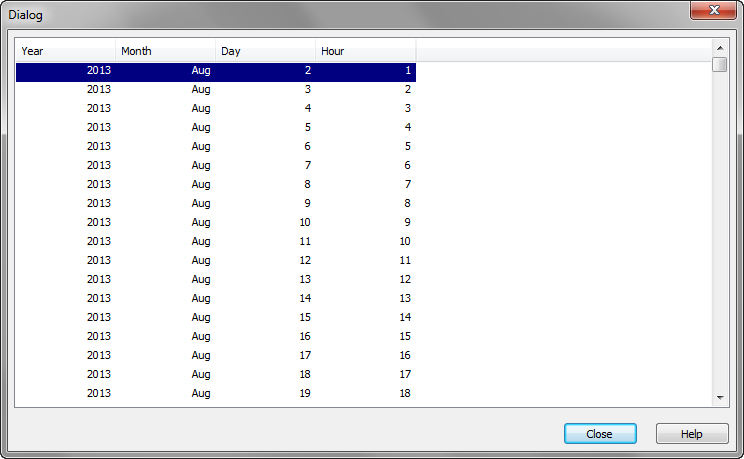
I can see two problems:
1. August 2013 is starting on day 2, it should start on day 1.
2. Each date should have 24 records, one for each hour. For example: Aug 1st 2013 should have 24 lines, one for the hour, starting in 0 and ending in 23.
tresB
- Mark as New
- Bookmark
- Subscribe
- Mute
- Subscribe to RSS Feed
- Permalink
- Report Inappropriate Content
PFA