Unlock a world of possibilities! Login now and discover the exclusive benefits awaiting you.

- Qlik Community
- :
- All Forums
- :
- QlikView
- :
- Max Year and Latest Month
- Subscribe to RSS Feed
- Mark Topic as New
- Mark Topic as Read
- Float this Topic for Current User
- Bookmark
- Subscribe
- Mute
- Printer Friendly Page

- Mark as New
- Bookmark
- Subscribe
- Mute
- Subscribe to RSS Feed
- Permalink
- Report Inappropriate Content
Max Year and Latest Month
I am trying to display sum of payments for the current year and latest month in my set of data. I have checked several threads on the discussion board and none have provided a solution. My set analysis is currently:
=sum({<PayYear={'$(=Max(PayYear))'}, PayMonth={'$(=Max(PayMonth))'}>}[DIST AMT USD])
Sum keeps coming out to 0 ... What am I missing?

 ramoncova06
- Mark as New
- Bookmark
- Subscribe
- Mute
- Subscribe to RSS Feed
- Permalink
- Report Inappropriate Content
Try sum({<PayYear={'=$(=Max(PayYear))'}, PayMonth={'=$(=Max(PayMonth))'}>}[DIST AMT USD])
I would suggest as creating them as variables

 danieloberbilli
- Mark as New
- Bookmark
- Subscribe
- Mute
- Subscribe to RSS Feed
- Permalink
- Report Inappropriate Content
or try
sum({<PayYear={"=$(=Max(PayYear))"}, PayMonth={"=$(=Max(PayMonth))"}>}[DIST AMT USD])

 robert_mika
- Mark as New
- Bookmark
- Subscribe
- Mute
- Subscribe to RSS Feed
- Permalink
- Report Inappropriate Content
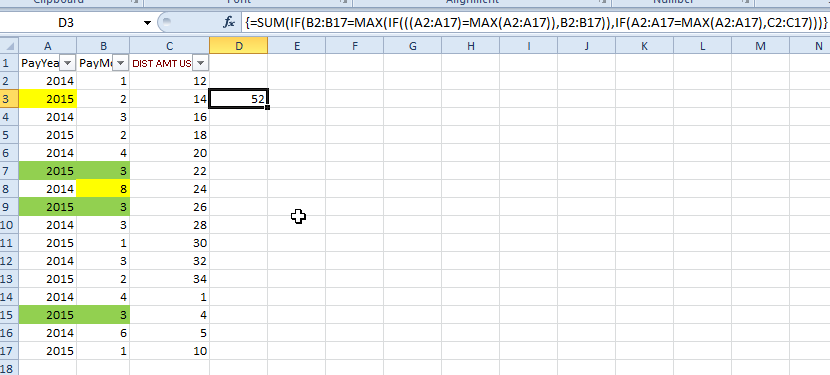
The issue you are facing here that if your Max month is let say 8 but the year does not reach that point you will get zero.
Example
Year,Month
2015,3
2014,5
The Max Year is 2015, the MaxMonth is 8 but MaxYear&MaxMonth =0.
I can not give you answer but you need somehow first extract the array of 2015 and then based on that look for Max of this year.
This is easy in Excel where you can use array formulas The results is 2+22+26=52

 hariprasadqv
- Mark as New
- Bookmark
- Subscribe
- Mute
- Subscribe to RSS Feed
- Permalink
- Report Inappropriate Content
Hi,
take max(year), min
(month) of the years.
 sagarkharpude
- Mark as New
- Bookmark
- Subscribe
- Mute
- Subscribe to RSS Feed
- Permalink
- Report Inappropriate Content
Try this. its working fine
Month should be in number format
=Sum({<PayYear={$(=max(PayYear))},PayMonth={$(=max(PayMonth))}>}[DIST AMT USD])
 mukesh24
- Mark as New
- Bookmark
- Subscribe
- Mute
- Subscribe to RSS Feed
- Permalink
- Report Inappropriate Content
Hi David,
Simply calculated Max Year & Max Month, if u directly write max month in expression as per suggested by Robert u will not get proper result.
Declare variable as :-
vMaxYear = max(Year)
vMaxMonth = max({<Year = {"$(vMaxYear)"}>}Month)
use above variable in expression as
=sum({<PayYear={"$(vMaxYear )"}, PayMonth={"$(vMaxMonth)")'}>}[DIST AMT USD])
Try
- Mark as New
- Bookmark
- Subscribe
- Mute
- Subscribe to RSS Feed
- Permalink
- Report Inappropriate Content
Do you have a date field? If so just do max(date). It's the same as max year and max month.