Unlock a world of possibilities! Login now and discover the exclusive benefits awaiting you.

- Qlik Community
- :
- All Forums
- :
- QlikView
- :
- Re: Max month
- Subscribe to RSS Feed
- Mark Topic as New
- Mark Topic as Read
- Float this Topic for Current User
- Bookmark
- Subscribe
- Mute
- Printer Friendly Page

- Mark as New
- Bookmark
- Subscribe
- Mute
- Subscribe to RSS Feed
- Permalink
- Report Inappropriate Content
Max month
I have the following:
=NUM(SUM({$<CommonMonth={$(=max(CommonMonth))}, CommonMonth= >} RetainedAccounts)/Sum({<CommonMonth = {"$(=date(AddYears(Date(DATE#(CommonMonth,'YYYY/MM')),-1),'YYYY/MM'))"}>} NumAccts),'#0%')
The first half calculates correctly, it finds the maximum month in my dataset and sums the retained accounts. The second part I want to do the same thing but look 1 year back (Current month but the previous year). I have tried to insert the MAX function into the second part of the statement (red text) with no luck. My aim is to have a static value no matter what date you select as it will always show the MAX date from my dataset.
- Tags:
- dynamic formula
- « Previous Replies
-
- 1
- 2
- Next Replies »

 sunny_talwar
- Mark as New
- Bookmark
- Subscribe
- Mute
- Subscribe to RSS Feed
- Permalink
- Report Inappropriate Content
Why do you need to do that? If your top expression is working with Max(CommonMonth), it means that your date is read correctly as a date...
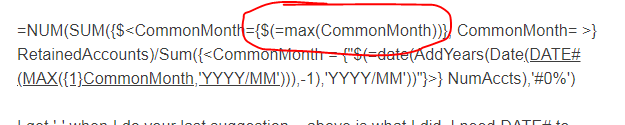
But anyways, try this
=Num(Sum({$<CommonMonth={$(=max(CommonMonth))}, CommonMonth= >} RetainedAccounts)/Sum({<CommonMonth = {"$(=Date(AddYears(Date(Date#(Max({1}CommonMonth),'YYYY/MM')), -1), 'YYYY/MM'))"}>} NumAccts),'#0%')
- Mark as New
- Bookmark
- Subscribe
- Mute
- Subscribe to RSS Feed
- Permalink
- Report Inappropriate Content
Because I am trying to look 1 year back, I understood previously that I would have to convert my string YYYY/MM into a date, go back one year.
I still get a '-' when I use the revised formula.
sunny_talwar
- Mark as New
- Bookmark
- Subscribe
- Mute
- Subscribe to RSS Feed
- Permalink
- Report Inappropriate Content
Unless I see... I won't know.... Sorry
sunny_talwar
- Mark as New
- Bookmark
- Subscribe
- Mute
- Subscribe to RSS Feed
- Permalink
- Report Inappropriate Content
Some threads for look at
- « Previous Replies
-
- 1
- 2
- Next Replies »