Unlock a world of possibilities! Login now and discover the exclusive benefits awaiting you.

- Qlik Community
- :
- All Forums
- :
- QlikView
- :
- Max without NULL
- Subscribe to RSS Feed
- Mark Topic as New
- Mark Topic as Read
- Float this Topic for Current User
- Bookmark
- Subscribe
- Mute
- Printer Friendly Page

 phongnnguyen
- Mark as New
- Bookmark
- Subscribe
- Mute
- Subscribe to RSS Feed
- Permalink
- Report Inappropriate Content
Max without NULL
Hello guys,
I have a problem with my set analysis. I want to show Max of Close_date without NULL. My data like table below
| Account | Client | Closedate |
|---|---|---|
| A1 | A | 10-20-2017 |
| A2 | A | 10-19-2017 |
| A1 | A | - |
| A2 | A | - |
Client A is main account and each Client has many child Account . Because this is certain way to store the data . So each Account has each Closedate. But I just wanna show 1 Closedate is 10-20-2017 ( because this is Close date of Main Account .
I use my expression like this: max({<closedate={'*'}>}closedate ). But it doesnt work.
Please give me solutions for this issue. Many Thanks

 sunny_talwar
- Mark as New
- Bookmark
- Subscribe
- Mute
- Subscribe to RSS Feed
- Permalink
- Report Inappropriate Content
What happens when you use the above expression? Can you elaborate?
phongnnguyen
- Mark as New
- Bookmark
- Subscribe
- Mute
- Subscribe to RSS Feed
- Permalink
- Report Inappropriate Content
Hi Sunny Talwar,
Its result is - ( NULL ) not is my expectation.

 sunilkumarqv
- Mark as New
- Bookmark
- Subscribe
- Mute
- Subscribe to RSS Feed
- Permalink
- Report Inappropriate Content
hi ,
what is you dimensions and expression ,
try it max({<closedate={'*'}-{' '}>}closedate ).

 tresB
tresB
- Mark as New
- Bookmark
- Subscribe
- Mute
- Subscribe to RSS Feed
- Permalink
- Report Inappropriate Content
Perhaps your date field is a text field. Try like:
Date(Max(Date#(closedate, 'MM-DD-YYYY')), 'MM-DD-YYYY')

 qlikviewwizard
- Mark as New
- Bookmark
- Subscribe
- Mute
- Subscribe to RSS Feed
- Permalink
- Report Inappropriate Content
Hi Phong Nguyen,
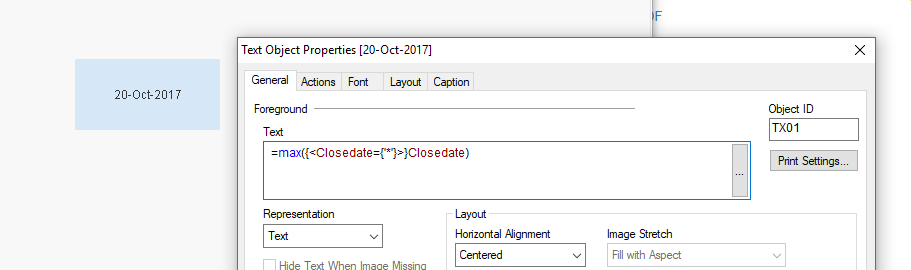
You can achieve your requirement like this.
Data:
LOAD Account,Client,DATE(DATE#(Closedate,'MM-DD-YYYY'),'DD-MMM-YYYY') AS Closedate INLINE [
Account,Client,Closedate
A1,A,10-20-2017
A2,A,10-19-2017
A1,A,
A2,A,
];

 jonathandienst
- Mark as New
- Bookmark
- Subscribe
- Mute
- Subscribe to RSS Feed
- Permalink
- Report Inappropriate Content
If your document was created using the latest version (September 2017), then you will need to use double quotes*:
Max({<closedate = {"*"}>} closedate)
Although Max() will ignore nulls any way, so the set expression is not required to exclude nulls.
*The rule has always been that single quotes is for a LITERAL, and double quotes for a SEARCH. This was ignored in earlier versions, but will be enforced for the latest and subsequent versions. See the release notes for more detail.

 ChennaiahNallan
- Mark as New
- Bookmark
- Subscribe
- Mute
- Subscribe to RSS Feed
- Permalink
- Report Inappropriate Content
Remove null values in the script only
Like below exp and try.
SET NullValue = 'Null';
NULLASVALUE *;
