Unlock a world of possibilities! Login now and discover the exclusive benefits awaiting you.

- Qlik Community
- :
- All Forums
- :
- QlikView
- :
- Re: Merge two columns
- Subscribe to RSS Feed
- Mark Topic as New
- Mark Topic as Read
- Float this Topic for Current User
- Bookmark
- Subscribe
- Mute
- Printer Friendly Page

 souadouert
- Mark as New
- Bookmark
- Subscribe
- Mute
- Subscribe to RSS Feed
- Permalink
- Report Inappropriate Content
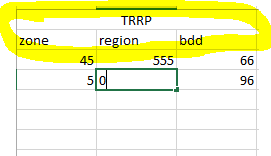
Merge two columns
Good Morning
How to merge two columns with pivot table
- Tags:
- qlikview_scripting
- « Previous Replies
- Next Replies »

 sunny_talwar
- Mark as New
- Bookmark
- Subscribe
- Mute
- Subscribe to RSS Feed
- Permalink
- Report Inappropriate Content
This is what I did
Script
Table:
LOAD * INLINE [
Rubriques, Effort brut, relisCumule2017, Objectif2017, Zone, Region
Conquete client, 10, 20, 52, 12, 10
];
Dim2:
LOAD * Inline [
Dim2
1
2
3
4
5
];
So, basically add Dim2 as an inline table in your script
and then this
Dimensions
Rubriques
=Pick(Dim2, ' ', ' ', ' ', 'TRRP', 'TRRP')
=Pick(Dim2, 'Effort brut', 'relisCumule2017', 'Objectif2017', 'Zone', 'Region')
Expression
Pick(Dim2, Sum([Effort brut]), Sum(relisCumule2017), Sum(Objectif2017), Sum(Objectif2017), Sum(Region))
souadouert
- Mark as New
- Bookmark
- Subscribe
- Mute
- Subscribe to RSS Feed
- Permalink
- Report Inappropriate Content
thank y sunny

 murugesh
- Mark as New
- Bookmark
- Subscribe
- Mute
- Subscribe to RSS Feed
- Permalink
- Report Inappropriate Content
murugesh
- Mark as New
- Bookmark
- Subscribe
- Mute
- Subscribe to RSS Feed
- Permalink
- Report Inappropriate Content
 nahlaalami
- Mark as New
- Bookmark
- Subscribe
- Mute
- Subscribe to RSS Feed
- Permalink
- Report Inappropriate Content
hey ,
Please i didn't understand !!
you have create a new dimension in your script , but what's is 1,2,3,4,5 refers to?.

- « Previous Replies
- Next Replies »