Unlock a world of possibilities! Login now and discover the exclusive benefits awaiting you.

- Qlik Community
- :
- All Forums
- :
- QlikView
- :
- Merge two string variables into one
- Subscribe to RSS Feed
- Mark Topic as New
- Mark Topic as Read
- Float this Topic for Current User
- Bookmark
- Subscribe
- Mute
- Printer Friendly Page

 annabergendal
- Mark as New
- Bookmark
- Subscribe
- Mute
- Subscribe to RSS Feed
- Permalink
- Report Inappropriate Content
Merge two string variables into one
I want to create a variable with two other variables, year and previous week.
=$(vYear) &' - '& $(vPreviousWeek)
It doesn't work though, what is the syntax? I want it to be for example "2014-39"
Thanks
Accepted Solutions

 maxgro
- Mark as New
- Bookmark
- Subscribe
- Mute
- Subscribe to RSS Feed
- Permalink
- Report Inappropriate Content
it depends on how you define vYear and vPreviousWeek
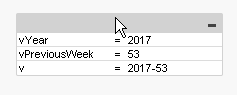
example, with this in an input box
vYear =max(Year) // field Year
vPreviousWeek =max(Week) // field Week
v =$(vYear) & '-' & $(vPreviousWeek)
you get
maxgro
- Mark as New
- Bookmark
- Subscribe
- Mute
- Subscribe to RSS Feed
- Permalink
- Report Inappropriate Content
it depends on how you define vYear and vPreviousWeek
example, with this in an input box
vYear =max(Year) // field Year
vPreviousWeek =max(Week) // field Week
v =$(vYear) & '-' & $(vPreviousWeek)
you get

 danieloberbilli
- Mark as New
- Bookmark
- Subscribe
- Mute
- Subscribe to RSS Feed
- Permalink
- Report Inappropriate Content
And you have to do it in the variable-window of the frontend - not in the script as you have to replace the $-signs to avoid QV in executing them unintentional
annabergendal
- Mark as New
- Bookmark
- Subscribe
- Mute
- Subscribe to RSS Feed
- Permalink
- Report Inappropriate Content
vYear = Year($(vToday)) and same for vWeek.
Should I define withuot '$' ? But it doesn't work without...
With the syntax =$(vYear) & '-' & $(vPreviousWeek) I get 1976 when vYear is 2014 and vWeek is 39.
 vardhancse
- Mark as New
- Bookmark
- Subscribe
- Mute
- Subscribe to RSS Feed
- Permalink
- Report Inappropriate Content
=$(vYear) & ' - ' & $(vPreviousWeek)
danieloberbilli
- Mark as New
- Bookmark
- Subscribe
- Mute
- Subscribe to RSS Feed
- Permalink
- Report Inappropriate Content
seems that vPreviousWeek is also defined as year - thats why it substracts 39 years. Try Week() instead of Year

- Mark as New
- Bookmark
- Subscribe
- Mute
- Subscribe to RSS Feed
- Permalink
- Report Inappropriate Content
Anna,
Pls share your complete variable logic & it depend on the logic being user there.normally if you variable having year
To use that varable, following is the syntax
$(variablename) or $(=variablename)
yoy can use eaither of those two.
annabergendal
- Mark as New
- Bookmark
- Subscribe
- Mute
- Subscribe to RSS Feed
- Permalink
- Report Inappropriate Content
Thanks, I think this was actually my problem, when using the created variable in a script I used $, when I take that away it works 
- Mark as New
- Bookmark
- Subscribe
- Mute
- Subscribe to RSS Feed
- Permalink
- Report Inappropriate Content
I look at your statement: vYear = Year($(vToday)) and same for vWeek
If you store "Today" date in a variable and then put it, as a date field, in other date function (Year($(Today)) in your case) that function may have a problem to convert your $(Today) variable.
To solve this you can replace
Year ($ (vToday))
with the syntax:
Year (Today ()).
Today() function will be converted correctly by Year() function.
The same for the week function.