Unlock a world of possibilities! Login now and discover the exclusive benefits awaiting you.

- Qlik Community
- :
- All Forums
- :
- QlikView
- :
- Re: Merging 2 fields from 2 separate tables
- Subscribe to RSS Feed
- Mark Topic as New
- Mark Topic as Read
- Float this Topic for Current User
- Bookmark
- Subscribe
- Mute
- Printer Friendly Page

- Mark as New
- Bookmark
- Subscribe
- Mute
- Subscribe to RSS Feed
- Permalink
- Report Inappropriate Content
Merging 2 fields from 2 separate tables
Hi
I have field called say, "Item Serial Number" in Table A and I have another field called , say " Component Serial Number" in Table B.
I want to create combine the two fields and rename it as "Serial Number".
How do I do this.
kind regards
Nayan
Accepted Solutions

 robert_mika
- Mark as New
- Bookmark
- Subscribe
- Mute
- Subscribe to RSS Feed
- Permalink
- Report Inappropriate Content
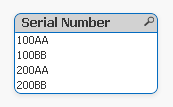
TableA:
load * inline
[ Item Serial Number
100
200
]
;
join
TableB:
load * inline
[Component Serial Number
AA
BB
];
temp:
load [Item Serial Number] &[Component Serial Number] as IS resident TableA;
drop table TableA
robert_mika
- Mark as New
- Bookmark
- Subscribe
- Mute
- Subscribe to RSS Feed
- Permalink
- Report Inappropriate Content
TableA:
load * inline
[ Item Serial Number
100
200
]
;
join
TableB:
load * inline
[Component Serial Number
AA
BB
];
temp:
load [Item Serial Number] &[Component Serial Number] as IS resident TableA;
drop table TableA
 sunny_talwar
- Mark as New
- Bookmark
- Subscribe
- Mute
- Subscribe to RSS Feed
- Permalink
- Report Inappropriate Content
Not sure, but is this what you want?

where first two serial numbers are from Table A and the last two are from Table B
[Table A]:
load * inline
[Item Serial Number
123abc
4561bc
]
;
[Table B]:
load * inline
[Component Serial Number
kl123
jk453
];
[Combined Serial Number]:
NoConcatenate
LOAD [Item Serial Number] as [Serial Number]
Resident [Table A];
Concatenate ([Combined Serial Number])
LOAD [Component Serial Number] as [Serial Number]
Resident [Table B];
DROP Tables [Table A], [Table B];
Best,
S
- Mark as New
- Bookmark
- Subscribe
- Mute
- Subscribe to RSS Feed
- Permalink
- Report Inappropriate Content
Hi Robert
Thank you for your reply
kind regards
Nayan
robert_mika
- Mark as New
- Bookmark
- Subscribe
- Mute
- Subscribe to RSS Feed
- Permalink
- Report Inappropriate Content
You are welcome.
Thanks for feedback