Unlock a world of possibilities! Login now and discover the exclusive benefits awaiting you.

- Qlik Community
- :
- All Forums
- :
- QlikView
- :
- Re: Month Count
- Subscribe to RSS Feed
- Mark Topic as New
- Mark Topic as Read
- Float this Topic for Current User
- Bookmark
- Subscribe
- Mute
- Printer Friendly Page

- Mark as New
- Bookmark
- Subscribe
- Mute
- Subscribe to RSS Feed
- Permalink
- Report Inappropriate Content
Month Count
Hi All,
Please if any one can help me on the solution.
I need to get the data for the previous months. For Eg:- If year is 2017 and Month selected is April then i should get the count records of (Jan+Feb+March+April). If i click March then it should get the count records of (Jan+Feb+March)
its bit urgent.
Thanks in Advance!!
Accepted Solutions

 devarasu07
- Mark as New
- Bookmark
- Subscribe
- Mute
- Subscribe to RSS Feed
- Permalink
- Report Inappropriate Content
Hi,
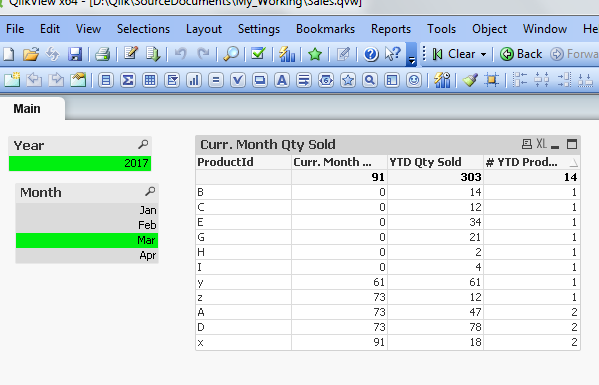
Refer to the attached sample, just use below kind of expression (productid changed to your field)
for the count,
Count({$<Year = {$(=max(Year))}, Month = {"<=$(=max({<Year={$(=max(Year))}>} Month))"}>} ProductId)

 vishsaggi
- Mark as New
- Bookmark
- Subscribe
- Mute
- Subscribe to RSS Feed
- Permalink
- Report Inappropriate Content
Can you share a sample to look into and work on?
devarasu07
- Mark as New
- Bookmark
- Subscribe
- Mute
- Subscribe to RSS Feed
- Permalink
- Report Inappropriate Content
Try like this,
SUM({$<Year = {$(=max(Year))}, Month = {"<=$(=max({<Year={$(=max(Year))}>} Month))"}>} SoldQty)
devarasu07
- Mark as New
- Bookmark
- Subscribe
- Mute
- Subscribe to RSS Feed
- Permalink
- Report Inappropriate Content
Hi,
Refer to the attached sample, just use below kind of expression (productid changed to your field)
for the count,
Count({$<Year = {$(=max(Year))}, Month = {"<=$(=max({<Year={$(=max(Year))}>} Month))"}>} ProductId)
- Mark as New
- Bookmark
- Subscribe
- Mute
- Subscribe to RSS Feed
- Permalink
- Report Inappropriate Content
Thanks Devarasu. This is what i was looking for.