Unlock a world of possibilities! Login now and discover the exclusive benefits awaiting you.

- Qlik Community
- :
- All Forums
- :
- QlikView
- :
- Month sort order at edit script
- Subscribe to RSS Feed
- Mark Topic as New
- Mark Topic as Read
- Float this Topic for Current User
- Bookmark
- Subscribe
- Mute
- Printer Friendly Page

 nihhalmca
- Mark as New
- Bookmark
- Subscribe
- Mute
- Subscribe to RSS Feed
- Permalink
- Report Inappropriate Content
Month sort order at edit script
Hi All,
I have a Date field (YYYYMM) in fact table and i derived Year and Month fields from Date field in fact table.
need to present Month sort order in UI like Jan, Feb ------, as of now it showing like Apr, Aug -----
have to do sort order at edit script (not at UI).
I have tried dual and applymap functions.
Dual scenario: Month contains 24 fields (12 as text and 12 as number) and no changes if i join dual table with fact as well.
Applymap scenario: I need to do resident or preceding load.
Thanks,
Nihhal.
- « Previous Replies
-
- 1
- 2
- Next Replies »
Accepted Solutions

 tresB
tresB
- Mark as New
- Bookmark
- Subscribe
- Mute
- Subscribe to RSS Feed
- Permalink
- Report Inappropriate Content
Derive you month field or other date fields using proper date functions (rather than any string function) like:
Date(Date#(YourDateText, 'YYYYMM')) as Date,
Month(Date#(YourDateText, 'YYYYMM')) as Month,
...
Then all fields sort should work fine.

 sunny_talwar
- Mark as New
- Bookmark
- Subscribe
- Mute
- Subscribe to RSS Feed
- Permalink
- Report Inappropriate Content
Are you creating Month like this?
Month(DateField)?
If you are, then you can just use numeric sort because Month() function created a dual field which does have a underlying numeric value associated with it
tresB
- Mark as New
- Bookmark
- Subscribe
- Mute
- Subscribe to RSS Feed
- Permalink
- Report Inappropriate Content
Derive you month field or other date fields using proper date functions (rather than any string function) like:
Date(Date#(YourDateText, 'YYYYMM')) as Date,
Month(Date#(YourDateText, 'YYYYMM')) as Month,
...
Then all fields sort should work fine.
nihhalmca
- Mark as New
- Bookmark
- Subscribe
- Mute
- Subscribe to RSS Feed
- Permalink
- Report Inappropriate Content
Hi Tresesco, thanks.
nihhalmca
- Mark as New
- Bookmark
- Subscribe
- Mute
- Subscribe to RSS Feed
- Permalink
- Report Inappropriate Content
Hi Sunny,
I have done this way.
Date format like YYYYMM
Date(Date#(Date,'YYYYMM'),'YYYY-MM') as Date,
Right(Date(Date#(Date,'YYYYMM'),'MMM'),3) as Month,
Right(Date(Date#(Date,'YYYYMM'),'YYYY'),4) as Year,
Month(Date) did not give result as expected.
sunny_talwar
- Mark as New
- Bookmark
- Subscribe
- Mute
- Subscribe to RSS Feed
- Permalink
- Report Inappropriate Content
May be try this
Month(Date#(Date,'YYYYMM')) as Month
nihhalmca
- Mark as New
- Bookmark
- Subscribe
- Mute
- Subscribe to RSS Feed
- Permalink
- Report Inappropriate Content
Hi Tresesco,
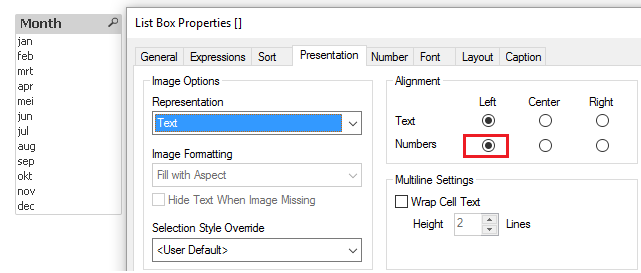
Month names are showing right side in filter pane as number.
Sort order goes wrong If i use Text(Month).
nihhalmca
- Mark as New
- Bookmark
- Subscribe
- Mute
- Subscribe to RSS Feed
- Permalink
- Report Inappropriate Content
Hi Sunny.
Month names are showing right side in filter pane as number.
Sort order goes wrong If i use Text(Month).
sunny_talwar
- Mark as New
- Bookmark
- Subscribe
- Mute
- Subscribe to RSS Feed
- Permalink
- Report Inappropriate Content
Why are you using Text(Month) my friend? I am not sure I understand the reason for using Text() function?
tresB
- Mark as New
- Bookmark
- Subscribe
- Mute
- Subscribe to RSS Feed
- Permalink
- Report Inappropriate Content
If this is only for the sake of alignment, you can adjust that from presentation tab like:

- « Previous Replies
-
- 1
- 2
- Next Replies »