Unlock a world of possibilities! Login now and discover the exclusive benefits awaiting you.

- Qlik Community
- :
- All Forums
- :
- QlikView
- :
- Re: Monthly Cumulative for year as a field
- Subscribe to RSS Feed
- Mark Topic as New
- Mark Topic as Read
- Float this Topic for Current User
- Bookmark
- Subscribe
- Mute
- Printer Friendly Page

- Mark as New
- Bookmark
- Subscribe
- Mute
- Subscribe to RSS Feed
- Permalink
- Report Inappropriate Content
Monthly Cumulative for year as a field
Hi Team,
I have three fields Year, Month, Sales as
Load * inline [
Year, Month, Sales
2012,1,100
2012,2,200
2012,3,300
2013,1,100
2013,2,200
2013,3,300
]
I want to create a new field cumulative sum for each year separately which should look like:
Year, Month, Sales,CumSales
2012,1,100,100
2012,2,200,300
2012,3,300,600
2013,1,100,100
2013,2,200,300
2013,3,300,600
Please provide your suggestions
- « Previous Replies
-
- 1
- 2
- Next Replies »
Accepted Solutions

 tamilarasu
- Mark as New
- Bookmark
- Subscribe
- Mute
- Subscribe to RSS Feed
- Permalink
- Report Inappropriate Content
Fine. You need cumulative sales based on the ID.? If yes, check the attachment or post your expected output based on new input (with ID).
tamilarasu
- Mark as New
- Bookmark
- Subscribe
- Mute
- Subscribe to RSS Feed
- Permalink
- Report Inappropriate Content
Hi S V,
Use the below expression in your chart,
Rangesum(Above(Sum(Sales),0,RowNo()))
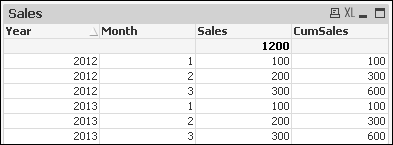
File attached against your sample data.
- Mark as New
- Bookmark
- Subscribe
- Mute
- Subscribe to RSS Feed
- Permalink
- Report Inappropriate Content
Hi Nagaraj,
I need to create a field instead in the chart. I was trying to use below scripts from community answers but it doesnt work.
LOAD
F1,
F2,
F3,
RangeSum(F3, Peek('CumAll')) as CumAll,
if(F1<> previous(F1),F3,RangeSum(F3, Peek('CumF1'))) AS CumF1
RESIDENT Data;
DROP TABLE Data;
tamilarasu
- Mark as New
- Bookmark
- Subscribe
- Mute
- Subscribe to RSS Feed
- Permalink
- Report Inappropriate Content
Check the attachment !
- Mark as New
- Bookmark
- Subscribe
- Mute
- Subscribe to RSS Feed
- Permalink
- Report Inappropriate Content
This works fantastic but got one other small change
I have three fields Year, Month, Sales as
Load * inline [
ID,Year, Month, Sales
1,2012,1,100
1,2012,2,200
2,2012,3,300
2,2013,1,100
3,2013,2,200
3,2013,3,300
]
When I have this ID field it ignores and calculations are wrong. Is it possible to add ID as well in the condition, i tried but no success.
tamilarasu
- Mark as New
- Bookmark
- Subscribe
- Mute
- Subscribe to RSS Feed
- Permalink
- Report Inappropriate Content
Check the below code.
Data:
Load * inline [
ID,Year, Month, Sales
1,2012,1,100
1,2012,2,200
2,2012,3,300
2,2013,1,100
3,2013,2,200
3,2013,3,300
];

Final:
LOAD
    ID,
    Year,
    Month,
    Sales,
    RangeSum(Sales, Peek('CumAll')) as CumAll,
    if(Year <> previous(Year) , Sales , RangeSum(Sales,Peek('CumF1'))) AS CumF1
RESIDENT Data Order by Year, Month;

DROP TABLE Data;
Just a question,
When I have this ID field it ignores and calculations are wrong. Is it possible to add ID as well in the condition, i tried but no success.
Could you post the result or code.!!
- Mark as New
- Bookmark
- Subscribe
- Mute
- Subscribe to RSS Feed
- Permalink
- Report Inappropriate Content
The result is coming as null when i select some id, actually i am trying to perform on different dataset using the same expressions. It is displaying sums by ignoring the id's for me
Thank you so much for your help.
tamilarasu
- Mark as New
- Bookmark
- Subscribe
- Mute
- Subscribe to RSS Feed
- Permalink
- Report Inappropriate Content
Is it possible to post your QVW file. It's hard to give you the solution without seeing your file.
- Mark as New
- Bookmark
- Subscribe
- Mute
- Subscribe to RSS Feed
- Permalink
- Report Inappropriate Content
Even in the example you shared, I got the problem: Please see below screenshot
For ID 2: The cumulative sum shows 100 and 600 which should be 100 and 400 instead. It just ignored that ID field
tamilarasu
- Mark as New
- Bookmark
- Subscribe
- Mute
- Subscribe to RSS Feed
- Permalink
- Report Inappropriate Content
Fine. You need cumulative sales based on the ID.? If yes, check the attachment or post your expected output based on new input (with ID).
- « Previous Replies
-
- 1
- 2
- Next Replies »