Unlock a world of possibilities! Login now and discover the exclusive benefits awaiting you.

- Qlik Community
- :
- All Forums
- :
- QlikView
- :
- Monthstart and Monthend
- Subscribe to RSS Feed
- Mark Topic as New
- Mark Topic as Read
- Float this Topic for Current User
- Bookmark
- Subscribe
- Mute
- Printer Friendly Page

- Mark as New
- Bookmark
- Subscribe
- Mute
- Subscribe to RSS Feed
- Permalink
- Report Inappropriate Content
Monthstart and Monthend
Hi All,
Can anyone help me in getting the below calculation,
Count({<Date=Monthstart(Date)>}empid)
As per my requirement i should get the sum(Count of Employees in Monthstart of every Month. and month end of every month)
Regards,
Priyanka
- « Previous Replies
-
- 1
- 2
- Next Replies »
Accepted Solutions

 its_anandrjs
- Mark as New
- Bookmark
- Subscribe
- Mute
- Subscribe to RSS Feed
- Permalink
- Report Inappropriate Content
Hi Priyanka,
This is your complete script you have the date format issue i thing for this use Trim to remove spaces from field and get the script as
tmp:
LOAD
Date(Date,'M/D/YYYY') AS Date,
MonthStart( Trim(Date)) as MonStartDate,
MonthEnd( trim( Date)) as MonEndDate,
empid,
Type
FROM
mockup.xlsx
(ooxml, embedded labels, table is Sheet1);
NoConcatenate
N:
LOAD
Date(Trim(Date)) as Date,
Date( Trim( MonStartDate )) as MonStartDate,
Date(Trim( MonEndDate )) as MonEndDate,
empid,
Type
Resident tmp;
DROP Table tmp;
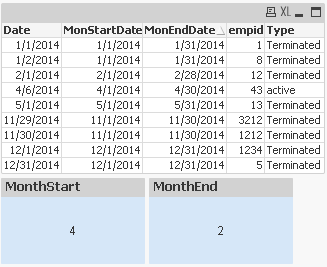
And then write expressions:-
Monthstart
=Count( if( Date = MonStartDate , empid ))
MonthEnd
=Count( if( (Date) = Trim(MonEndDate) , empid ))
Regards
Anand
 ashfaq_haseeb
- Mark as New
- Bookmark
- Subscribe
- Mute
- Subscribe to RSS Feed
- Permalink
- Report Inappropriate Content
Hi,
This must work
Count({<Date={'$(=(Monthstart(Date)))'}>}empid)
Count({<Date={'$(=(Monthend(Date)))'}>}empid)
Format your date accordingly.
Regards
ASHFAQ

 PradeepReddy
- Mark as New
- Bookmark
- Subscribe
- Mute
- Subscribe to RSS Feed
- Permalink
- Report Inappropriate Content
try like this...
Count({<Date={'$(=(Monthstart(Date)))'}>}empid)
Count({<Date={'$(=(Monthend(Date)))'}>}empid)
- Mark as New
- Bookmark
- Subscribe
- Mute
- Subscribe to RSS Feed
- Permalink
- Report Inappropriate Content
Hi AShfaq,
I have tried implementing the formula,you mentioned ,but am getting 0 value.
Please find the attached QVW
its_anandrjs
- Mark as New
- Bookmark
- Subscribe
- Mute
- Subscribe to RSS Feed
- Permalink
- Report Inappropriate Content
Hi,
Try this expressions
=Count({<Date={'$(=(Monthstart(Max(Date))))'}>}empid)
=Count({<Date={'$(=(Monthend(Max(Date))))'}>}empid)
And what is your expected output in this two
Regards
Anand
- Mark as New
- Bookmark
- Subscribe
- Mute
- Subscribe to RSS Feed
- Permalink
- Report Inappropriate Content
Hi Anand,
Both are not working,If any one of the expressions work,Its fine.
- Mark as New
- Bookmark
- Subscribe
- Mute
- Subscribe to RSS Feed
- Permalink
- Report Inappropriate Content
Priyana,
I would do this in your script, create new field(s) to evaluate if the date is a month start or month end. Then just use that flag within your set analysis
EG
Load
empid
,Date
,If(Date=MonthStart(Date),1) As MonthStartFlag
,If(Date=MonthEnd(Date),1) As MonthEndFlag
from xxxxx
Then just make your expression
Count({<MonthStartFlag={1}>} empid)
Count({<MonthEndFlag={1}>} empid)
something like that
Hope that helps
Joe

 jonathandienst
- Mark as New
- Bookmark
- Subscribe
- Mute
- Subscribe to RSS Feed
- Permalink
- Report Inappropriate Content
Hi
I suspect that the problem is you are trying to use it in a chart or table. The set expression is evaluated once for the chart (outside of the dimensions) and not row by row. If you need to do this row by row, you can use count(if()) or set a month end flag during the load.
count(if()):
count(if(Date = MonthEnd(Date), empid))
flag:
LOAD ...
Date,
If(Date = MonthEnd(Date), 1, 0) As IsMonthEnd,
...
count({<MonthEnd = {1}, empid)
(I include a month end flag in my common master calendar which is in a qvd shared by many models)
HTH
Jonathan
its_anandrjs
- Mark as New
- Bookmark
- Subscribe
- Mute
- Subscribe to RSS Feed
- Permalink
- Report Inappropriate Content
Hi Priyanka,
Try this way then by adding the fields MonthStart date and MonthEnd Date
LOAD Date,
MonthStart(Date) as MonStartDate,
MonthEnd(Date) as MonEndDate,
empid,
Type
FROM
mockup.xlsx
(ooxml, embedded labels, table is Sheet1);
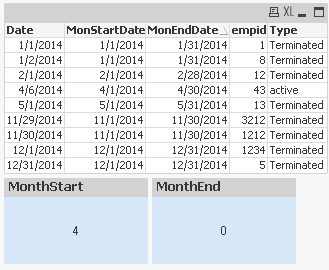
And then in the front end write expressions in any text object or the straight table
For MonthStart
=Count( if( Date = MonStartDate, empid ))
For MonthEnd
=Count( if( Date = MonEndDate, empid ))
Output you get
Regards
Anand
- Mark as New
- Bookmark
- Subscribe
- Mute
- Subscribe to RSS Feed
- Permalink
- Report Inappropriate Content
Hi,
Please find the attachment...
this attachment will give u the solution .........
Thanks
Venkata Sreekanth
- « Previous Replies
-
- 1
- 2
- Next Replies »