Unlock a world of possibilities! Login now and discover the exclusive benefits awaiting you.

- Qlik Community
- :
- All Forums
- :
- QlikView
- :
- Re: Multiple Fields with same values in Pivot Tabl...
- Subscribe to RSS Feed
- Mark Topic as New
- Mark Topic as Read
- Float this Topic for Current User
- Bookmark
- Subscribe
- Mute
- Printer Friendly Page

- Mark as New
- Bookmark
- Subscribe
- Mute
- Subscribe to RSS Feed
- Permalink
- Report Inappropriate Content
Multiple Fields with same values in Pivot Table
Hi,
Imagine that I have the following table that shows the name of some students as column name and his grades on a test as values:
| John | Peter | Carrizo | Stewart |
| A | B | A | C |
| B | C | C | D |
| A | A | A | B |
| C | C | A | C |
Students:
LOAD Names
FROM file;
I only have four grandes and I want to obtain the count of grades of each student like this:
| A | B | C | D | |
| John | 2 | 1 | 1 | 0 |
| Peter | 1 | 1 | 1 | 0 |
| Carrizo | 3 | 0 | 1 | 0 |
| Stewart | 0 | 1 | 1 | 1 |
How can I do this in Qlikview?
Many thanks!
Accepted Solutions

 sunny_talwar
- Mark as New
- Bookmark
- Subscribe
- Mute
- Subscribe to RSS Feed
- Permalink
- Report Inappropriate Content
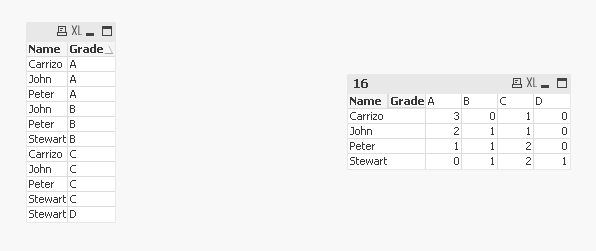
May be use a CrossTable load
Table:
CrossTable(Name, Grade)
LOAD 1,
John,
Peter,
Carrizo,
Stewart
FROM
[https://community.qlik.com/thread/232385]
(html, codepage is 1252, embedded labels, table is @1);
sunny_talwar
- Mark as New
- Bookmark
- Subscribe
- Mute
- Subscribe to RSS Feed
- Permalink
- Report Inappropriate Content
May be use a CrossTable load
Table:
CrossTable(Name, Grade)
LOAD 1,
John,
Peter,
Carrizo,
Stewart
FROM
[https://community.qlik.com/thread/232385]
(html, codepage is 1252, embedded labels, table is @1);

 swuehl
- Mark as New
- Bookmark
- Subscribe
- Mute
- Subscribe to RSS Feed
- Permalink
- Report Inappropriate Content
Use
to transform your table from a cross table to a straight table (using an additional Recno() field as qualifying field).
Then use Name and Grade as dimensions in a pivot table chart and
=Count(Name)
as expression
- Mark as New
- Bookmark
- Subscribe
- Mute
- Subscribe to RSS Feed
- Permalink
- Report Inappropriate Content
Hi Sunny T, many thanks!  Only one more question:
If I want to show in the table names instead of students , for example instead of John I want to appear "Student A". How can I do this?
sunny_talwar
- Mark as New
- Bookmark
- Subscribe
- Mute
- Subscribe to RSS Feed
- Permalink
- Report Inappropriate Content
You can use a mapping load to anonymize your data