Unlock a world of possibilities! Login now and discover the exclusive benefits awaiting you.

- Qlik Community
- :
- All Forums
- :
- QlikView
- :
- Need help on Creating pivot table with arrows
Options
- Subscribe to RSS Feed
- Mark Topic as New
- Mark Topic as Read
- Float this Topic for Current User
- Bookmark
- Subscribe
- Mute
- Printer Friendly Page
Turn on suggestions
Auto-suggest helps you quickly narrow down your search results by suggesting possible matches as you type.
Showing results for

 venkanna_info
Partner - Contributor
2017-07-07
01:55 AM
- Mark as New
- Bookmark
- Subscribe
- Mute
- Subscribe to RSS Feed
- Permalink
- Report Inappropriate Content
Need help on Creating pivot table with arrows
Make a pivot table taking County, Sales office, Employee name and measures as TY YTD sales, LY YTD sales and Year salary.
Color code: TY YTD<LY YTD, RED arrow down
Color code: TY YTD>LY YTD, Green arrow Up
I am facing problem while creating arrows as per above condition.Can anyone help me on the same.
Thanks,
Venkanna
1,258 Views
3 Replies


2017-07-07
01:59 AM
- Mark as New
- Bookmark
- Subscribe
- Mute
- Subscribe to RSS Feed
- Permalink
- Report Inappropriate Content
Normally, we can write like below
If(TYYTD Expression < LYYTD Expression, RedAroowImagePath,
If(TYYTD Expression > LYYTD Expression, GreenAroowImagePath))
Best Anil, When applicable please mark the correct/appropriate replies as "solution" (you can mark up to 3 "solutions". Please LIKE threads if the provided solution is helpful
1,191 Views
 ahaahaaha
Partner - Master
2017-07-07
03:24 AM
- Mark as New
- Bookmark
- Subscribe
- Mute
- Subscribe to RSS Feed
- Permalink
- Report Inappropriate Content
Hi Venkanna,
May be like this
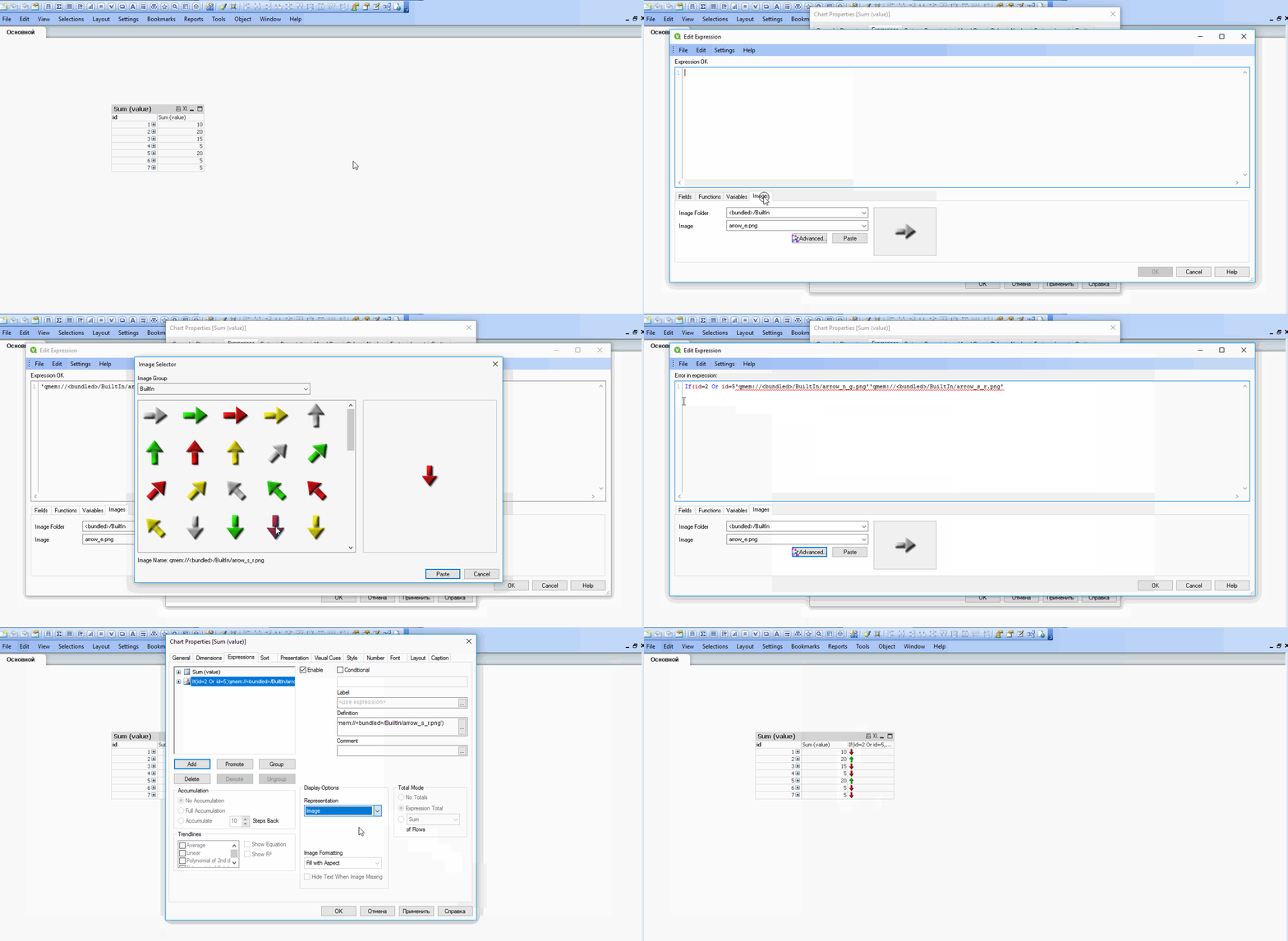
Regards,
Andrey
1,191 Views
venkanna_info
Partner - Contributor
2017-07-07
08:05 AM
Author
- Mark as New
- Bookmark
- Subscribe
- Mute
- Subscribe to RSS Feed
- Permalink
- Report Inappropriate Content
Thanks for your prompt response.but can u tell me how it works in qliksense?
1,191 Views
