Unlock a world of possibilities! Login now and discover the exclusive benefits awaiting you.

- Qlik Community
- :
- All Forums
- :
- QlikView
- :
- How to create/Get YTD average for a derived expre...
- Subscribe to RSS Feed
- Mark Topic as New
- Mark Topic as Read
- Float this Topic for Current User
- Bookmark
- Subscribe
- Mute
- Printer Friendly Page

- Mark as New
- Bookmark
- Subscribe
- Mute
- Subscribe to RSS Feed
- Permalink
- Report Inappropriate Content
How to create/Get YTD average for a derived expression
Good day,
I have a business requirement to present YTD % achieved based on Target value.
in this actual value is derived value expression based on daily
expression to get daily Actual value :-
=num(Avg(aGGR((Count({<TYPE={181,182},D_PK= {"=D_Date=D_min_Date"}>}DISTINCT ID_A))
/Count({<User_Type= {"Screener"}>}DISTINCTperson),Day,Month,Year)),'##0.0')
Now YTD budget :-
avg({<Type={'Production'},D_Month_Name_Num={'<=$(=max({<Flag={Y}>}D_Month_Name_Num))'},Month=>}Daily_Budget)
From above 2 expression how do I derive YTD expression??
appreciate some help on this , may this could be easy one , I am a beginner
- Tags:
- ytd%
Accepted Solutions

 sunny_talwar
- Mark as New
- Bookmark
- Subscribe
- Mute
- Subscribe to RSS Feed
- Permalink
- Report Inappropriate Content
Look here for Dates in Set Analysis
sunny_talwar
- Mark as New
- Bookmark
- Subscribe
- Mute
- Subscribe to RSS Feed
- Permalink
- Report Inappropriate Content
It might be easier to help if you can share a sample for us to take a look at.
Preparing examples for Upload - Reduction and Data Scrambling
- Mark as New
- Bookmark
- Subscribe
- Mute
- Subscribe to RSS Feed
- Permalink
- Report Inappropriate Content
Thank you so much for quick responds
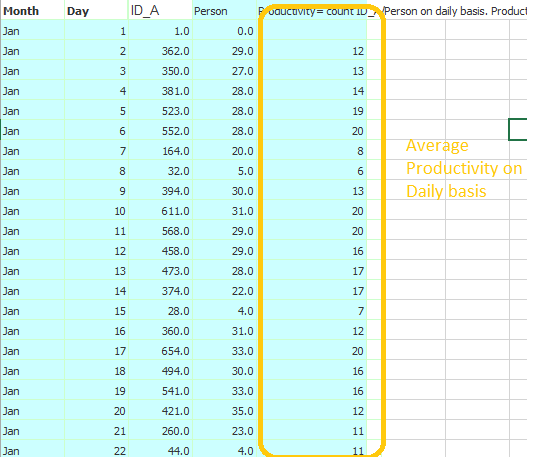
I may make it bit more simple . a derived expression productivity on daily basis rollup to YTD
Productivity =count ID_A/count of person on Daily
Count =DISTINCT ID_A
Person=DISTINCTperson
Expression used in Application
=num(Avg(aGGR((Count(DISTINCT ID_A)) /Count(DISTINCTperson),Day,Month,Year)),'##0.0')
Now how to get YTD Average on this??
sunny_talwar
- Mark as New
- Bookmark
- Subscribe
- Mute
- Subscribe to RSS Feed
- Permalink
- Report Inappropriate Content
You will have Month and Day as a dimension or this was just to show how the data is laid out? Is this expression for a text box object? Try like this
=Num(Avg({<Date = {"$(='>=' & Date(YearStart(Max(Date)), 'DateFieldFormatHere') & '<=' & Date(Max(Date), 'DateFieldFormatHere'))"}>} Aggr(Count({<Date = {"$(='>=' & Date(YearStart(Max(Date)), 'DateFieldFormatHere') & '<=' & Date(Max(Date), 'DateFieldFormatHere'))"}>} DISTINCT ID_A)/Count({<Date = {"$(='>=' & Date(YearStart(Max(Date)), 'DateFieldFormatHere') & '<=' & Date(Max(Date), 'DateFieldFormatHere'))"}>} DISTINCT person), Day, Month, Year)),'##0.0')
You need to replace DateFieldFormatHere with the format of your Date field.
- Mark as New
- Bookmark
- Subscribe
- Mute
- Subscribe to RSS Feed
- Permalink
- Report Inappropriate Content
Thank you,
Its is a text value and i am having problem in the same , (i am getting YTD for Chart value,)
can you help me i have amended the script as below, but no value reflecting in text. I think I am doing something wrong ? is date format is important, how do i specify the format, do you have any eg?
=Num(Avg({<Date = {"$(='>=' & Date(YearStart(Max(Date)), 'DateFieldFormatHere') & '<=' & Date(Max(Date), 'DateFieldFormatHere'))"}>} Aggr(Count({<ID_DA_UPDATE_TYPE={12,43,45,89},DA_PK= {"=ONLY({1}DA_Date)=ONLY({<Month=>}DA_min_Date)"},Date = {"$(='>=' & Date(YearStart(Max(Date)), 'DateFieldFormatHere') & '<=' & Date(Max(Date), 'DateFieldFormatHere'))"}>} DISTINCT ID_DA)/Count({<User_Type= {"Screener"},Date = {"$(='>=' & Date(YearStart(Max(Date)), 'DateFieldFormatHere') & '<=' & Date(Max(Date), 'DateFieldFormatHere'))"}>} DISTINCT PDA_Screener), Day, Month, Year)),'##0.0')
sunny_talwar
- Mark as New
- Bookmark
- Subscribe
- Mute
- Subscribe to RSS Feed
- Permalink
- Report Inappropriate Content
Look here for Dates in Set Analysis