Unlock a world of possibilities! Login now and discover the exclusive benefits awaiting you.

- Qlik Community
- :
- All Forums
- :
- QlikView
- :
- Need help on Month & Date
- Subscribe to RSS Feed
- Mark Topic as New
- Mark Topic as Read
- Float this Topic for Current User
- Bookmark
- Subscribe
- Mute
- Printer Friendly Page

- Mark as New
- Bookmark
- Subscribe
- Mute
- Subscribe to RSS Feed
- Permalink
- Report Inappropriate Content
Need help on Month & Date
I'm new to qlikview and need your help in the below scenario.
I have a date field "Field1" with normal dates. ( say from jan 1 2008 to current date in dd/mm/yyyy format )
Now i want a month filed "Field2" out of this dates .. condition is dates from 26th of every month to 25th of next month should be grouped as a month .. any suggestions will be greatly helpful !
- « Previous Replies
-
- 1
- 2
- Next Replies »
Accepted Solutions

 jonathandienst
- Mark as New
- Bookmark
- Subscribe
- Mute
- Subscribe to RSS Feed
- Permalink
- Report Inappropriate Content
Hi
Use script like this when loading you calendar (adapt field names to your requirements):
Calendar:
LOAD Date,
Month(Date) As CalendarMonth,
Month(If(Day(Date) <= 25, Date, AddMonths(Date, 1))) As FiscalMonth,
...
HTH
Jonathan

 amit_saini
- Mark as New
- Bookmark
- Subscribe
- Mute
- Subscribe to RSS Feed
- Permalink
- Report Inappropriate Content
Venkat,
You can create two Month variable like vMonthStart and vMonthEnd and assign them desired range values.
Thanks,
AS

 MarcoWedel
- Mark as New
- Bookmark
- Subscribe
- Mute
- Subscribe to RSS Feed
- Permalink
- Report Inappropriate Content
MonthName(Field1 - 25) as Field2
regards
Marco
- Mark as New
- Bookmark
- Subscribe
- Mute
- Subscribe to RSS Feed
- Permalink
- Report Inappropriate Content
Amit,
As i said , i'm new to qv. Can you please elaborate.
My requirement is , for e.g if a user selects any date between "26 jan" to "25 feb" if should come user accounting month ( filed name) Feb, if he selects accounting month march all dates from 26 feb to 25 march should be considered
amit_saini
- Mark as New
- Bookmark
- Subscribe
- Mute
- Subscribe to RSS Feed
- Permalink
- Report Inappropriate Content
Venkat,
Understand !
Could you please share your source file or application .
Thanks,
AS
jonathandienst
- Mark as New
- Bookmark
- Subscribe
- Mute
- Subscribe to RSS Feed
- Permalink
- Report Inappropriate Content
Hi
Use script like this when loading you calendar (adapt field names to your requirements):
Calendar:
LOAD Date,
Month(Date) As CalendarMonth,
Month(If(Day(Date) <= 25, Date, AddMonths(Date, 1))) As FiscalMonth,
...
HTH
Jonathan
- Mark as New
- Bookmark
- Subscribe
- Mute
- Subscribe to RSS Feed
- Permalink
- Report Inappropriate Content
Amit,
Thank you for the help .. Jonathan trick has solved my problem
- Mark as New
- Bookmark
- Subscribe
- Mute
- Subscribe to RSS Feed
- Permalink
- Report Inappropriate Content
Marco,
Results were a bit different that i expected.. i get results from feb 26 to march 25 when i select feb .. what i really want is jan26 to feb 25 when i select feb.. useful suggestion though , can be used for other requirements 😉
- Mark as New
- Bookmark
- Subscribe
- Mute
- Subscribe to RSS Feed
- Permalink
- Report Inappropriate Content
Jonathan,
It worked like a charm .. Thank you very much 🙂
MarcoWedel
- Mark as New
- Bookmark
- Subscribe
- Mute
- Subscribe to RSS Feed
- Permalink
- Report Inappropriate Content
that's a static offset which can be corrected like (without the need for any potentially time consuming conditions):
MonthName(Field1 - 25, 1) as Field2
one sample app:
table1:
LOAD *,
     MonthName(Field1 - 25, 1) as Field2;
LOAD
  Date(Date#('01/01/2008', 'MM/DD/YYYY')+IterNo()-1, 'MM/DD/YYYY') as Field1
AutoGenerate 1
While Date#('01/01/2008', 'MM/DD/YYYY')+IterNo()-1 <= Today();
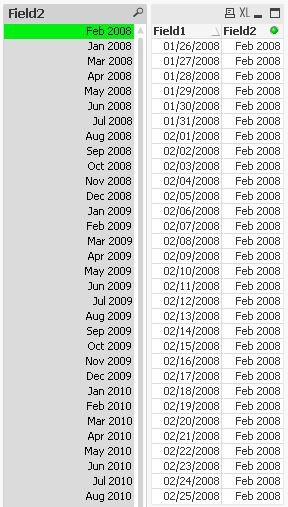
hope this helps also
regards
Marco
- « Previous Replies
-
- 1
- 2
- Next Replies »