Unlock a world of possibilities! Login now and discover the exclusive benefits awaiting you.

- Qlik Community
- :
- All Forums
- :
- QlikView
- :
- Re: Need help on this date format
- Subscribe to RSS Feed
- Mark Topic as New
- Mark Topic as Read
- Float this Topic for Current User
- Bookmark
- Subscribe
- Mute
- Printer Friendly Page

 NZFei
NZFei
- Mark as New
- Bookmark
- Subscribe
- Mute
- Subscribe to RSS Feed
- Permalink
- Report Inappropriate Content
Need help on this date format
Hi all,
I load some data from some web API with this date format. Can you anyone know how to translate it into normal date format in QlikView / Sense?
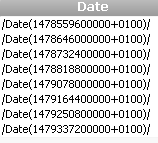
Thank you very much!
Fei
Accepted Solutions
NZFei
- Mark as New
- Bookmark
- Subscribe
- Mute
- Subscribe to RSS Feed
- Permalink
- Report Inappropriate Content
I think I have figured out. Some other article says we need to divide it by 1000 first so I have tried this and it looks working.
=Timestamp( MakeDate(1970) + Num(TextBetween(Date, '(','+'))/1000/60/60/24)
Thank you very much Gysbert!
Fei
Another thing: the result is UTC so to change to local time we need to use converttolocaltime function, for example when converting it to New Zealand time, it will be like ths:
=ConvertToLocalTime(Timestamp( MakeDate(1970) + Num(1487014261)/1000/60/60/24),'Wellington')
 Gysbert_Wassena
- Mark as New
- Bookmark
- Subscribe
- Mute
- Subscribe to RSS Feed
- Permalink
- Report Inappropriate Content
That looks like a unix timestamp embedded in a text string. Something like this might do the trick:
Timestamp( MakeDate(1970) + Num(TextBetween(Date, '(','+')) /60/60/24)
talk is cheap, supply exceeds demand
NZFei
- Mark as New
- Bookmark
- Subscribe
- Mute
- Subscribe to RSS Feed
- Permalink
- Report Inappropriate Content
Hi Gysbert,
Thank you for your reply. If we take /Date(1479078000000+0100)/ as an example, it returns 12/02/48840 8:00:00 AM. How to get the date (48840) please?
Cheers.
Fei
NZFei
- Mark as New
- Bookmark
- Subscribe
- Mute
- Subscribe to RSS Feed
- Permalink
- Report Inappropriate Content
I think I have figured out. Some other article says we need to divide it by 1000 first so I have tried this and it looks working.
=Timestamp( MakeDate(1970) + Num(TextBetween(Date, '(','+'))/1000/60/60/24)
Thank you very much Gysbert!
Fei
Another thing: the result is UTC so to change to local time we need to use converttolocaltime function, for example when converting it to New Zealand time, it will be like ths:
=ConvertToLocalTime(Timestamp( MakeDate(1970) + Num(1487014261)/1000/60/60/24),'Wellington')
