Unlock a world of possibilities! Login now and discover the exclusive benefits awaiting you.

- Qlik Community
- :
- All Forums
- :
- QlikView
- :
- Re: Need help with Expression (Accummulate and sum...
Options
- Subscribe to RSS Feed
- Mark Topic as New
- Mark Topic as Read
- Float this Topic for Current User
- Bookmark
- Subscribe
- Mute
- Printer Friendly Page
Turn on suggestions
Auto-suggest helps you quickly narrow down your search results by suggesting possible matches as you type.
Showing results for

 pathompong_vm
Contributor II
2019-04-09
03:50 AM
- Mark as New
- Bookmark
- Subscribe
- Mute
- Subscribe to RSS Feed
- Permalink
- Report Inappropriate Content
Need help with Expression (Accummulate and sum)
I do Accumulate report by Pivot Chart like this;
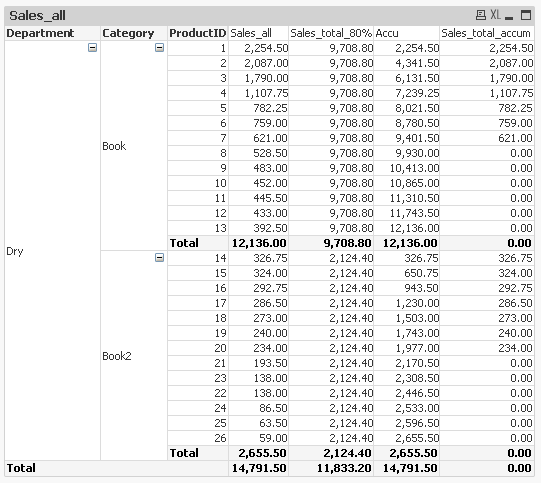
I'm stuck with 'Sales_total_accum' => I do in If Clause; If(Accu<=Sales_total_80%,Sum(Sales_All),0).
But no number in 'Total' level, I would like to sum it up. So I need you suggestion and help .You can view my solution in attach.
Thanks.
Labels (4)
Labels
- Subscribe by Topic:
-
Application Development
-
Creating Analytics
-
General Question
-
QlikView App Dev
1,306 Views
1 Solution
Accepted Solutions

 sunny_talwar
MVP
2019-04-09
07:45 AM
- Mark as New
- Bookmark
- Subscribe
- Mute
- Subscribe to RSS Feed
- Permalink
- Report Inappropriate Content
Try this
=Sum(Aggr(If(RangeSum(Above(Sum(Sales_All), 0, RowNo())) <= Sum(TOTAL <Department, Category> Sales_All)*0.8, Sum(Sales_All), 0), Department, Category, ProductID))
or this if you have QV12
=Sum(Aggr(If(RangeSum(Above(Sum(Sales_All), 0, RowNo())) <= Sum(TOTAL <Department, Category> Sales_All)*0.8, Sum(Sales_All), 0), Department, Category, (ProductID, (NUMERIC))))
1,290 Views
2 Replies
sunny_talwar
MVP
2019-04-09
07:45 AM
- Mark as New
- Bookmark
- Subscribe
- Mute
- Subscribe to RSS Feed
- Permalink
- Report Inappropriate Content
Try this
=Sum(Aggr(If(RangeSum(Above(Sum(Sales_All), 0, RowNo())) <= Sum(TOTAL <Department, Category> Sales_All)*0.8, Sum(Sales_All), 0), Department, Category, ProductID))
or this if you have QV12
=Sum(Aggr(If(RangeSum(Above(Sum(Sales_All), 0, RowNo())) <= Sum(TOTAL <Department, Category> Sales_All)*0.8, Sum(Sales_All), 0), Department, Category, (ProductID, (NUMERIC))))
1,291 Views
pathompong_vm
Contributor II
2019-04-09
10:50 PM
Author
- Mark as New
- Bookmark
- Subscribe
- Mute
- Subscribe to RSS Feed
- Permalink
- Report Inappropriate Content
It's working very fine, Thank you so much 🙂
1,278 Views
