Unlock a world of possibilities! Login now and discover the exclusive benefits awaiting you.

- Qlik Community
- :
- All Forums
- :
- QlikView
- :
- Re: Need logic help.
- Subscribe to RSS Feed
- Mark Topic as New
- Mark Topic as Read
- Float this Topic for Current User
- Bookmark
- Subscribe
- Mute
- Printer Friendly Page

 lalitkgehlot89
- Mark as New
- Bookmark
- Subscribe
- Mute
- Subscribe to RSS Feed
- Permalink
- Report Inappropriate Content
Need logic help.
In Given Data I want character after customer and before Delivery.
These character represents the customer no.
Please help me out asap.
Thanks
Lalit Kumar

 varshavig12
- Mark as New
- Bookmark
- Subscribe
- Mute
- Subscribe to RSS Feed
- Permalink
- Report Inappropriate Content
What is the expected output ?
Please, give an example for the same.
varshavig12
- Mark as New
- Bookmark
- Subscribe
- Mute
- Subscribe to RSS Feed
- Permalink
- Report Inappropriate Content
Are you looking for something like:
Customer 107001-00022 Sales order 107001-SO-1415-0023 Delivery address New Delhi
or
what character are you talking about ?
lalitkgehlot89
- Mark as New
- Bookmark
- Subscribe
- Mute
- Subscribe to RSS Feed
- Permalink
- Report Inappropriate Content
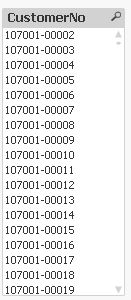
Expected output should be like this:-
107001-00022
107001-00003
107001-00004
107001-00005
.. .. . . . . .
. . . .. . . ..
107001-00021
107001-00022
and so on.
varshavig12
- Mark as New
- Bookmark
- Subscribe
- Mute
- Subscribe to RSS Feed
- Permalink
- Report Inappropriate Content
Try this,
=TextBetween(F1,'Customer','Delivery')

 MarcoWedel
- Mark as New
- Bookmark
- Subscribe
- Mute
- Subscribe to RSS Feed
- Permalink
- Report Inappropriate Content
Hi,
maybe also helpful to trim the leading and trailing spaces as well:
LOAD A,
    Trim(TextBetween(A, 'Customer', 'Delivery')) as CustomerNo
FROM [https://community.qlik.com/servlet/JiveServlet/download/1178265-257593/test%20Data.xls.xlsx] (ooxml, no labels, table is LB11_20161215_084329);
hope this helps
regards
Marco
varshavig12
- Mark as New
- Bookmark
- Subscribe
- Mute
- Subscribe to RSS Feed
- Permalink
- Report Inappropriate Content
Please close the thread by marking the answer as correct.
