Unlock a world of possibilities! Login now and discover the exclusive benefits awaiting you.

- Qlik Community
- :
- All Forums
- :
- QlikView
- :
- Re: Need to get 2 ages
- Subscribe to RSS Feed
- Mark Topic as New
- Mark Topic as Read
- Float this Topic for Current User
- Bookmark
- Subscribe
- Mute
- Printer Friendly Page

 bharatkishore
- Mark as New
- Bookmark
- Subscribe
- Mute
- Subscribe to RSS Feed
- Permalink
- Report Inappropriate Content
Need to get 2 ages
HI All,
I have the following code:
load
System_Code ,
// SystemCodeDescription as SCD,
Country ,
Market ,
Equipment ,
Calendar_Month_Code ,
Plant ,
District ,
[Part Group] ,
Entitlement ,
Key_EMS ,
Install_Flag ,
Removal_Flag ,
TechnicalStartDate ,
// Age2 as AGE2,
Age_Final ,
Part_Age_Bucket
Now to get the minimum age i will write this expression
min(Age_Final ) as Age_Final and do group by. for this i will get one minimum age which is fine.
But i need to get 2 min ages.
Can you please help me.
Thanks,
Bharat
bharatkishore
- Mark as New
- Bookmark
- Subscribe
- Mute
- Subscribe to RSS Feed
- Permalink
- Report Inappropriate Content
Hi Anil,
Any help pls..

 sasiparupudi1
- Mark as New
- Bookmark
- Subscribe
- Mute
- Subscribe to RSS Feed
- Permalink
- Report Inappropriate Content
May be try like below
Data:
LOAD Equipment,
[Part Group],
Key_EMS,
Calendar,
Age_Final,
Quantity
FROM
(ooxml, embedded labels, table is Sheet1);
Left Join(Data)
Load
Equipment,
[Part Group],
Calendar,
Sum(Quantity) as TotalQty
Resident Data
Group By
Equipment,
[Part Group],
Calendar
;
Left Join(Data)
Load
Equipment,
[Part Group],
Calendar,
Min(TotalQty,1) as Min1,
Min(TotalQty,2) as Min2
Resident Data
Group By
Equipment,
[Part Group],
Calendar
;
bharatkishore
- Mark as New
- Bookmark
- Subscribe
- Mute
- Subscribe to RSS Feed
- Permalink
- Report Inappropriate Content
Thanks For your reply.. But not getting the desired output
sasiparupudi1
- Mark as New
- Bookmark
- Subscribe
- Mute
- Subscribe to RSS Feed
- Permalink
- Report Inappropriate Content
May I know the desired o/p?
bharatkishore
- Mark as New
- Bookmark
- Subscribe
- Mute
- Subscribe to RSS Feed
- Permalink
- Report Inappropriate Content
Output should be in the below format:
| Equipment | Part Group | Key_EMS | Calendar | Age_Final | Quantity |
| E1 | P1 | Key2 | 2013-01 | 3 | 0 |
| E1 | P1 | Key4 | 2013-01 | 5 | 1 |
| E2 | P1 | Key7 | 2013-01 | 22 | 1 |
| E2 | P1 | Key8 | 2013-01 | 15 | 0 |
| E3 | P2 | Key10 | 2013-02 | 5 | 1 |
| E3 | P2 | Key11 | 2013-02 | 5 | 0 |
And need to do sum of quantity and group by should be on following columns i.e Equipment,Part Group,Calendar
sasiparupudi1
- Mark as New
- Bookmark
- Subscribe
- Mute
- Subscribe to RSS Feed
- Permalink
- Report Inappropriate Content
Try
Data:
LOAD Equipment,
[Part Group],
Key_EMS,
Calendar,
Age_Final,
Quantity
FROM
(ooxml, embedded labels, table is Sheet1);
MinData:
Load
Equipment,
[Part Group],
Calendar,
Min(Age_Final,1) as Age_Final
Resident Data
Group By
Equipment,
[Part Group],
Calendar
;
concatenate( MinData)
Load
Equipment,
[Part Group],
Calendar,
Min(Age_Final,2) as Age_Final
Resident Data
Group By
Equipment,
[Part Group],
Calendar
;
Left Join(MinData)
LOAD Equipment,
[Part Group],
Key_EMS,
Calendar,
Age_Final,
Quantity
Resident Data;
Drop Table Data;
bharatkishore
- Mark as New
- Bookmark
- Subscribe
- Mute
- Subscribe to RSS Feed
- Permalink
- Report Inappropriate Content
Thank you so much for your time and reply. Only thing i need to get is that please find the below image:
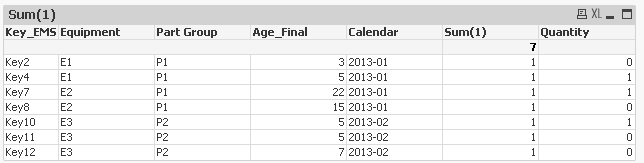
Here for equipment E3 i am getting 3 age final.. where only i need to get 2 ages. which means it should be
| E3 | P2 | Key10 | 2013-02 | 5 | 1 |
| E3 | P2 | Key11 | 2013-02 | 5 | 0 |
If this is done then hopefully it will be done. Kindly help.
Please let me know if you need anything more.
bharatkishore
- Mark as New
- Bookmark
- Subscribe
- Mute
- Subscribe to RSS Feed
- Permalink
- Report Inappropriate Content
HI Sasidhar,
Any suggestion pls..
bharatkishore
- Mark as New
- Bookmark
- Subscribe
- Mute
- Subscribe to RSS Feed
- Permalink
- Report Inappropriate Content
vamsee99999 can you please have a look and help..

 vamsee
- Mark as New
- Bookmark
- Subscribe
- Mute
- Subscribe to RSS Feed
- Permalink
- Report Inappropriate Content
Can you please share your final QVW after the progress you've achieved with the above suggestions.
