Unlock a world of possibilities! Login now and discover the exclusive benefits awaiting you.

- Qlik Community
- :
- All Forums
- :
- QlikView
- :
- Re: Nested IF statement List Box
- Subscribe to RSS Feed
- Mark Topic as New
- Mark Topic as Read
- Float this Topic for Current User
- Bookmark
- Subscribe
- Mute
- Printer Friendly Page

- Mark as New
- Bookmark
- Subscribe
- Mute
- Subscribe to RSS Feed
- Permalink
- Report Inappropriate Content
Nested IF statement List Box
Hi All,
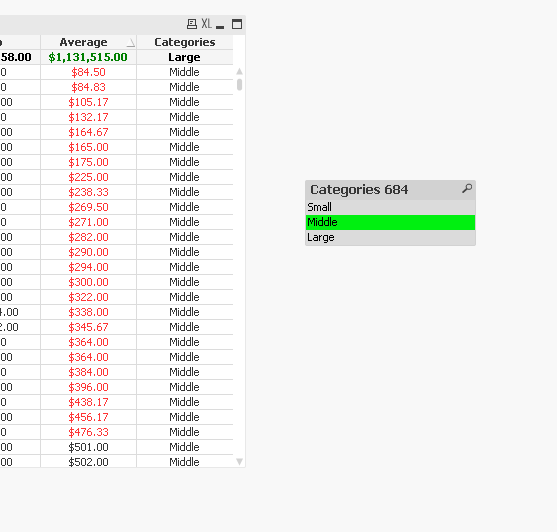
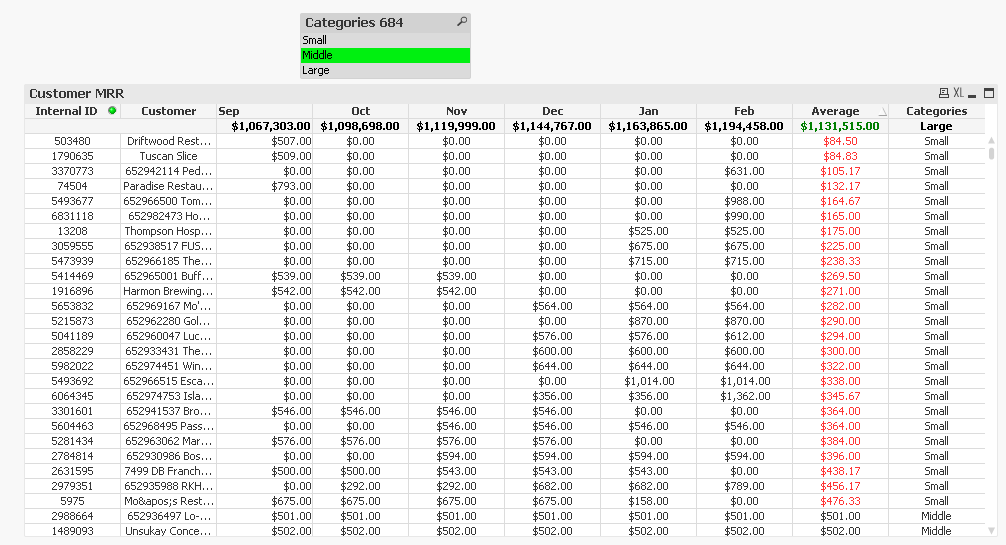
I have situation where I've a if statement which isn't filtering out the right way. It shows Small when it should be showing Middle and Middle when it should be showing Large.
<= 500 Small
<=12000 Middle
else Large
Please provide insights!!!!!!!!!
Thanks,
- « Previous Replies
-
- 1
- 2
- Next Replies »

 sunny_talwar
- Mark as New
- Bookmark
- Subscribe
- Mute
- Subscribe to RSS Feed
- Permalink
- Report Inappropriate Content
Try this may be:
=If(RangeAvg(Sum(SepRound),Sum(OctRound),Sum(NovRound),Sum(DecRound),Sum(JanRound),Sum(FebRound)) <= 500, 'Small',
If(RangeAvg(Sum(SepRound),Sum(OctRound),Sum(NovRound),Sum(DecRound),Sum(JanRound),Sum(FebRound)) <= 12000, 'Middle', 'Large'))
sunny_talwar
- Mark as New
- Bookmark
- Subscribe
- Mute
- Subscribe to RSS Feed
- Permalink
- Report Inappropriate Content
Your application attached with the correct expression for the Categories 661 list box also

 MK_QSL
- Mark as New
- Bookmark
- Subscribe
- Mute
- Subscribe to RSS Feed
- Permalink
- Report Inappropriate Content
may be try this..
MK_QSL
- Mark as New
- Bookmark
- Subscribe
- Mute
- Subscribe to RSS Feed
- Permalink
- Report Inappropriate Content
Middle may be 661 and not 668. May be I could be wrong..
sunny_talwar
- Mark as New
- Bookmark
- Subscribe
- Mute
- Subscribe to RSS Feed
- Permalink
- Report Inappropriate Content
Seems like the number keeps on getting changed everytime 
sunny_talwar
- Mark as New
- Bookmark
- Subscribe
- Mute
- Subscribe to RSS Feed
- Permalink
- Report Inappropriate Content
Got it, it seems to be driven by an expression I get 661 still. Is 661 for Middle incorrect?
MK_QSL
- Mark as New
- Bookmark
- Subscribe
- Mute
- Subscribe to RSS Feed
- Permalink
- Report Inappropriate Content
661 should be correct as per my view. Have you consider Customer as well in listbox aggr?
sunny_talwar
- Mark as New
- Bookmark
- Subscribe
- Mute
- Subscribe to RSS Feed
- Permalink
- Report Inappropriate Content
I did not, but I think I should because that is one of the dimensions on the chart, right?
sunny_talwar
- Mark as New
- Bookmark
- Subscribe
- Mute
- Subscribe to RSS Feed
- Permalink
- Report Inappropriate Content
I guess if Internal ID is unique, we might not need customer.
- Mark as New
- Bookmark
- Subscribe
- Mute
- Subscribe to RSS Feed
- Permalink
- Report Inappropriate Content
Thanks for all your help guys, remarkable teamwork!!!!!
- « Previous Replies
-
- 1
- 2
- Next Replies »