Unlock a world of possibilities! Login now and discover the exclusive benefits awaiting you.

- Qlik Community
- :
- All Forums
- :
- QlikView
- :
- Re: No value on total
- Subscribe to RSS Feed
- Mark Topic as New
- Mark Topic as Read
- Float this Topic for Current User
- Bookmark
- Subscribe
- Mute
- Printer Friendly Page

- Mark as New
- Bookmark
- Subscribe
- Mute
- Subscribe to RSS Feed
- Permalink
- Report Inappropriate Content
No value on total
Hi everybody;
i have a issue, i have some value which are from a applymap, this is numeric number and i get it in "monetary" on the type of number.
But when i do a total that don't worK as you can see on attached file
do you know why?
Thanks a lot!

- « Previous Replies
-
- 1
- 2
- Next Replies »

 MK_QSL
- Mark as New
- Bookmark
- Subscribe
- Mute
- Subscribe to RSS Feed
- Permalink
- Report Inappropriate Content
Its very difficult to answer by only looking your JPG file. Kindly upload sample application or sample data!
- Mark as New
- Bookmark
- Subscribe
- Mute
- Subscribe to RSS Feed
- Permalink
- Report Inappropriate Content
Hi ,
Post sample data for more help...
Try like below,
Go to Expression properties>Total mode>select Total
or
properties>Number>select calculated field>select Number format setting >Number

 amit_saini
- Mark as New
- Bookmark
- Subscribe
- Mute
- Subscribe to RSS Feed
- Permalink
- Report Inappropriate Content
Sab,
Not sure if you are doing like below to get the sum total:
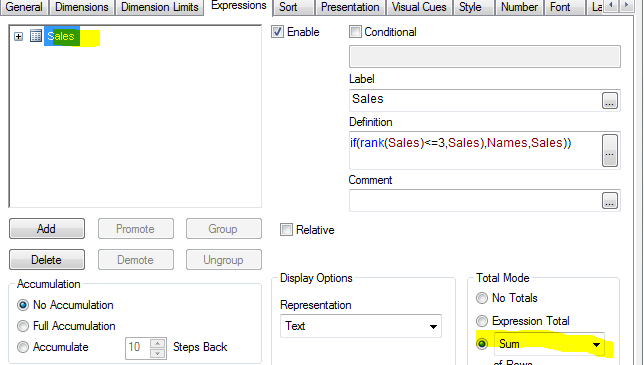
Thanks,
AS
- Mark as New
- Bookmark
- Subscribe
- Mute
- Subscribe to RSS Feed
- Permalink
- Report Inappropriate Content
I posted it at the main post!
Thanks for your answers
 avinashelite
- Mark as New
- Bookmark
- Subscribe
- Mute
- Subscribe to RSS Feed
- Permalink
- Report Inappropriate Content
Hi Sab,
The Issue is with the DATA , in your expression their are lot of null values because of this even the total is appearing as null, convert the null values to zero in the script and then try , the total column will get populate
Hope this helps you
- Mark as New
- Bookmark
- Subscribe
- Mute
- Subscribe to RSS Feed
- Permalink
- Report Inappropriate Content
I tried it but it not work..
- Mark as New
- Bookmark
- Subscribe
- Mute
- Subscribe to RSS Feed
- Permalink
- Report Inappropriate Content
HI
try with straight table it will work ,
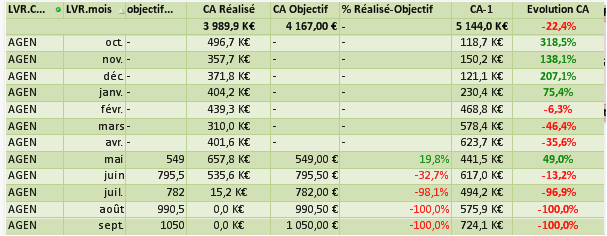
Rather,
if we use pivot try like below if possible,
num(sum(objectif_synth)/10800,'# ##0,0 K€;-# ##0,00 €')
avinashelite
- Mark as New
- Bookmark
- Subscribe
- Mute
- Subscribe to RSS Feed
- Permalink
- Report Inappropriate Content
Did you handled the null values in the script? if not change the null values to 0 in the script level it will work
try changing the Pivot table to Straight table and then check?
- Mark as New
- Bookmark
- Subscribe
- Mute
- Subscribe to RSS Feed
- Permalink
- Report Inappropriate Content
Sorry for all my questions because i'm a beginner ahah
but where i put this instruction "num(sum(objectif_synth)/10800,'# ##0,0 K€;-# ##0,00 €')"?
In the expression?
- « Previous Replies
-
- 1
- 2
- Next Replies »